
Microsoft Patents a Readiness Check for Moving Work Logins to the Cloud
Moving a company's work sign-in system to the cloud means rebuilding the settings for every app, one by one. Microsoft's patent describes software that translates those settings and checks each app first, so the ones that would break stay put.
What Microsoft's login-migration patent does
Every workday, you sign in once and a pile of work apps just open for you. Behind the scenes, many companies run that sign-in system on their own servers, in a room full of equipment that someone has to buy, cool, secure and update.
Moving it to the cloud sounds simple until you count the apps. Each one has its own sign-in settings, and some rely on rules the cloud service may not support. Microsoft's patent describes software that reads the old settings, translates them into the cloud version, and tests each app first to see whether it is ready to move.
Apps that fail the test get flagged with the exact setting causing trouble, so an administrator can fix it. Nothing switches over until an administrator gives the go-ahead. The software can also pick the order of the move, for example starting with apps people rarely open, so any mistakes bother fewer people.
… determine, for at least a subset of the applications, whether authentication of access to respective applications in the subset of the applications is ready to be migrated to a target access management service …
Translation: The system checks which apps are actually ready to be switched over to the new login manager.
How the system checks each app before moving
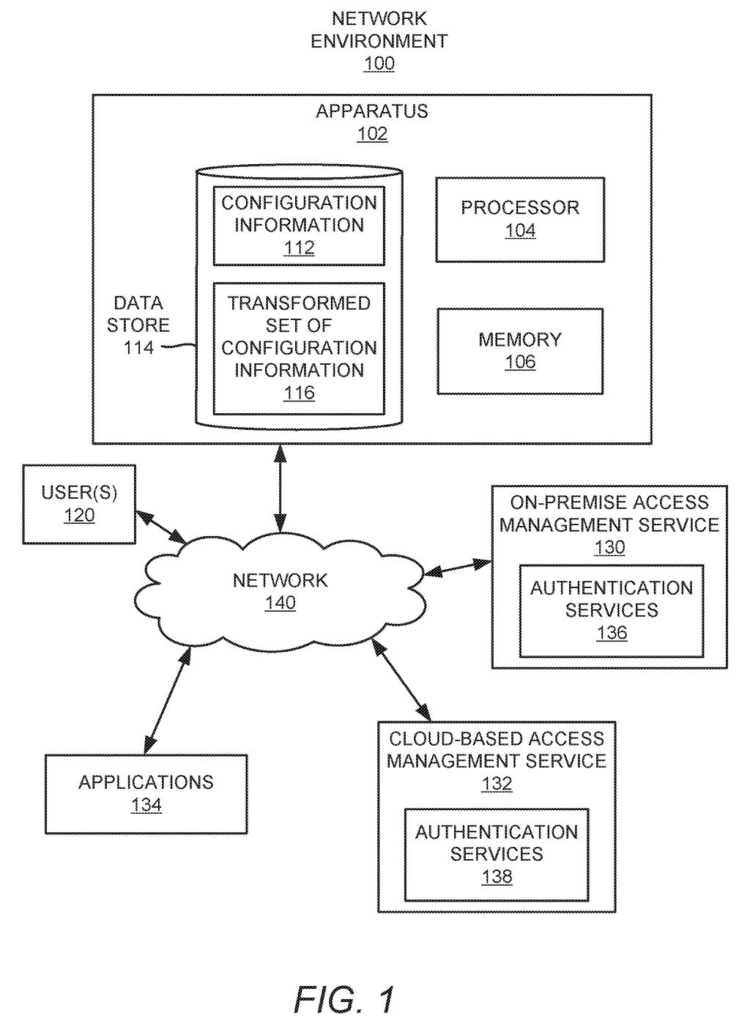
The claims cover a system that works with two sign-in services: a source (the one a company runs itself) and a target (the cloud version). It identifies the configuration information (the settings that tell each app how to trust a sign-in) and finds every app that depends on the source service.
Then it decides, app by app, whether each one is ready to move. The tests look for things the cloud side can't handle, such as:
- A sign-in endpoint (the web address where logins are processed) that the cloud service doesn't support
- Custom rules for delegation or impersonation (letting one account act on behalf of another), or for issuing and transforming identity details
- An authentication type that the cloud service doesn't offer
For apps that pass, the system transforms the settings. It maps endpoints, certificates (digital files that prove a server is genuine) and claims mapping policies (rules for which facts about a user get passed to the app) into their cloud equivalents. It can do this using a stored lookup table of old-to-new pairs. Authentication for those apps is then migrated.
For apps that fail, the system outputs an indication naming the rule, setting or endpoint in the way. The description adds that nothing goes live until an administrator gives the instruction. It also describes ranking apps by usage numbers and using per-app templates.
… transform the identified configuration information into a transformed set of configuration information to be used by a cloud-based access management service to provide authentication services to the applications by users …
Translation: It converts the old security settings so they work in the cloud environment.
Why Microsoft's cloud sign-in checklist matters
The practical payoff is for companies sitting on a lot of apps and an aging login server. A readiness check that points to the exact setting blocking a move could cut the guesswork about time, budget and expertise that the filing itself says makes these migrations hard. For you as an employee, the best outcome is that the switch happens and you never notice.
It also fits a plain business logic: the more companies move their sign-in to the cloud, the more they rely on the cloud provider. This filing continues a family of earlier applications, and the text says two of them already issued as patents. The idea is routine plumbing, but plumbing that large organizations pay real money to get right.
Microsoft's 590th filing in our Microsoft coverage since May adds to a run that includes flagging suspicious connections and AI that thinks in numbers.
If this works as described, most employees will never notice it, and that is the point. The failure it prevents is the Monday morning when your company switches its sign-in system and one app you need refuses to let you in.
Checking each app before the switch, and naming the exact setting in the way, gives the person running the migration a to-do list instead of a surprise. One option the filing describes is starting with the rarely opened apps, so a mistake lands on fewer people.
This is corporate plumbing, and it will matter mostly to IT teams. Still, anyone who has lost half a workday to a login problem will understand the appeal.
Get our take in your Top Stories
Liked this breakdown? Add Patentlyze as a preferred source on Google, and our plain-English take shows up more often in your Top Stories the next time Microsoft patent news breaks.
There are more where this came from
We read every patent application Big Tech publishes and send you the ones worth knowing. Plain English, free, every week.
The drawings
5 drawing sheets from US 2026/0352661 A1 · click any drawing to enlarge


Want this weekly breakdown for a company we don't cover? Patentlyze Pro →
Be the first to weigh in