
Qualcomm Files Patent for a Touch Shortcut That Cuts Screen Stutter on Your Phone
Your phone's screen can idle at about one frame per second to save power, and the lag when you touch it awake is what Qualcomm is trying to erase. Its answer is to let the touch sensor warn the display directly.
What Qualcomm's touch-to-screen shortcut does
Every time you touch a phone screen that has been sitting idle, the display has to figure out that it should wake up and draw faster. To save power, an idle screen may redraw itself as slowly as once per second. Normally the news of your touch travels through several layers of the phone's software before anyone orders a speedup, and that detour can cause a visible hiccup.
Qualcomm's patent application describes a shortcut. The touch sensor taps the display on the shoulder through a dedicated wire the moment it senses something that might be a touch. The display speeds up right away, while the phone's main processor checks the touch in the background.
If it turns out to be a false alarm, like your phone getting bumped in a pocket, the screen slows back down. If it was a real touch, the faster speed simply stays on.
… notifying a display panel circuit of the potential touch event via a signal communicated from the touch sensor circuit to the display panel circuit; and changing a frame rate at the display panel circuit from a first frame rate to a second frame rate in response to the indication.
Translation: The touch sensor immediately alerts the screen hardware to speed up when you are about to touch it.
How a dedicated wire flags a possible touch
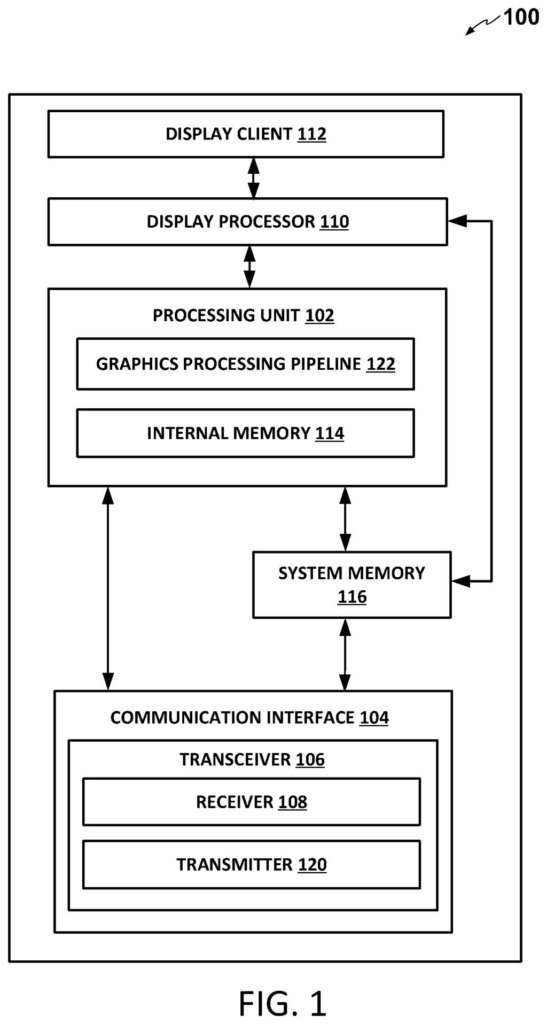
The filing splits a touch into two parallel paths. On the quick path, the touch sensor circuit sends a signal straight to the display panel circuit over a hardware pin (a physical wire dedicated to that message). On the host path, the same sensor sends raw touch data to the host processor (the phone's main brain), which runs it through the normal graphics pipeline.
The sequence the filing describes:
- The sensor picks up a potential touch.
- It notifies the display panel directly, without waiting for the host to verify anything.
- The panel switches from its idle frame rate (how many images it draws per second) to a higher one, and asks the host to supply the higher rate.
- The host filters the raw data for false events and sends back a verdict.
How does the host spot a false alarm? One example is a timeout: if no follow-up touch data arrives within a preset period, the event is judged false. The host can also use learned or contextual clues, such as the irregular contact of a stylus, or a sign that the user has gone inactive. A false verdict drops the panel back to the lower rate. A valid one keeps the higher rate going.
The main example in the filing is a low-power OLED panel (a RAMLess LTPO OLED display), but the claims describe the general idea.
… switching back the frame rate from the second to the first frame rate in response to the potential touch event being determined to be a false event.
Translation: The phone slows the screen back down if it turns out you did not actually touch it.
Why your phone's idle screen delay matters
If you have ever tapped a sleeping screen and caught a stutter before things smoothed out, this is the gap the filing targets. The company says the wait comes from routing the touch through the graphics pipeline, which can produce glitches and interruptions. Skipping that wait could make phones, tablets, smart watches and other touch screens feel more responsive while keeping the battery savings of a slow idle.
The tradeoff is a few false starts: a screen that speeds up because of a bump in your pocket uses a bit more power before it slows again. The examiner's first review rejected the claims as filed, which is routine at this stage and usually followed by amendments.
Qualcomm's 72nd filing we've tracked in our cell phone coverage since May adds to a run that includes one on shrinking the camera black bar and one on syncing phone vibration to the screen.
The problem is minor and familiar. A split-second hitch when you touch a sleeping screen will not ruin anyone's day, yet it happens every time you pick up your phone, and people expect phones to feel instant.
The fix is sized to match. One dedicated wire and a rule that says speed up first and check later costs very little. The filing also has a plain answer for the downside: slow back down if the touch turns out to be false.
How much you would notice depends on how bad the delay is today, and the filing gives no numbers on that. Without them, it reads as a sensible, modest tweak for a polish-level annoyance.
Get our take in your Top Stories
Liked this breakdown? Add Patentlyze as a preferred source on Google, and our plain-English take shows up more often in your Top Stories the next time Qualcomm patent news breaks.
There are more where this came from
We read every patent application Big Tech publishes and send you the ones worth knowing. Plain English, free, every week.
The drawings
8 drawing sheets from US 2026/0349564 A1 · click any drawing to enlarge


Want this weekly breakdown for a company we don't cover? Patentlyze Pro →
Be the first to weigh in