
Samsung · Filed Jul 5, 2026 · Published Oct 29, 2026

Samsung Files Patent for a Headset Dial That Gradually Hides Augmented Reality

Samsung describes a headset control that works like a dimmer switch for reality. Hold the turn and the real room slowly takes over from the virtual one, while the app you're using stays the same size.
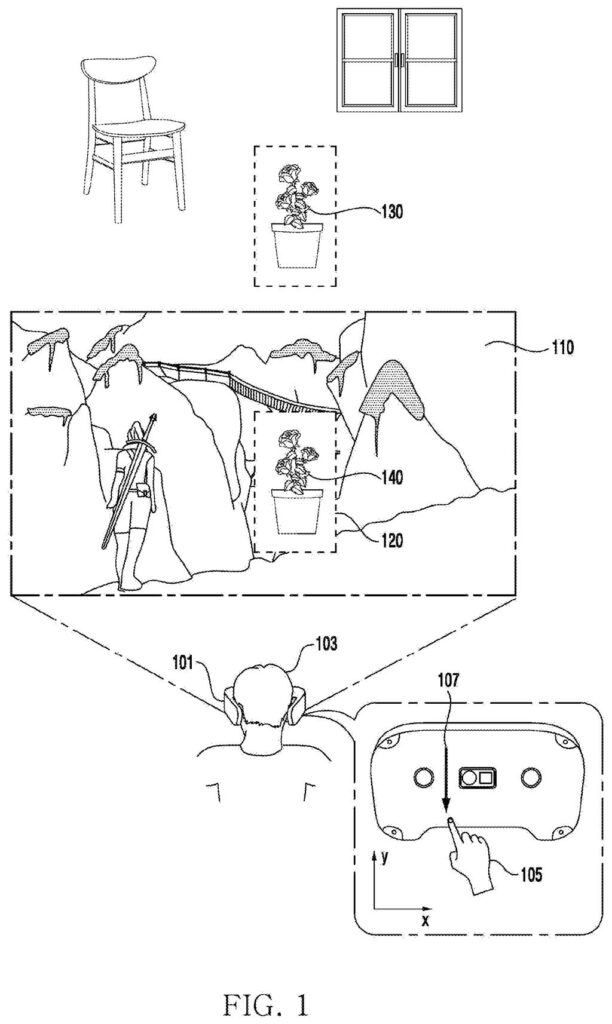
A headset wearer swipes the front visor to reveal real-world objects inside a virtual reality game. Drawing from patent filing US 2026/0340968 A1.
A headset wearer swipes the front visor to reveal real-world objects inside a virtual reality game.
See all 49 drawings from this filing ↓
Publication number US 2026/0340968 A1 US20260340968A1
Applicant Samsung Electronics Co., Ltd.
Filing date Jul 5, 2026
Publication date Oct 29, 2026
Inventors Eunbin LEE, Myoungwoo NAM, Eunyoung PARK, Dongil SON, Stephanie AHN, Bona LEE, Miyeoung CHUNG
US classification 345/426
Status when we published Waiting for an examiner (Aug 14, 2026)
Parent application is a Continuation of 18918687 (filed 2024-10-17)
Document 20 claims

What Samsung's headset dial actually does

A headset that covers your eyes shuts out the room by design. If you want to see who walked in or where your coffee is, the headset has to switch from its virtual mode to one that shows the outside world through its cameras. Samsung's filing is about making that switch quick and gradual.

Here is the idea. You turn a dial on the headset and keep turning. While you hold it, the virtual backdrop shrinks away and a live camera view of your room grows in. In one version, the room appears at the edges of your vision first and spreads toward the center.

The app window or object you were using doesn't shrink or move while this happens. Turn the dial the other way and the real world fades back out, so you can return to the virtual space.

From the filing · CLAIM 1
gradually reduce an area where the virtual space is displayed; and gradually enlarge an area where the at least portion of images obtained via the one or more cameras is displayed, and wherein a size of the virtual object is maintained while the first input is received.

Translation: Turning the dial slowly shrinks the virtual background while letting the real world in, but keeps any floating app windows the same size.

How the camera view replaces the backdrop

The first independent claim covers a headset with a housing that covers your eyes, a display in front of each eye, one or more cameras, and a processor. The headset shows a virtual object (an app window, say) on top of a virtual space, which is the computer-made background.

When it detects an input, it starts showing images from its cameras so you can see the environment outside. This is called video see-through: the cameras film the room and the screens play it back in front of your eyes. If the input keeps coming, the headset gradually shrinks the area showing the virtual space and gradually enlarges the area showing the camera view. The virtual object stays the same size the whole time.

The dependent claims add details:

  • The camera view can grow from the edges of the display toward the center.
  • A second input reverses the effect, shrinking the camera view and bringing the virtual space back.
  • A dial can supply both inputs, with one turning direction fading the room in and the other fading it out.
  • A third input on the same control can bring up icons for installed apps.
  • A visual cue can show how much of the display the virtual space still fills.

The description also covers related ways to trigger the same switch, including dragging a finger across the outside of the headset, hand gestures seen by the cameras, and a handheld controller.

From the filing · THE ABSTRACT
… receives an input for rotating a dial in a first direction while the superimposed virtual object is displayed in the virtual space.

Translation: Sensors track when you physically turn a dial on the headset to shift between virtual reality and the real world.

Why a gradual fade matters for headset users

If you use a headset for work or games, the awkward moment comes when someone speaks to you or you need to find your keyboard. A held dial turn would let you pull in only as much of the room as you need, while the thing you were using stays where it is and keeps its size.

The filing says its goal is easier mode switching, and the hardware it describes is ordinary for this kind of device: screens over the eyes, outward-facing cameras, and one control. That points to a comfort feature, the sort of small control that decides whether a headset feels annoying or easy to wear for an hour.

That makes this Samsung's 75th filing we've tracked in our AR glasses race watchlist since May, adding to work like selective 3D depth and low-light camera correction.

Editorial take

Of all the ideas in a headset patent, this one sits close to ready. A headset that already shows the room through cameras has the screens, the cameras and a place for a dial or touch strip, so what remains is software that blends two video layers while an app window holds still.

The shortest route to a product is a software update plus a decision about which control does the job. The claims cover any input that is held down, and the filing itself lists a dial, a touch-sensitive outer face, hand gestures and a handheld controller.

That makes it a modest comfort feature, a better way to glance at your desk. People who wear a headset for an hour at a time are the ones who would use it constantly.

Get our take in your Top Stories

Liked this breakdown? Add Patentlyze as a preferred source on Google, and our plain-English take shows up more often in your Top Stories the next time Samsung patent news breaks.

There are more where this came from

We read every patent application Big Tech publishes and send you the ones worth knowing. Plain English, free, every week.

The drawings

49 drawing sheets from US 2026/0340968 A1 · click any drawing to enlarge

Swiping the headset front reveals real objects behind virtual scenery, drawing sheet 1 from US 2026/0340968 A1
Sheet 1 Swiping the headset front reveals real objects behind virtual scenery
Sensors and cameras embedded across the headset body, drawing sheet 2 from US 2026/0340968 A1
Sheet 2 Sensors and cameras embedded across the headset body
A short horizontal finger swipe across the front panel, drawing sheet 3 from US 2026/0340968 A1
Sheet 3 A short horizontal finger swipe across the front panel
A full edge to edge horizontal swipe on the visor, drawing sheet 4 from US 2026/0340968 A1
Sheet 4 A full edge to edge horizontal swipe on the visor
Pulling a short downward swipe along the upper front visor, drawing sheet 5 from US 2026/0340968 A1
Sheet 5 Pulling a short downward swipe along the upper front visor
Dragging a finger all the way down the front face, drawing sheet 6 from US 2026/0340968 A1
Sheet 6 Dragging a finger all the way down the front face
Pushing a short swipe upward from the lower bezel, drawing sheet 7 from US 2026/0340968 A1
Sheet 7 Pushing a short swipe upward from the lower bezel
Tracing an entire bottom to top swipe along the surface, drawing sheet 8 from US 2026/0340968 A1
Sheet 8 Tracing an entire bottom to top swipe along the surface
Show the other 41 sheets
Virtual boxes defining real-world viewing windows, drawing sheet 9 from US 2026/0340968 A1
Sheet 9 Virtual boxes defining real-world viewing windows
Swiping along the headset reveals a piece of your room, drawing sheet 10 from US 2026/0340968 A1
Sheet 10 Swiping along the headset reveals a piece of your room
Tracing a shorter swipe carves out a smaller real-world view, drawing sheet 11 from US 2026/0340968 A1
Sheet 11 Tracing a shorter swipe carves out a smaller real-world view
Selecting desk objects by tapping touch zones on the headset, drawing sheet 12 from US 2026/0340968 A1
Sheet 12 Selecting desk objects by tapping touch zones on the headset
Peeking at a room's left side with a swipe, drawing sheet 13 from US 2026/0340968 A1
Sheet 13 Peeking at a room's left side with a swipe
Opening a center view into reality with a middle swipe, drawing sheet 14 from US 2026/0340968 A1
Sheet 14 Opening a center view into reality with a middle swipe
Revealing the right side of the room by swiping, drawing sheet 15 from US 2026/0340968 A1
Sheet 15 Revealing the right side of the room by swiping
Revealing the top of your surroundings with an upward gesture, drawing sheet 16 from US 2026/0340968 A1
Sheet 16 Revealing the top of your surroundings with an upward gesture
Swiping upward on the headset reveals the lower real-world room, drawing sheet 17 from US 2026/0340968 A1
Sheet 17 Swiping upward on the headset reveals the lower real-world room
Tracing an L-shaped gesture opens a custom window to reality, drawing sheet 18 from US 2026/0340968 A1
Sheet 18 Tracing an L-shaped gesture opens a custom window to reality
Bringing real objects into view with a quick vertical swipe, drawing sheet 19 from US 2026/0340968 A1
Sheet 19 Bringing real objects into view with a quick vertical swipe
Raising the real-world pass-through window to reveal more surroundings, drawing sheet 20 from US 2026/0340968 A1
Sheet 20 Raising the real-world pass-through window to reveal more surroundings
Blending a real pet directly into the virtual scenery, drawing sheet 21 from US 2026/0340968 A1
Sheet 21 Blending a real pet directly into the virtual scenery
App windows floating in a virtual workspace, drawing sheet 22 from US 2026/0340968 A1
Sheet 22 App windows floating in a virtual workspace
Moving virtual apps aside as the real room appears, drawing sheet 23 from US 2026/0340968 A1
Sheet 23 Moving virtual apps aside as the real room appears
Stacking app icons vertically to stay clear of physical space, drawing sheet 24 from US 2026/0340968 A1
Sheet 24 Stacking app icons vertically to stay clear of physical space
App shortcuts arranged inside the remaining virtual view, drawing sheet 25 from US 2026/0340968 A1
Sheet 25 App shortcuts arranged inside the remaining virtual view
Widgets expanding in the visible digital space, drawing sheet 26 from US 2026/0340968 A1
Sheet 26 Widgets expanding in the visible digital space
Swiping down to reveal the room above your apps, drawing sheet 27 from US 2026/0340968 A1
Sheet 27 Swiping down to reveal the room above your apps
Grabbing both headset edges while fully immersed, drawing sheet 28 from US 2026/0340968 A1
Sheet 28 Grabbing both headset edges while fully immersed
Touching the sides instantly reveals the real room, drawing sheet 29 from US 2026/0340968 A1
Sheet 29 Touching the sides instantly reveals the real room
Swipe gestures recognized along the headset temple, drawing sheet 30 from US 2026/0340968 A1
Sheet 30 Swipe gestures recognized along the headset temple
Rotating a physical dial to adjust virtual blend, drawing sheet 31 from US 2026/0340968 A1
Sheet 31 Rotating a physical dial to adjust virtual blend
Smart glasses framing displays over each lens, drawing sheet 32 from US 2026/0340968 A1
Sheet 32 Smart glasses framing displays over each lens
Hardware packed inside the frame of smart glasses, drawing sheet 33 from US 2026/0340968 A1
Sheet 33 Hardware packed inside the frame of smart glasses
Inside view of the headset lenses and tracking cameras, drawing sheet 34 from US 2026/0340968 A1
Sheet 34 Inside view of the headset lenses and tracking cameras
Exterior sensors and cameras across the front headset visor, drawing sheet 35 from US 2026/0340968 A1
Sheet 35 Exterior sensors and cameras across the front headset visor
Steps for revealing the real room with a touch swipe, drawing sheet 36 from US 2026/0340968 A1
Sheet 36 Steps for revealing the real room with a touch swipe
Sharing a virtual space between a headset and a phone, drawing sheet 37 from US 2026/0340968 A1
Sheet 37 Sharing a virtual space between a headset and a phone
Turning the dial to expand virtual reality over real space, drawing sheet 38 from US 2026/0340968 A1
Sheet 38 Turning the dial to expand virtual reality over real space
Rotating the dial backwards to restore the physical room, drawing sheet 39 from US 2026/0340968 A1
Sheet 39 Rotating the dial backwards to restore the physical room
Expanding virtual reality outwards from where you look, drawing sheet 40 from US 2026/0340968 A1
Sheet 40 Expanding virtual reality outwards from where you look
Shrinking the virtual world into an app icon, drawing sheet 41 from US 2026/0340968 A1
Sheet 41 Shrinking the virtual world into an app icon
How turning a dial resizes virtual space, drawing sheet 42 from US 2026/0340968 A1
Sheet 42 How turning a dial resizes virtual space
Steps for collapsing floating apps into icons, drawing sheet 43 from US 2026/0340968 A1
Sheet 43 Steps for collapsing floating apps into icons
Looking at a chair expands the camera view, drawing sheet 44 from US 2026/0340968 A1
Sheet 44 Looking at a chair expands the camera view
Focusing your gaze on a floating app keeps it visible, drawing sheet 45 from US 2026/0340968 A1
Sheet 45 Focusing your gaze on a floating app keeps it visible
Pressing the dial instantly shows the home screen, drawing sheet 46 from US 2026/0340968 A1
Sheet 46 Pressing the dial instantly shows the home screen
Twisting a smartwatch bezel blends virtual worlds, drawing sheet 47 from US 2026/0340968 A1
Sheet 47 Twisting a smartwatch bezel blends virtual worlds
How an external gadget commands the headset to reveal reality, drawing sheet 48 from US 2026/0340968 A1
Sheet 48 How an external gadget commands the headset to reveal reality
Revealing a pet as it walks toward your headset view, drawing sheet 49 from US 2026/0340968 A1
Sheet 49 Revealing a pet as it walks toward your headset view
Browse all the drawings 49 drawing sheets
Patent filing page

Source. Full patent text and figures from the official USPTO publication PDF.
Reader comments

Be the first to weigh in

Start the discussion

Real name or a handle, either is fine. Comments are read by a person before they appear, so allow a little time. Keep it about the filing.