
Samsung Files Patent for Phone Video That Lets You Change Its Star After Filming
Your phone's auto-zoom can lock onto the wrong star of a video, and today that choice usually sticks. A new Samsung patent application keeps the original footage so you can re-pick the subject later.
What Samsung's re-pick-your-subject video does
Today, when a phone's auto-framing follows the wrong person in your video, the tight, zoomed clip it saved is what you're stuck with. Fixing it afterward is hard, because the phone only kept its own guess about who mattered.
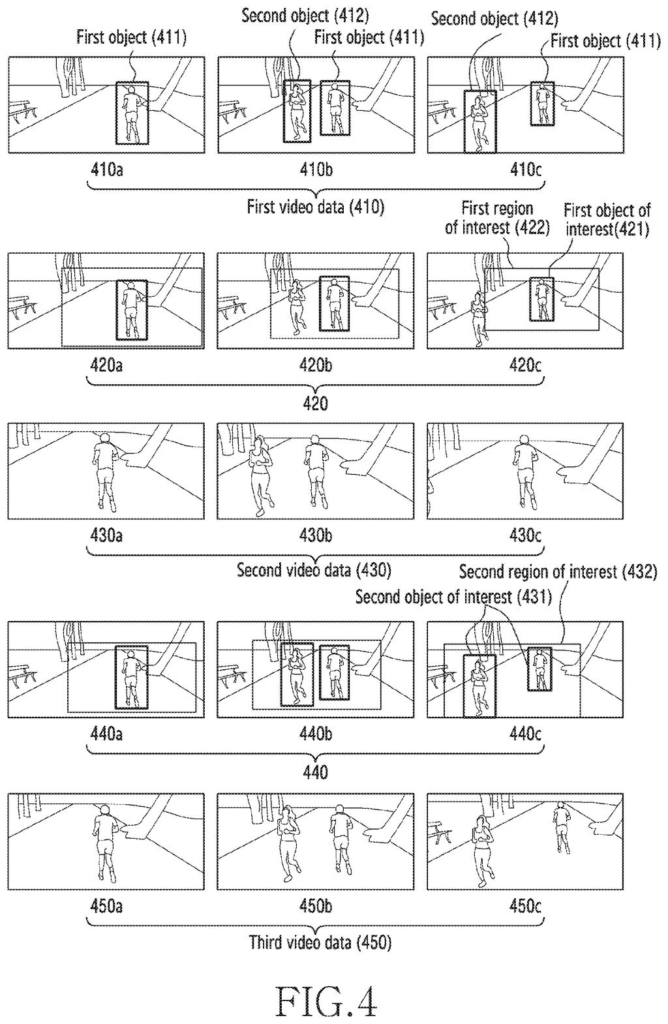
Samsung's patent application changes that. While you film, the phone spots people or pets, crops in on one of them, and shows you that tighter view as a live preview. It also saves the full, uncropped recording alongside it.
Later, you can open the saved video, tap a different person (or tap two people at once), and the phone builds a fresh cropped version from the original. To spare you from fixing every frame, it flags key moments, such as someone new walking into view, so you only adjust those.
capture source video data using the camera, the source video data comprising a plurality of source image frames, while capturing the source video data: determine a first object of interest in the plurality of source image frames …
Translation: The phone records regular video while simultaneously tracking a specific moving subject.
How the phone flags moments worth re-cropping
The claims cover a phone that does four things at once while you record. It captures the full video, picks an object of interest (the person or animal the video should follow), works out a cropping region around that subject, and cuts that region out of every frame. The cut-out is scaled to a set output size, shown as a live preview, and saved next to the untouched original.
Other claims add that the crop can be adjusted by touch, that the subject can be picked by you or found automatically by detecting a person, and that a second crop around a different subject can be made later. The two crops can even come from different apps.
The description fills in the editing side:
- Key frames: moments where something changes, like the number of people in view, are marked with a V on the video's progress bar. Red marks come from the phone, blue marks from you.
- Limited edits: the resize handles on the crop box only appear on key frames, and the phone fills in the crop for the frames in between.
- Setting up before you film: the phone can show a quick look at the scene, and you tap who to follow. It can also suggest faces or pets already saved in your gallery.
The filing also covers housekeeping. The older crop can be deleted once the new one exists, and the phone can ask before deleting the original, since a new crop would no longer be possible without it.
… receive a user input for determining a second object of interest, different from the first object of interest, in the plurality of the image frames included in the first video data …
Translation: You can tap a different person or thing in the recorded video to switch the focus.
Why your auto-zoomed videos could stop being final
The practical payoff is that a recording stops being a one-shot gamble. If you film a birthday party or two puppies playing and the phone zooms in on the wrong one, you could re-crop around the right one, or around both, instead of losing the moment.
The tradeoff is storage: keeping the full original next to one or more cropped versions takes more space, which is likely why the filing includes a prompt before the original gets deleted. For phone makers, the idea sits on tools phones already have, like face and pet detection, and gives auto-framing an undo button that today's versions seem to lack.
Samsung has filed its 34th application we've tracked since July in the AI photo editing race, adding to earlier work like fixing stretched selfie faces and replacing closed eyes.
Nothing in this filing needs new hardware. The claims describe a camera, a screen and a processor, which every phone already has, so the work is all software: find a person, crop around them, and keep the original.
What has to exist first is dependable subject tracking and room to store the extra video. The filing deals with the second part itself, with a prompt before the original is deleted. The shortest route to a product is a camera app update plus an edit screen in the gallery, which is a modest build.
The fix is modest but aimed at a real annoyance: anyone who has filmed a toddler and a dog and watched the phone follow the dog will see the appeal. It is a practical, incremental feature that could ship without waiting on anything exotic.
Get our take in your Top Stories
Liked this breakdown? Add Patentlyze as a preferred source on Google, and our plain-English take shows up more often in your Top Stories the next time Samsung patent news breaks.
There are more where this came from
We read every patent application Big Tech publishes and send you the ones worth knowing. Plain English, free, every week.
The drawings
16 drawing sheets from US 2026/0352945 A1 · click any drawing to enlarge


Show the other 8 sheets


Want this weekly breakdown for a company we don't cover? Patentlyze Pro →
Be the first to weigh in