
Apple Files Patent for Check In Safety-Alert Screen Designs and Communication Tools
Walking home alone at night, you want someone to know you got there safely without having to remember to text. Apple's Check In feature is designed for exactly that moment, and this patent covers the user interface that makes it work.
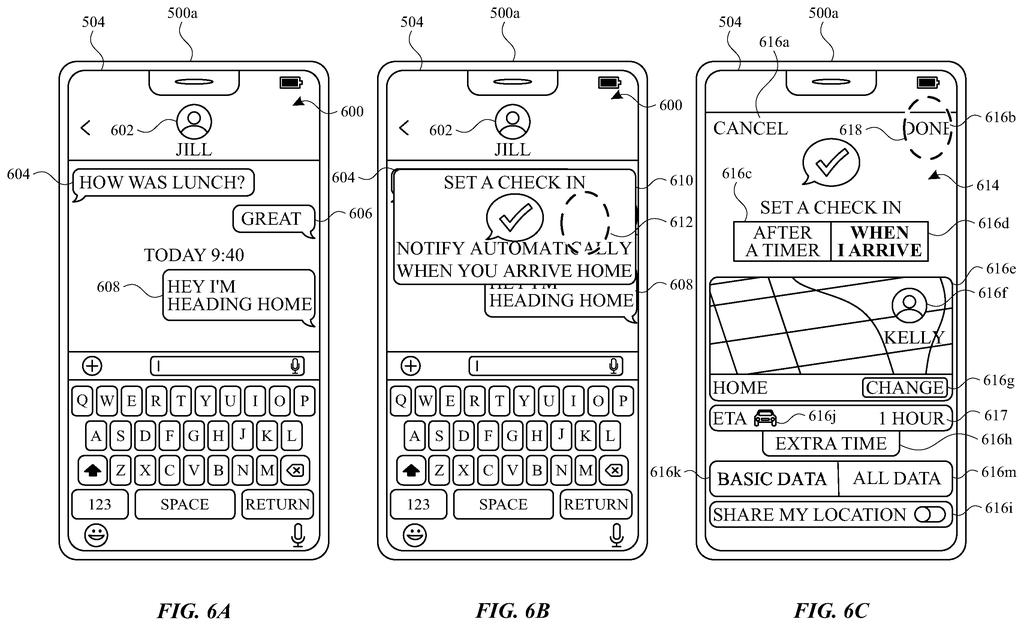
What Apple's Check In safety feature actually does
Ever set up a safety check with a friend before a late-night walk, then forgotten to text when you got home? Apple's Check In feature is built for that situation. You tell your iPhone you're heading somewhere, and it automatically notifies a contact when you arrive.
The key part of the system is what Apple calls a termination condition: a set of rules that decide when the check-in is considered complete. If you arrive at your destination on time, your contact gets a confirmation. If something goes wrong and the condition isn't met, they get an alert instead.
This patent specifically covers the on-screen displays that guide both the person starting a Check In and the person receiving the update. It's the behind-the-scenes blueprint for the visual side of a feature that already ships on iPhones, making sure both sides of the conversation see clear, timely information.
receiving, via the one or more input devices, a first indication of initiation of a check in interaction between the first user account and a second user account, different from the first user account …
Translation: The system detects when a user starts a check in session with someone else.
How the Check In termination condition triggers alerts
The patent describes a method running on a first electronic device (your iPhone) that manages a Check In interaction between two user accounts.
The process works in three stages:
- Initiation: You start a Check In, and the device immediately displays a visual confirmation that the session has begun.
- Monitoring: The system watches for a termination condition (think: arriving at a GPS location, or a deadline passing without a response). This condition defines specific criteria that have to be satisfied for the check-in to close normally.
- Resolution: Once the termination signal arrives, whether because you arrived safely or because something triggered an alert, the device shows a second visual indication that the Check In has ended.
The claim covers the device on the receiving end as well, meaning the friend or family member waiting for the update also gets structured UI feedback, not just a raw text message. The patent is tightly focused on how these status changes are communicated visually across both devices, ensuring neither party is left guessing about where things stand.
… display a plurality of user interfaces corresponding to communication regarding a check in interaction.
Translation: The devices show various screens related to safety check in messages.
What this means for everyday personal safety on iPhone
For anyone who has ever asked a friend to "just let me know when you're home," this is the formal engineering backbone of that reassurance. When Check In works well, you never have to think about it: no manual text, no forgotten follow-up, no anxious friend wondering if they should call. The feature handles the handshake automatically.
The patent also covers the failure case, which is the part that matters most. If the termination condition is never satisfied because you didn't arrive, your contact is notified without you having to do anything. That's a meaningful safety net for solo travel, late commutes, or meeting a stranger for the first time. Whether Apple extends this UI framework to other devices like Apple Watch is an open question the patent doesn't answer directly.
Apple's 508th filing in our Apple coverage since May continues a push on Vision Pro optics, joining one on predictive rendering and one on gaze-based sharpening.
Check In, already available on iPhones, lets you automatically notify a trusted contact when you arrive somewhere safely. This patent locks down the specific screens and messages both people see throughout that process, protecting the visual design Apple has built around the feature.
The part that matters most for users is what happens when things go wrong. If you stop moving and don't respond, the feature flags that to your contact without you having to do anything. That automatic failure alert is where the feature earns its place on your phone.
If you already use Check In, nothing about your experience changes today. This filing is Apple's way of controlling how that experience looks and works as the feature grows.
There are more where this came from
We read every patent application Big Tech publishes and send you the ones worth knowing. Plain English, free, every week.
The drawings
41 drawing sheets from US 2026/0299776 A1 · click any drawing to enlarge


Want this weekly breakdown for a company we don't cover? Patentlyze Pro →
Be the first to weigh in