
Adobe Files Patent to Trace the Edge of a Photo's Main Subject More Sharply
Adobe's filing teaches software to look at a photo twice, once at rough detail and once at fine detail, then merge the two into one clean outline of the main subject.
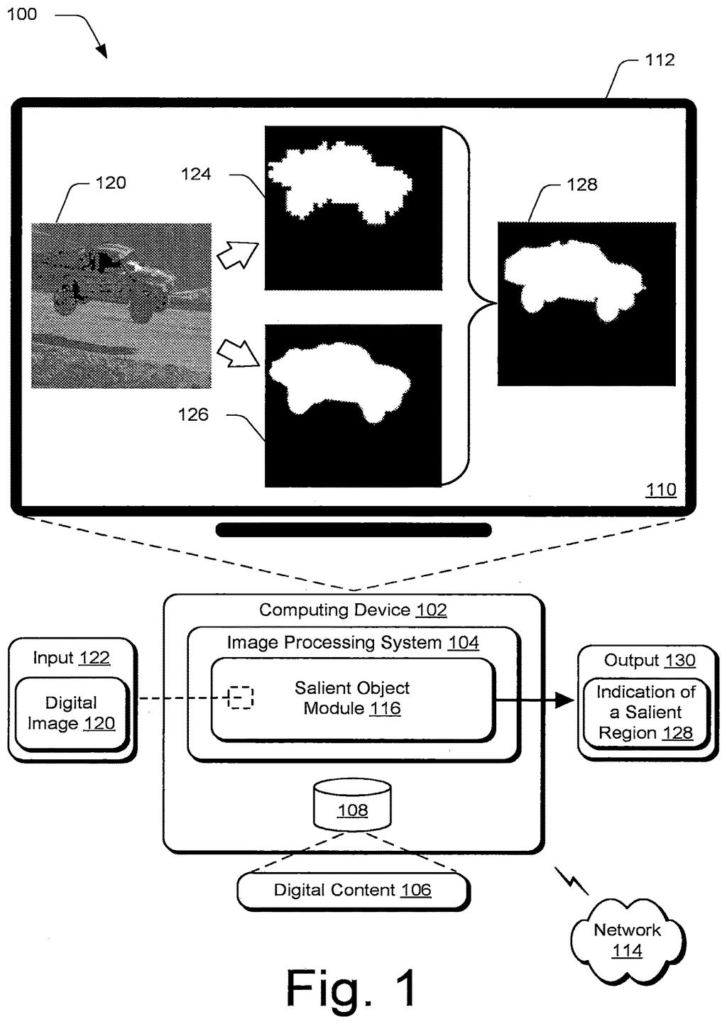
What Adobe's subject-outlining patent covers
A photo shows a red car on a gray road. You see the car first, and your eye jumps to it without any effort. Software has a harder job, because it has to decide which pixels belong to the car and which belong to the road.
This Adobe filing describes a way to make that call. The software chops the photo into small squares, works out which squares look alike, and sorts them into two piles: the main subject and everything else. It builds a rough outline and a sharp outline at the same time, then lets the two correct each other.
If you have ever cut someone out of a photo and ended up with jagged, chewed-up edges, this filing is aimed at fixing exactly that.
… generating, by the processing device, an adjacency matrix that maps pairwise semantic similarity of the patches based on the embeddings using the one or more machine learning models …
Translation: The software compares different parts of the picture to see how similar their meanings are.
How Adobe sorts photo patches into two piles
The filing starts by chopping a photo into a grid of small squares called patches. A vision model (an AI trained to understand what images contain) turns each patch into embeddings, lists of numbers that capture what the patch looks like and means. The description names a model called DINO, which learns without human-labeled examples.
Next comes an adjacency matrix, a big table recording how similar every patch is to every other one. A graph-clustering method called Normalized Cut then splits the patches into two groups that are as different from each other as possible.
To decide which group is the subject, the system looks at the corners of the image. A group that reaches three or four corners is treated as background. A group in only one or two corners is treated as the subject.
The filing also describes making two masks (a mask is a stencil that marks the subject) at once:
- Coarse mask: a low-resolution outline, 40 by 40 squares in the example, that finds the right spot but has rough edges.
- Fine mask: a sharper version scaled up to 320 by 320 that catches edge details.
A cleanup step called Graph Total Variation compares nearby pixels, makes the two masks agree, and keeps the outline following real contours.
The salient object system generates a first mask for the salient object by partitioning the digital image into salient and non-salient regions.
Translation: The system outlines the main subject by separating it from the background.
Why sharper subject outlines matter for editors
If you edit photos, the practical gain is cleaner automatic cutouts: lifting a person or a product off its background without fuzzy, chewed-up edges. The filing says older methods either produce one rough, low-resolution outline that erodes when enlarged, or need people to hand-mark training images.
For Adobe, which builds image editing software, a method that trains without labeled photos could mean less labeling work. The filing also says it skips the extra cleanup step that wears down outlines. It is a divisional of an application filed in August 2023, so it carries forward an idea Adobe has already been developing.
Adobe's 52nd filing we've tracked since May in the AI photo editing race adds to work like choosing removal methods and light-matched object pasting.
Cutting a subject out of a photo is one of the most common jobs in any editor, and bad edges are the first thing people notice. A halo of leftover background or a chewed-up hairline ruins a cutout, and that happens every time someone makes a product listing, a poster, or a profile picture.
Adobe's answer matches the size of that problem. It checks the photo at two levels of detail and lets them correct each other, which is a sensible fix for an outline that finds the right spot but loses the edges. The corner rule for picking the subject is simple, and it could struggle on photos where the subject fills the frame.
A method that skips hand-labeled training photos and goes straight at the edge problem is well aimed at a real, everyday annoyance.
Get our take in your Top Stories
Liked this breakdown? Add Patentlyze as a preferred source on Google, and our plain-English take shows up more often in your Top Stories the next time Adobe patent news breaks.
There are more where this came from
We read every patent application Big Tech publishes and send you the ones worth knowing. Plain English, free, every week.
The drawings
7 drawing sheets from US 2026/0330614 A1 · click any drawing to enlarge


Want this weekly breakdown for a company we don't cover? Patentlyze Pro →
Be the first to weigh in