
Adobe Files Patent to Fit Your Photo Slideshow Into a Reel's Time Limit
Making a 30-second reel from a pile of photos usually means doing arithmetic on every slide. Adobe's filing describes an editor that hands out the screen time for you, giving busier slides more of it.
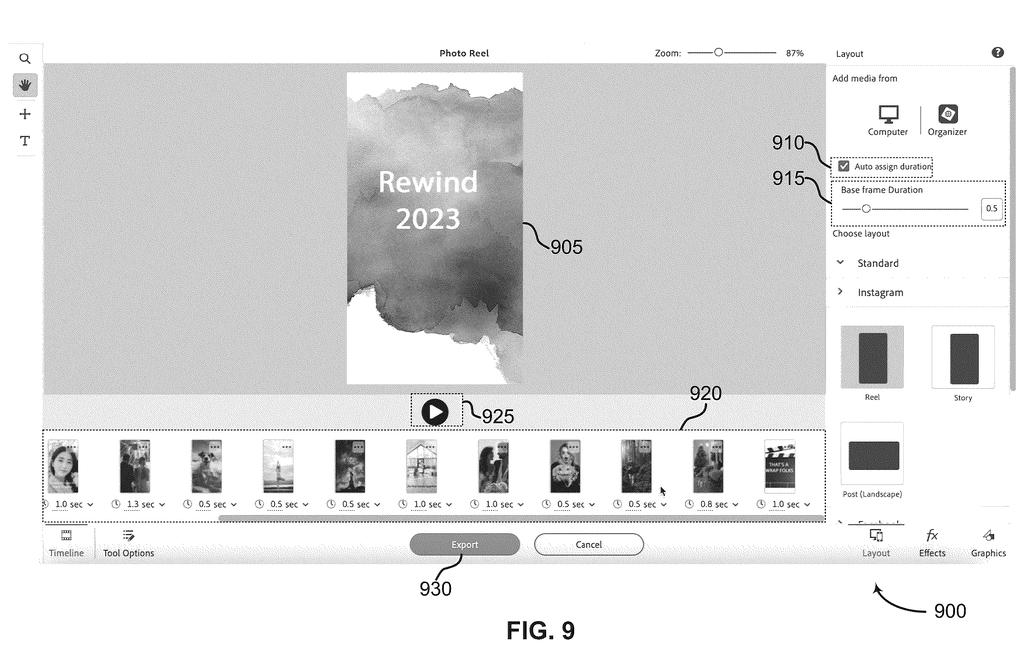
What Adobe's auto-timing for photo reels does
Imagine you have five wedding photos, one with an animated "She said YES!!" ribbon, and you want to post them as a 30-second reel. Today you would work out how long each photo should stay up, then type those numbers in one by one. Get the math wrong and the video runs over the platform's limit.
Adobe's patent application describes software that does the math for you. You hand it your photos, clips and text, pick where you are posting, and it decides how long each piece gets. A frame with more going on, like a photo with text and graphics layered on top, gets more time than a plain one.
Animated pieces keep their own built-in length, and the leftover time is shared among the still images. A single slider then lets you speed the whole video up or slow it down.
… identifying a content type of a media content item of the plurality of media content items; computing a duration for the media content item based on the content type; and generating a media file including the plurality of media content items …
Translation: The software figures out what kind of media you have, decides how long it should stay on screen, and builds the final video.
How the screen-time weights get divided up
The system takes a pile of photos, GIFs, clips and animated text, and labels each one by content type: still, animated, text, graphic or audio. It computes an on-screen length for each and builds one video file using those lengths. A second claim sets the animated item's length first, then works out the still image's length from it.
Animated text and graphics come as presets with built-in lengths of 3, 6 or 9 seconds, and the system leaves them untouched. You pick a platform preset, which sets a maximum length (the filing's example is 90 seconds for Instagram reels). If the animations alone run over, they are trimmed and you get a warning.
Leftover time goes to the still frames, split by weight (a number for how much screen time a frame deserves):
- A plain photo counts as 1.0.
- Each graphic layer adds 0.5.
- Each text layer adds 1.0.
Each frame's time is its weight times a base of 0.5 seconds. A slider moves that base between 0.1 and 2.5 seconds, speeding up or slowing down the whole video.
The filing also covers a timeline where you set one frame's length by hand, an optional user profile, and a target aspect ratio.
A method, apparatus, non-transitory computer readable medium, and system for media generation include obtaining a set of media content items and identifying a content type of a media content item of the set of media content items.
Translation: The system starts by gathering your photos or clips and figuring out what type of content each one contains.
Why a photo reel editor could ship this soon
If you make reels or slideshows, the dull part is deciding how long each slide stays up. This would do that for you, and you could export several versions for different platforms without redoing the timing. Busier slides, like a photo with a caption and graphics, would automatically stay up longer than a plain one. Anyone who posts to several apps would save the most time.
The examiner's first review rejected the claims as filed, which is routine and usually followed by amendments, so the final wording may change. Even so, the idea needs no new hardware. It would live inside an editing app's export screen, next to the controls the filing already shows.
This is the 232nd Adobe filing we've tracked since May, part of our Adobe coverage that includes work on color edits by scene type and turning emails into editable pieces.
Nothing here needs new hardware, and the document shows how short the road to a product is. The pieces it needs, a timeline of slides, an "auto assign duration" checkbox, a base-duration slider and an export screen, are all drawn in the figures already.
The math is simple enough for a napkin: a photo counts as 1, a graphic as 0.5, a text layer as 1, and the total is multiplied by half a second. What has to exist first is an editor that knows which slides carry animation and which platform you are exporting to. A photo-reel editor would likely have both.
The weak spot is that the weights are hand-picked guesses, tuned from usage statistics, so early results may feel off for some videos. The filing says the numbers can adapt as you tweak them, which would fix that over time. As a feature it looks like a quick win: small, easy to explain and easy to ship.
Get our take in your Top Stories
Liked this breakdown? Add Patentlyze as a preferred source on Google, and our plain-English take shows up more often in your Top Stories the next time Adobe patent news breaks.
There are more where this came from
We read every patent application Big Tech publishes and send you the ones worth knowing. Plain English, free, every week.
The drawings
17 drawing sheets from US 2026/0340923 A1 · click any drawing to enlarge


Show the other 9 sheets


Want this weekly breakdown for a company we don't cover? Patentlyze Pro →
Be the first to weigh in