
Google Files Patent to Let Gadget Makers Add Their Own Controls to One Home App
Your phone may already hold a separate app for every gadget in your house. A new Google patent describes a way for a single home app to add a control screen whenever a new device shows up.
What Google's home app extension patent does
You buy a new smart lamp from a brand you've never heard of, and it wants its own app. Your phone already has apps for your thermostat, your doorbell and your TV. Now there's one more to download, with its own menus and its own way of doing things.
A new Google patent describes a way around that. Instead of every brand building a full app, the brand fills out a simple form that says which buttons and dials should appear on a screen and which feature of the device each one runs. Your existing home app then fetches that form and builds the screen itself, in the app's usual look.
So the lamp's controls show up inside the app you already use. The idea is to spare you the pile of apps and spare small makers the cost of writing software.
… receiving, by the electronic device, the application extension in response to the request, wherein the application extension includes an application extension template populated with at least one value in a layout defining section and at least one value in a binding section …
Translation: The phone downloads a custom code package that dictates both how the menu looks and how it connects to the gadget.
How the form ties each button to a device feature
The filing centers on a device trait specification, which is a list of what a gadget can do. Each item is a trait (for a thermostat: set temperature, minimum temperature, maximum temperature). A server uses that list to generate an application extension template, a blank form with two parts.
- Layout defining section: which on-screen elements appear, where they sit, and how big they are.
- Binding section: which trait each element is tied to.
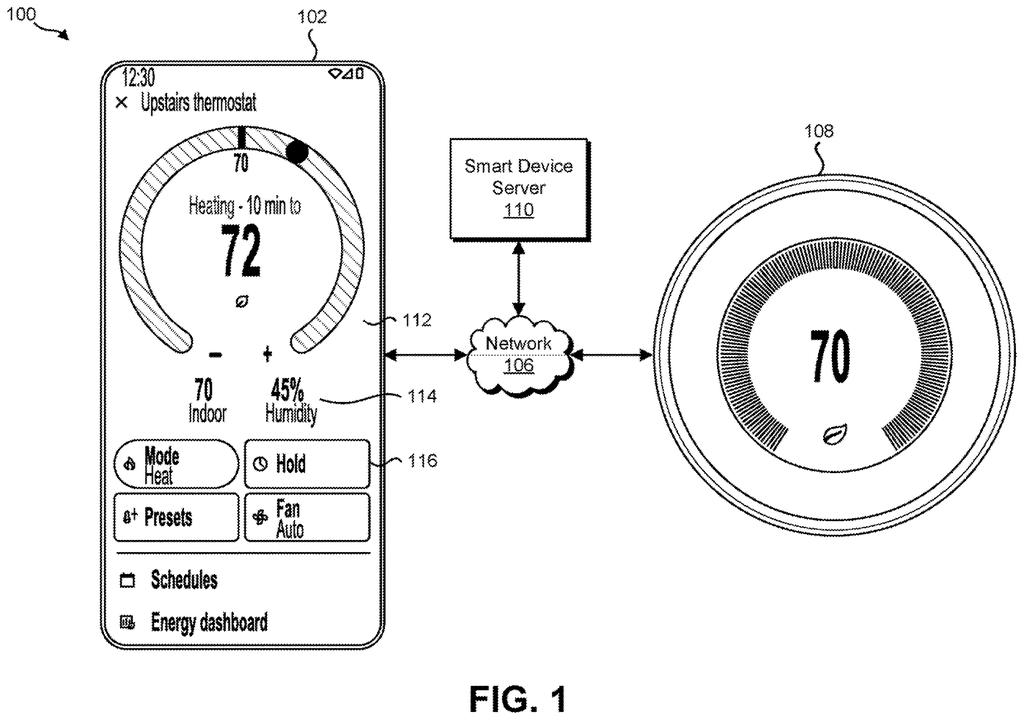
A developer or user fills in the form. In the thermostat example, a dial, a minus sign and a plus sign from the app's own library of interface pieces are placed on the page, and the dial is bound to the temperature trait. The result is packaged as an extension container, which can be written in JavaScript (a common web programming language). The server can check it for errors, malware and store policy problems before it goes out.
On the phone, the app sends a request for an extension, for example after it detects a new device. Once the extension arrives, the app's dynamic layout engine (the part that assembles screens from instructions) builds the page. When you tap the dial, the app uses the binding to match your input to the trait, then controls the device. The claims name thermostats, presence-sensing cameras and lights as examples.
An application extension can be generated based on the application extension template being populated with layout defining values and binding values.
Translation: Third party developers can build customized user interfaces to control their own smart home hardware.
What this means for gadget makers and your phone
If this works as described, adding a lamp or camera from a lesser-known brand to your home app could mean no new app to download. The screen would show up inside the app you already use, built from the same buttons and dials as everything else, so it would look and behave like the rest of your devices.
For gadget makers, the filing says the aim is minimal software effort, since they would fill out a form instead of writing and maintaining a full app. It names the Google Home app as an example of a control app that could be extended this way. It also says the approach works across operating systems, which would matter to anyone who switches between phones.
Google's 1028th filing we've tracked since May in our Google coverage follows work like the angry-review tracer and the key-finding glasses.
Every gadget maker that uses this gives something up: control over how its product looks and feels. The filing says the app keeps its native look, so a brand's custom touches are limited to the buttons, dials and switches in the app's own library. A control that is not in the library is not available to them.
The second cost is trust. The app downloads instructions from a server and builds screens from them, so someone has to check each extension for errors and malware. The filing includes a validation step for exactly that job, and it makes the app's owner the gatekeeper for every new device.
For most households, that trade looks worth making. Giving up some brand flair in return for one familiar screen and fewer apps is an easy swap for the person holding the phone. Makers with big design teams may weigh it differently.
Get our take in your Top Stories
Liked this breakdown? Add Patentlyze as a preferred source on Google, and our plain-English take shows up more often in your Top Stories the next time Google patent news breaks.
There are more where this came from
We read every patent application Big Tech publishes and send you the ones worth knowing. Plain English, free, every week.
The drawings
10 drawing sheets from US 2026/0349589 A1 · click any drawing to enlarge


Show the other 2 sheets


Want this weekly breakdown for a company we don't cover? Patentlyze Pro →
Be the first to weigh in