
Salesforce
Salesforce · AI / ML · Filed May 7, 2025 · USPTO published Nov 12, 2026 · This week's release
Salesforce Patents an AI Button That Recaps a Customer's Case Across Email, Chat and Phone
Ever had to explain your problem from scratch to a new support rep who knew nothing about your last three contacts? Salesforce's patent application describes a button that reads all of that history, across email, chat and phone transcripts, and writes the recap for the agent.
- Publication number
- US 2026/0359560 A1(US20260359560A1)
- Applicant
- Salesforce, Inc.
- Filed · Published
- May 7, 2025 · Nov 12, 2026
- Inventors
- Shaunak Shatmanyu, Vishal Surendrabhai Shah, Aditi Deshpande, Melissa Hoang, Sameer Abhinkar, Keyurkumar Rajendrabhai Patel, Janice Johnson, Xiangbo Mao
- Status when we published
- Waiting for an examiner
- Document
- 20 claims
- US classification
- 715/254
What Salesforce's case-summary button actually does
A customer emails about a browser that keeps crashing on Monday. On Wednesday she chats with a support agent. On Friday she calls, and a third agent picks up. Each conversation lives in a different system, and nobody has the full story.
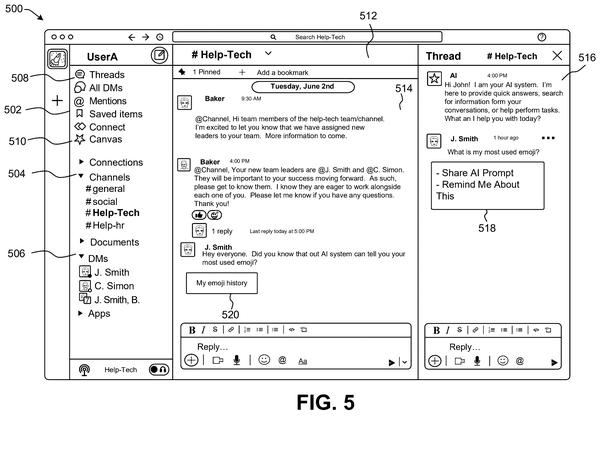
If you have ever had to explain your problem from scratch to a new rep, you know the feeling. Salesforce's patent application describes a button inside the support software. An agent clicks it, and an AI pulls together the emails, chats, website messages and phone-call transcripts tied to that case, then writes a short recap.
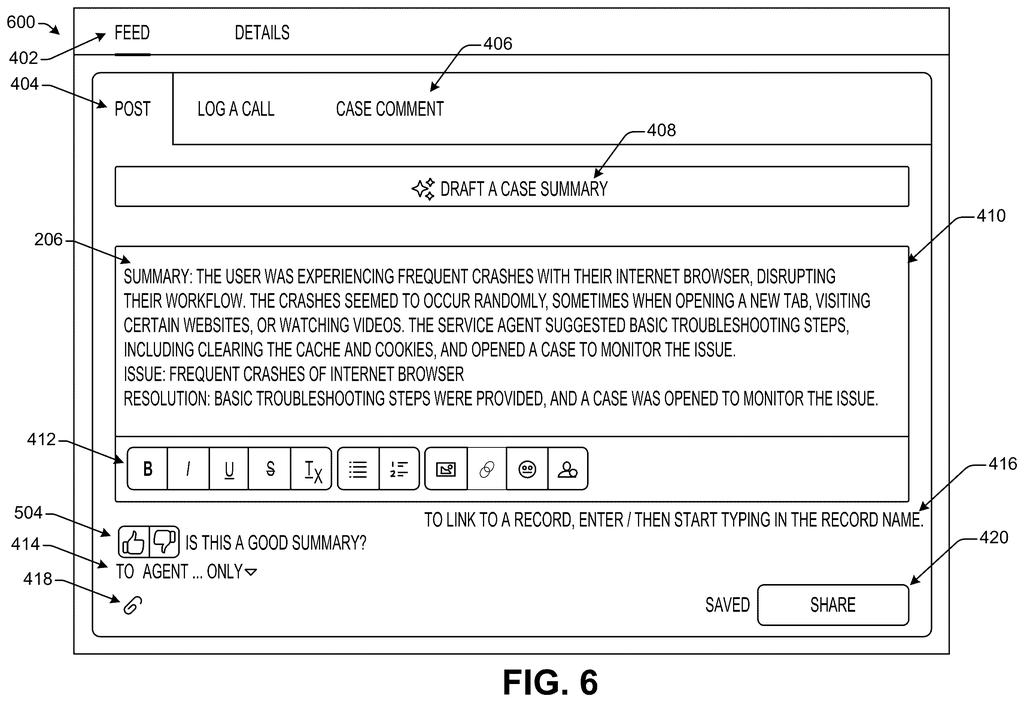
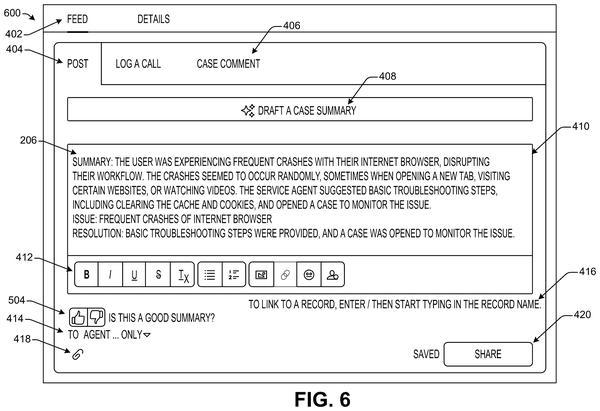
The recap names the issue, summarizes what has happened so far, and, once the case is closed, notes how it was resolved. The agent can edit it, approve it, and save it to the case so the next person starts caught up instead of starting over.
receiving, from a device and via a user interface, a selection of a selectable element indicating a request to generate a summarization associated with a case, wherein the case includes communications exchanged via a plurality of different communication channels …
Translation: Clicking a button triggers an AI summary of a customer support case built from multiple communication channels.
How the summary gets built from scattered messages
The core claim is a simple flow. An agent clicks a button asking for a summary of a case (the running record of one customer's problem). The system then extracts the conversation data from each place it lives, feeds it to one or more AI models, and shows the result on the same screen.
The filing says each case gets an ID when the first contact happens, whatever channel it came through. That ID lets the system search email, chat, website messages and call transcripts (text versions of phone calls) and gather everything. Because those sources store things in different formats, the system first converts them into one consistent form the AI can read.
The output has a few parts:
- Issue: what the customer is struggling with
- Summary: what has happened so far
- Resolution: how it was fixed, added once the case closes
Other claims cover a prompt template (a reusable set of instructions to the AI with fill-in blanks) that an administrator can change, including which channels or sources to pull from. The agent reviews and approves the summary before it is saved to the case. The request can also come from a different agent who was not part of the original conversations.
Communications may occur within multiple different communication channels (e.g., email messages, chat messages, text messages, audio calls, messages exchanged via a website) and be stored within sources associated with the communication channels.
Translation: Customer conversations happen across emails, chats, texts, phone calls, and website messages stored in different places.
Why support agents could stop playing detective
For you as a customer, the best case is fewer repeated explanations. When a case bounces between agents or channels, the next person can read a recap in seconds instead of combing through an inbox, a chat log and a call transcript. The filing ties this to shorter handle time (how long an agent spends on each case) and less after-call paperwork.
For companies that run support with this kind of software, summaries are saved to the case, so the history stays readable months later and can help with similar problems. The catch is accuracy. The filing builds in thumbs up or down feedback and lets the agent edit before saving, a nod to the fact that AI summaries can miss things.
Salesforce files its sixth patent in the AI assistants that remember you group we've tracked since July, building on earlier work like shrinking old topics in memory and recalling past user details.
Source: US 2026/0359560 A1 at the USPTO (PDF). Full patent text and figures are in the official publication.
Get our take in your Top Stories
Liked this breakdown? Add Patentlyze as a preferred source on Google, and our plain-English take shows up more often in your Top Stories the next time Salesforce patent news breaks.
Add Patentlyze on Google
One click.
There are more where this came from
We read every patent application Big Tech publishes and send you the ones worth knowing. Plain English, free, every week.
The drawings · 10 sheets
10 drawing sheets from US 2026/0359560 A1 · click any drawing to enlarge


Show the other 2 sheets


More from Salesforce
All 108 Salesforce patents →
More in AI / ML
All 2,637 AI / ML patents →
Samsung
A New Samsung Patent Lets Your TV Borrow Another Device's Memory of Your Voice
Google
Google Files Patent for an AI That Writes Differently to Your Boss Than to Your Friends
Google
Google Patents a Way for Its AI Assistant to Fill In Task Details Mid-Conversation
Google
No comments yet