Get the newsletter
Apple · Software · Filed Jul 16, 2026 · USPTO published Nov 12, 2026 · This week's release

Apple Patents Handwritten Notes That Rewrap Themselves Like Typed Text

Apple is working on handwriting that rewraps itself: change the width of the box around your notes, and your own writing flows onto more or fewer lines like typed text. It can even add a hyphen to split a handwritten word so it fits.
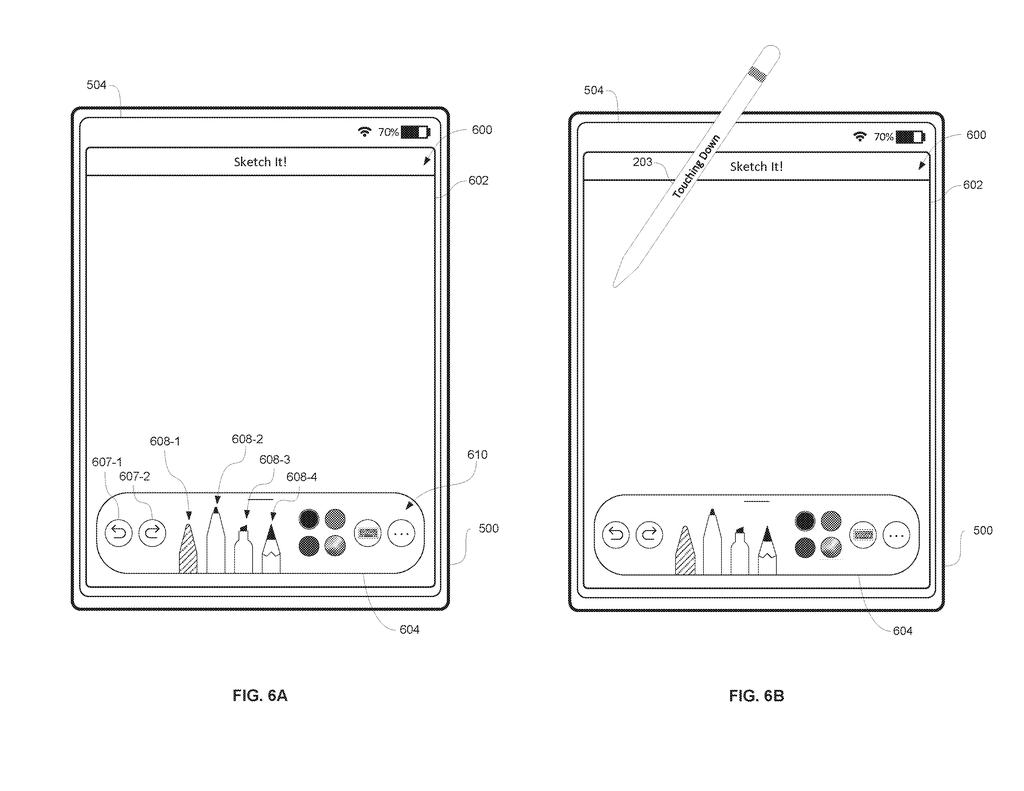
A tablet sketching app being used with a digital stylus to write notes and draw on the screen. Drawing from patent filing US 2026/0359548 A1.
A tablet sketching app being used with a digital stylus to write notes and draw on the screen.All 61 drawings ↓
Publication number
US 2026/0359548 A1(US20260359548A1)
Applicant
Apple Inc.
Filed · Published
Jul 16, 2026 · Nov 12, 2026
Inventors
Jennifer P. CHEN, Elizabeth J. BOARD, Christopher D. SOLI, Thomas DESELAERS, Aditya GALADA, Michael P. CONDON, Ryan S. DIXON, Hannah MORGAN
Status when we published
Waiting for an examiner
Document
17 claims
US classification
715/249
Parent application
Continuation of 18/325,968 (filed May 30, 2023)(18325968)

What Apple's rewrapping handwriting actually does

A person writes a to-do list by hand on a tablet, then realizes the note box is too narrow and the last words run off the edge. With paper, that is the end of it. On a screen, you would probably erase and rewrite.

Apple's patent describes handwriting that behaves like typed text. Select your writing, drag a handle on its edge, and the words rewrap onto more or fewer lines, still in your own handwriting. If a word has to break across two lines, the device can add a hyphen. The device chooses the new line count itself, so you never place each word by hand.

The filing also covers straightening a crooked line of writing, and rewrapping the words if that straightening would push them past the edge of the page.

From the filing · CLAIM 1
… displaying, via the display generation component, a second representation of the handwritten content, wherein the handwritten content in the second representation of the handwritten content is displayed in a second number of lines of handwritten content, different from the first number of lines of handwritten content.

Translation: The device automatically reformats the handwriting onto a different number of lines when you change the layout.

How the drag handles change your line count

The core idea is a handwriting editor that can change how many lines your writing takes up. While your handwriting sits on some number of lines, the device watches for an input that changes a metric (a setting for how much writing fits on one line, such as box width). It then redraws the same words on a different number of lines.

That input can be a drag on resizing handles. Select part of your writing, and handles appear at its edges; drag one and the metric changes by a matching amount. The device picks the new line count itself, and the new arrangement is not one your handwriting defined.

Other claimed behaviors:

  • If wrapping splits a word, the device shows a hyphen at the break.
  • If straightening pushes writing past a boundary, it rewraps onto a different number of lines.
  • Whether wrapped lines share a row can depend on the type of handwritten content.

Straightening rotates and shifts letters so the baseline (the invisible line your letters sit on) matches the page's horizontal, keeping the first letter in place. The description says it can start from a button, a pause after lifting the stylus (examples run from 0.5 to 5 seconds), or writing a new line.

From the filing · THE ABSTRACT
Some embodiments described in this disclosure are directed to electronic devices that provide for manipulation of handwritten content in a content-entry region, including wrapping of handwritten text in the content-entry region.

Translation: The patent covers devices that let you wrap handwritten text just like typed paragraphs.

What this means for handwritten notes on iPad

If you take handwritten notes on a tablet, resizing is where handwriting usually loses to typing. Typed paragraphs adjust when you change the page, and ink does not. This patent would close that gap, so a list or paragraph could fit a narrower column, or make room for a picture you drop in, without you redrawing a word.

The filing uses iPhone, iPad and stylus examples, and lists a Notes app among the apps these devices run. It is a continuation of a 2023 application, so the idea has been in Apple's pipeline for a while. As a patent application, it says nothing about when, or whether, you would see it in a product.

Apple's 665th filing in our Apple coverage since May adds to a run that includes the virtual-hands camera fix and colored light from virtual TVs.

Source: US 2026/0359548 A1 at the USPTO (PDF). Full patent text and figures are in the official publication.

Get our take in your Top Stories

Liked this breakdown? Add Patentlyze as a preferred source on Google, and our plain-English take shows up more often in your Top Stories the next time Apple patent news breaks.

There are more where this came from

We read every patent application Big Tech publishes and send you the ones worth knowing. Plain English, free, every week.

The drawings · 61 sheets

61 drawing sheets from US 2026/0359548 A1 · click any drawing to enlarge

Hardware parts and programs inside a touchscreen phone, drawing sheet 1 from US 2026/0359548 A1
Sheet 1 Hardware parts and programs inside a touchscreen phone
How the system organizes screen touches into actions, drawing sheet 2 from US 2026/0359548 A1
Sheet 2 How the system organizes screen touches into actions
Sensors and controls on a handheld touchscreen phone, drawing sheet 3 from US 2026/0359548 A1
Sheet 3 Sensors and controls on a handheld touchscreen phone
Internal parts of a computer using a separate trackpad, drawing sheet 4 from US 2026/0359548 A1
Sheet 4 Internal parts of a computer using a separate trackpad
Home screen showing standard built-in phone apps, drawing sheet 5 from US 2026/0359548 A1
Sheet 5 Home screen showing standard built-in phone apps
Using two-finger gestures on a separate trackpad, drawing sheet 6 from US 2026/0359548 A1
Sheet 6 Using two-finger gestures on a separate trackpad
Front view of a compact touchscreen tablet, drawing sheet 7 from US 2026/0359548 A1
Sheet 7 Front view of a compact touchscreen tablet
Electronic parts and motion sensors inside a tablet, drawing sheet 8 from US 2026/0359548 A1
Sheet 8 Electronic parts and motion sensors inside a tablet
Show the other 52 sheets
Sensors placed around the screen measure pressure at each touch, drawing sheet 9 from US 2026/0359548 A1
Sheet 9 Sensors placed around the screen measure pressure at each touch
Combining sensor readings to calculate the force of multiple touches, drawing sheet 10 from US 2026/0359548 A1
Sheet 10 Combining sensor readings to calculate the force of multiple touches
A light press on an app icon positions the cursor, drawing sheet 11 from US 2026/0359548 A1
Sheet 11 A light press on an app icon positions the cursor
Pressing harder pops up a recent document, drawing sheet 12 from US 2026/0359548 A1
Sheet 12 Pressing harder pops up a recent document
Increasing pressure reveals a second recent file, drawing sheet 13 from US 2026/0359548 A1
Sheet 13 Increasing pressure reveals a second recent file
Reaching maximum force uncovers a third document option, drawing sheet 14 from US 2026/0359548 A1
Sheet 14 Reaching maximum force uncovers a third document option
Hardware parts that connect the device to screens and remotes, drawing sheet 15 from US 2026/0359548 A1
Sheet 15 Hardware parts that connect the device to screens and remotes
Opening a sketch canvas with a stylus touch, drawing sheet 16 from US 2026/0359548 A1
Sheet 16 Opening a sketch canvas with a stylus touch
Writing a tilted title with a stylus, drawing sheet 17 from US 2026/0359548 A1
Sheet 17 Writing a tilted title with a stylus
Selecting an inking tool from the palette, drawing sheet 18 from US 2026/0359548 A1
Sheet 18 Selecting an inking tool from the palette
Circling handwritten words to open edit options, drawing sheet 19 from US 2026/0359548 A1
Sheet 19 Circling handwritten words to open edit options
Straightening the slanted handwriting automatically, drawing sheet 20 from US 2026/0359548 A1
Sheet 20 Straightening the slanted handwriting automatically
Adding a list item with a prompt to straighten it, drawing sheet 21 from US 2026/0359548 A1
Sheet 21 Adding a list item with a prompt to straighten it
Jotting another entry on two skewed lines, drawing sheet 22 from US 2026/0359548 A1
Sheet 22 Jotting another entry on two skewed lines
Shifting straightened lines upward to make space, drawing sheet 23 from US 2026/0359548 A1
Sheet 23 Shifting straightened lines upward to make space
Guided lines keeping new handwriting neatly aligned, drawing sheet 24 from US 2026/0359548 A1
Sheet 24 Guided lines keeping new handwriting neatly aligned
Writing a new note disables text input while you ink, drawing sheet 25 from US 2026/0359548 A1
Sheet 25 Writing a new note disables text input while you ink
Tapping handwritten text selects it like typed words, drawing sheet 26 from US 2026/0359548 A1
Sheet 26 Tapping handwritten text selects it like typed words
Scribbling over handwritten notes brings up an edit menu, drawing sheet 27 from US 2026/0359548 A1
Sheet 27 Scribbling over handwritten notes brings up an edit menu
Straightening handwriting in right to left scripts, drawing sheet 28 from US 2026/0359548 A1
Sheet 28 Straightening handwriting in right to left scripts
Switching to a sketch tool to draw freehand shapes, drawing sheet 29 from US 2026/0359548 A1
Sheet 29 Switching to a sketch tool to draw freehand shapes
Circling drawings with a stylus selects them for editing, drawing sheet 30 from US 2026/0359548 A1
Sheet 30 Circling drawings with a stylus selects them for editing
How the tablet straightens crooked lines of handwriting, drawing sheet 31 from US 2026/0359548 A1
Sheet 31 How the tablet straightens crooked lines of handwriting
Detecting when you finish writing to level out the line, drawing sheet 32 from US 2026/0359548 A1
Sheet 32 Detecting when you finish writing to level out the line
Revealing options to reshape a handwriting line after selecting it, drawing sheet 33 from US 2026/0359548 A1
Sheet 33 Revealing options to reshape a handwriting line after selecting it
Deciding whether to show formatting buttons based on past usage, drawing sheet 34 from US 2026/0359548 A1
Sheet 34 Deciding whether to show formatting buttons based on past usage
Checking whether handwritten strokes form words before offering actions, drawing sheet 35 from US 2026/0359548 A1
Sheet 35 Checking whether handwritten strokes form words before offering actions
Adjusting handwritten line spacing to match text size, drawing sheet 36 from US 2026/0359548 A1
Sheet 36 Adjusting handwritten line spacing to match text size
Aligning handwritten lines according to the detected language direction, drawing sheet 37 from US 2026/0359548 A1
Sheet 37 Aligning handwritten lines according to the detected language direction
Pinning the starting letter in place while straightening written text, drawing sheet 38 from US 2026/0359548 A1
Sheet 38 Pinning the starting letter in place while straightening written text
Displaying temporary guide lines while a user writes on screen, drawing sheet 39 from US 2026/0359548 A1
Sheet 39 Displaying temporary guide lines while a user writes on screen
Erasing guide lines and stray marks after writing, drawing sheet 40 from US 2026/0359548 A1
Sheet 40 Erasing guide lines and stray marks after writing
Opening a sketch canvas and touching down a stylus, drawing sheet 41 from US 2026/0359548 A1
Sheet 41 Opening a sketch canvas and touching down a stylus
Writing a handwritten header and switching tools, drawing sheet 42 from US 2026/0359548 A1
Sheet 42 Writing a handwritten header and switching tools
Selecting written text to reveal margin resize handles, drawing sheet 43 from US 2026/0359548 A1
Sheet 43 Selecting written text to reveal margin resize handles
Dragging inward wraps words onto a new line, drawing sheet 44 from US 2026/0359548 A1
Sheet 44 Dragging inward wraps words onto a new line
Grabbing a list item handle to widen it, drawing sheet 45 from US 2026/0359548 A1
Sheet 45 Grabbing a list item handle to widen it
Widening the boundary unrolls text onto one line, drawing sheet 46 from US 2026/0359548 A1
Sheet 46 Widening the boundary unrolls text onto one line
Circling the entire note to resize all lines, drawing sheet 47 from US 2026/0359548 A1
Sheet 47 Circling the entire note to resize all lines
Narrowing the entire note wraps each bullet point, drawing sheet 48 from US 2026/0359548 A1
Sheet 48 Narrowing the entire note wraps each bullet point
Selecting handwritten text opens an action menu, drawing sheet 49 from US 2026/0359548 A1
Sheet 49 Selecting handwritten text opens an action menu
Narrowing a selection box wraps handwritten words across lines, drawing sheet 50 from US 2026/0359548 A1
Sheet 50 Narrowing a selection box wraps handwritten words across lines
Tapping into handwritten text brings up an insertion menu, drawing sheet 51 from US 2026/0359548 A1
Sheet 51 Tapping into handwritten text brings up an insertion menu
Handwritten words automatically flow around an inserted image, drawing sheet 52 from US 2026/0359548 A1
Sheet 52 Handwritten words automatically flow around an inserted image
Resizing handwritten text into a single slanted line, drawing sheet 53 from US 2026/0359548 A1
Sheet 53 Resizing handwritten text into a single slanted line
Straightening angled handwriting rewraps it across two lines, drawing sheet 54 from US 2026/0359548 A1
Sheet 54 Straightening angled handwriting rewraps it across two lines
The initial steps for reflowing handwritten notes, drawing sheet 55 from US 2026/0359548 A1
Sheet 55 The initial steps for reflowing handwritten notes
Rules for adjusting line counts when handwriting wraps, drawing sheet 56 from US 2026/0359548 A1
Sheet 56 Rules for adjusting line counts when handwriting wraps
Deciding whether separate lines of handwriting share space when rewrapped, drawing sheet 57 from US 2026/0359548 A1
Sheet 57 Deciding whether separate lines of handwriting share space when rewrapped
Moving on-screen handles to adjust margins for handwritten text, drawing sheet 58 from US 2026/0359548 A1
Sheet 58 Moving on-screen handles to adjust margins for handwritten text
Reshaping the baseline path of handwritten text using boundary handles, drawing sheet 59 from US 2026/0359548 A1
Sheet 59 Reshaping the baseline path of handwritten text using boundary handles
Adding hyphens when handwritten words break across lines, drawing sheet 60 from US 2026/0359548 A1
Sheet 60 Adding hyphens when handwritten words break across lines

Sheets 61 to 61 are in the full USPTO filing.

Patent filing page

Reader comments

No comments yet

Start the discussion

Real name or a handle, either is fine. Comments are read by a person before they appear, so allow a little time. Keep it about the filing.