
A New Adobe Patent Lets You Reshape 3D Models by Typing What You Want
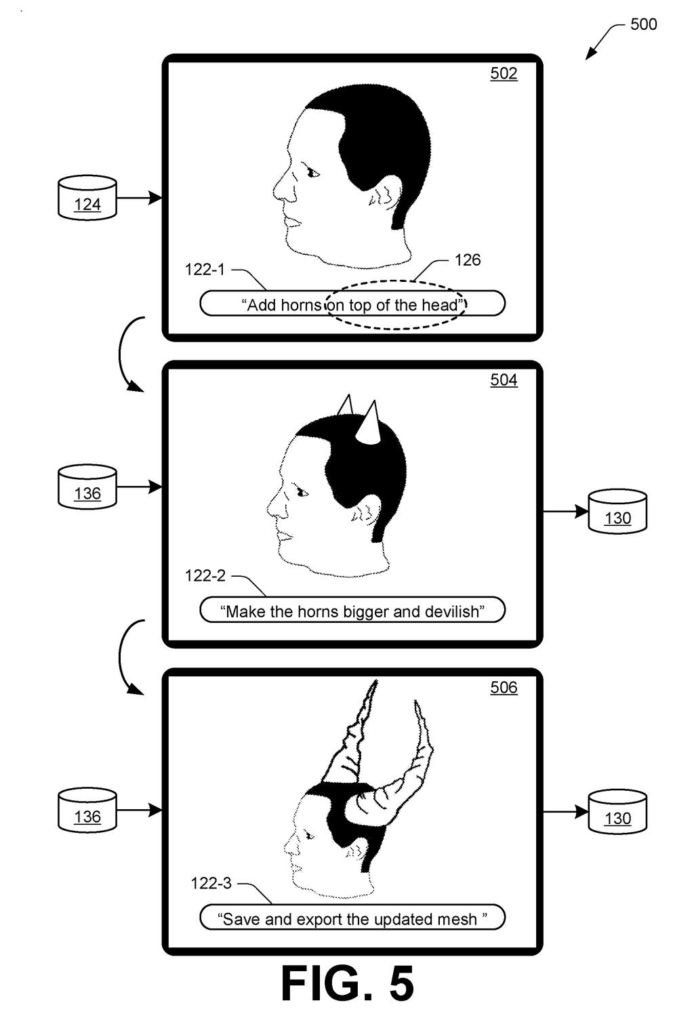
Adobe's filing lets you tell an AI 'add horns on top of the head' and watch a 3D character grow a pair, with the rest of the model left alone.
What Adobe's type-to-sculpt 3D patent does
Ever spent an afternoon dragging tiny dots around a 3D character just to give it a decent pair of horns? That's the daily reality for game artists, who shape digital objects out of a net of small flat surfaces called a mesh.
Adobe's patent filing aims to skip most of that work. You type something like "add horns on top of the head," mark the part of the model you care about, and an AI makes the change. Not happy with the result? Type "make the horns bigger and devilish" and it tries again.
The trouble with AI-only tools is that they can wander off and alter parts you wanted left alone, and what they produce is hard to hand to other software. Adobe's answer is to keep the AI's work and the regular mesh in step, so the final result is still an ordinary 3D file that other programs can open.
… receiving, by the processing device via the user interface, a natural language input that describes a requested modification to the mesh; detecting, by the processing device via the user interface, a region selection that indicates one or more surface regions of the mesh for applying the requested modification; …
Translation: The software takes your typed instructions and figures out which part of the 3D model you want to change.
How the AI keeps two versions of a model in sync
The patent starts with a mesh, the standard 3D format: a net of small flat shapes (triangles and other polygons) that together form an object's outer surface. Each shape stores details such as its color, size, and position. Claim 1 covers showing that mesh in an interface, taking a natural language request (typed or spoken, per the dependent claims), letting you select the part of the model to change, and using a machine-learning model to produce an updated mesh.
The filing also describes how the AI pulls this off. It first builds a second, neural representation of the same object, an AI-friendly version fitted to match the mesh. One example is a signed distance function (a formula that says how far any point in space sits from the object's surface). The AI makes the requested changes to that version in many small steps, and the mesh is updated to follow each step.
To keep the two matched, the system:
- Renders both versions from several angles, using color, opacity, and surface-direction maps
- Compares the pictures and measures the differences
- Feeds those differences back to the AI so the mesh tracks the AI's version more closely
One optional speedup: using the mesh as a guide cuts the samples needed to draw the AI version from around 512 per ray to as few as three.
… incrementally update, using a machine-learning model, the surface regions of the mesh based on incremental changes applied by the machine-learning model to the neural representation for achieving the requested modification …
Translation: An artificial intelligence model gradually reshapes the 3D surface to match your description.
Why typed 3D edits matter to game artists
If you've ever watched an AI image tool change something you didn't ask it to, you know the worry here. The filing says professional 3D artists have held back from AI tools partly because edits spill into areas they wanted left alone, and because AI output isn't a standard file other software can open. This patent goes after both problems: you choose the area, and the result comes out as an ordinary mesh that existing modeling and rendering tools accept.
For game studios and film teams, where the filing says artists can spend months fine-tuning individual models, even a rough first pass from a typed request could save time. It could also make 3D modeling friendlier to casual users, which the filing names as a gap in current tools. The patent doesn't name a product, so treat it as a direction Adobe is exploring.
Adobe's 18th filing in the AI simulation work we've tracked since May adds to a pattern that includes turning a photo into 3D material and text into a walkable world.
Claim 1 is short, and that is the interesting part. It covers showing a 3D model on screen, taking a typed or spoken request, letting you pick part of the model, and having an AI edit that part. Nothing in it mentions the two-version trick that fills most of the description.
That trick shows up only in later claims, so the opening claim is broad. Read literally, it describes any tool where you describe a change, mark where it goes, and an AI reshapes a 3D object, however the AI works inside.
Broad opening claims often get narrowed during review, so the later claims are the safer guide to what Adobe has actually worked out. The 'add horns' example is easy to grasp, and confining an AI edit to a patch you selected is a sensible answer to a real complaint from artists.
Get our take in your Top Stories
Liked this breakdown? Add Patentlyze as a preferred source on Google, and our plain-English take shows up more often in your Top Stories the next time Adobe patent news breaks.
There are more where this came from
We read every patent application Big Tech publishes and send you the ones worth knowing. Plain English, free, every week.
The drawings
7 drawing sheets from US 2026/0350952 A1 · click any drawing to enlarge


Want this weekly breakdown for a company we don't cover? Patentlyze Pro →
Be the first to weigh in