Get the newsletter
Apple · Software · Filed May 13, 2026 · USPTO published Nov 19, 2026 · This week's release

Apple Patents a Group Chat Button That Turns Questions Into Polls

Someone in your group chat asks where everyone wants to eat, and a pile of 'I don't mind' replies follows. Apple's patent would have your phone notice the question and offer a one-tap poll built from the conversation.
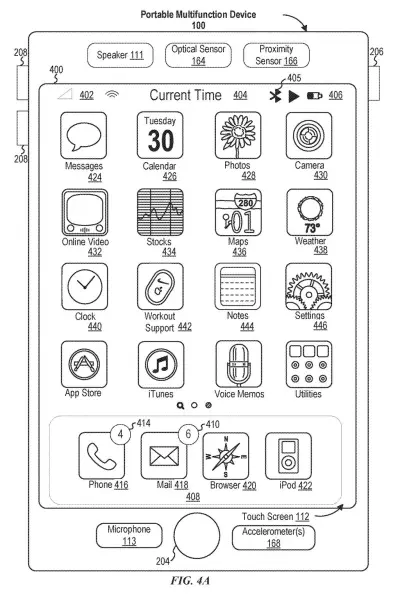
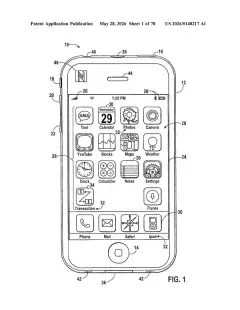
An iPhone home screen displaying familiar apps including Messages, Photos, and Maps. Drawing from patent filing US 2026/0367766 A1.
An iPhone home screen displaying familiar apps including Messages, Photos, and Maps.All 58 drawings ↓
Publication number
US 2026/0367766 A1(US20260367766A1)
Applicant
Apple Inc.
Filed · Published
May 13, 2026 · Nov 19, 2026
Inventors
Christian X. DALONZO, Stephen O. LEMAY
Status when we published
Waiting for an examiner
Document
28 claims
US classification
715/753
Parent application
Claims priority from a provisional application 63818972 (filed Jun 6, 2025)

What Apple's poll suggestion in group chats does

Right now, turning a group chat question into a poll means finding the poll menu, retyping the question, and then typing every option again by hand. Apple's patent describes a way for your phone to skip most of that work.

As you and your friends chat, the phone watches the conversation for signs that a poll would help, such as someone asking a question. When it spots one, a poll button shows up in the strip of suggestions near your keyboard. Tap it and you get a poll already filled in with choices pulled from the messages, which you can edit before sending. It can even appear while you're still typing, before you hit send.

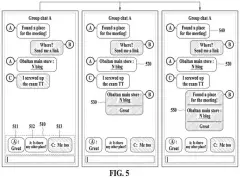
Once the poll is in the chat, it changes as people vote: an option grows in size when someone picks it and shrinks back if they undo the choice.

From the filing · CLAIM 1
… displaying, in the messaging user interface, a first user interface element, which is selectable to initiate a poll generation process corresponding to content of the one or more messages.

Translation: The app shows a button to turn chat messages into a poll.

How the chat decides a question needs a poll

The core of the filing is a trigger. While you view a conversation with several people, the device checks the messages against a set of conditions. When they are met, it shows a button that starts a poll generation process (the steps that build a poll from what people said).

Examples of conditions the filing lists:

  • A message contains a question, optionally of a certain content type.
  • The conversation has three or more people in it.
  • The messages were written by you, or by you and another participant.
  • An AI model decides the messages call for a poll.

The check can run on older messages, on a message you are still drafting, or on one you just sent. The button can sit in the strip of suggested content above the typing area, either replacing another suggestion or appearing beside it, with its own visual effect so it stands out. It can also live in a menu of chat actions.

Tapping it opens an editing view with poll fields already filled in from the conversation, plus a field to add another option. After you send, the poll changes its look in the chat, and the abstract says it appears in one spot when one person sends it and in another when someone else modifies it. The filing also includes a diagram for training the AI model that recommends polls.

From the filing · THE ABSTRACT
… a system for an AI/ML model detects one or more criteria for automatically recommending a poll for a messaging interface.

Translation: Artificial intelligence spots moments in the chat when a poll would be useful.

Why a poll button could shorten group chat debates

Anyone who has tried to pick a restaurant, a weekend, or a gift in a group chat knows how it goes: a pile of replies and nobody counting. A poll fixes that, but only if making one takes a few seconds. By offering the button at the moment a question appears, and filling in the options for you, the patent aims to make polling the easy default.

The filing is written around a messaging app on devices like the iPhone and iPad, so the most direct effect would be fewer taps in your own chats. The visuals matter too: options visibly grow as people pick them, so the whole group can see where things stand at a glance.

That makes this Apple's 729th filing in our Apple coverage since May, adding to a run that includes the shared headset screen idea and the camera lookup chooser.

Source: US 2026/0367766 A1 at the USPTO (PDF). Full patent text and figures are in the official publication.

Get our take in your Top Stories

Liked this breakdown? Add Patentlyze as a preferred source on Google, and our plain-English take shows up more often in your Top Stories the next time Apple patent news breaks.

There are more where this came from

We read every patent application Big Tech publishes and send you the ones worth knowing. Plain English, free, every week.

The drawings · 58 sheets

58 drawing sheets from US 2026/0367766 A1 · click any drawing to enlarge

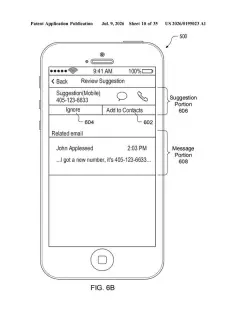
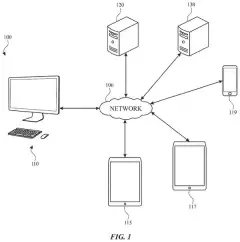
Hardware parts that run the phone and its apps, drawing sheet 1 from US 2026/0367766 A1
Sheet 1 Hardware parts that run the phone and its apps
How apps detect and organize screen touches, drawing sheet 2 from US 2026/0367766 A1
Sheet 2 How apps detect and organize screen touches
External buttons and sensors on a touch phone, drawing sheet 3 from US 2026/0367766 A1
Sheet 3 External buttons and sensors on a touch phone
Computer memory and processors running desktop programs, drawing sheet 4 from US 2026/0367766 A1
Sheet 4 Computer memory and processors running desktop programs
Steps for gathering data and putting it to work, drawing sheet 5 from US 2026/0367766 A1
Sheet 5 Steps for gathering data and putting it to work
Software layers that let apps talk to the system, drawing sheet 6 from US 2026/0367766 A1
Sheet 6 Software layers that let apps talk to the system
Exchanging requests and answers between software tools, drawing sheet 7 from US 2026/0367766 A1
Sheet 7 Exchanging requests and answers between software tools
Home screen layout with app icons and a dock, drawing sheet 8 from US 2026/0367766 A1
Sheet 8 Home screen layout with app icons and a dock
Show the other 50 sheets
Matching touchpad gestures to actions on a screen, drawing sheet 9 from US 2026/0367766 A1
Sheet 9 Matching touchpad gestures to actions on a screen
Front view of smart glasses with control buttons, drawing sheet 10 from US 2026/0367766 A1
Sheet 10 Front view of smart glasses with control buttons
Hardware inside a smartwatch including motion sensors and GPS, drawing sheet 11 from US 2026/0367766 A1
Sheet 11 Hardware inside a smartwatch including motion sensors and GPS
Measuring press force at four corners of a touch screen, drawing sheet 12 from US 2026/0367766 A1
Sheet 12 Measuring press force at four corners of a touch screen
Calculating the intensity of each fingertip touching the screen, drawing sheet 13 from US 2026/0367766 A1
Sheet 13 Calculating the intensity of each fingertip touching the screen
Tapping a trackpad lightly to choose an app icon, drawing sheet 14 from US 2026/0367766 A1
Sheet 14 Tapping a trackpad lightly to choose an app icon
Pressing harder on the trackpad to reveal a recent file, drawing sheet 15 from US 2026/0367766 A1
Sheet 15 Pressing harder on the trackpad to reveal a recent file
Deep pressing to reveal additional documents from the dock icon, drawing sheet 16 from US 2026/0367766 A1
Sheet 16 Deep pressing to reveal additional documents from the dock icon
Pressing harder on a trackpad reveals an app's open documents, drawing sheet 17 from US 2026/0367766 A1
Sheet 17 Pressing harder on a trackpad reveals an app's open documents
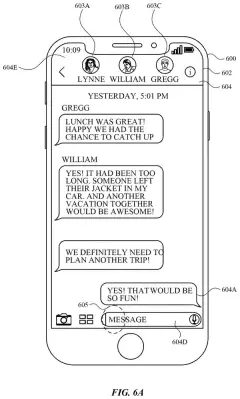
Three friends chatting in a group messaging thread, drawing sheet 18 from US 2026/0367766 A1
Sheet 18 Three friends chatting in a group messaging thread
One member asks the group a dinner question, drawing sheet 19 from US 2026/0367766 A1
Sheet 19 One member asks the group a dinner question
Another member begins typing food suggestions in reply, drawing sheet 20 from US 2026/0367766 A1
Sheet 20 Another member begins typing food suggestions in reply
A shortcut to create a poll appears above the keyboard, drawing sheet 21 from US 2026/0367766 A1
Sheet 21 A shortcut to create a poll appears above the keyboard
Tapping the poll suggestion button in the chat view, drawing sheet 22 from US 2026/0367766 A1
Sheet 22 Tapping the poll suggestion button in the chat view
The phone pre-fills voting choices pulled from previous texts, drawing sheet 23 from US 2026/0367766 A1
Sheet 23 The phone pre-fills voting choices pulled from previous texts
Everyone in the group receives the interactive voting poll, drawing sheet 24 from US 2026/0367766 A1
Sheet 24 Everyone in the group receives the interactive voting poll
Seeing poll results update across three group chat screens, drawing sheet 25 from US 2026/0367766 A1
Sheet 25 Seeing poll results update across three group chat screens
Avatars mark which friend voted for each food choice, drawing sheet 26 from US 2026/0367766 A1
Sheet 26 Avatars mark which friend voted for each food choice
Incoming text alerts everyone that someone has a new option, drawing sheet 27 from US 2026/0367766 A1
Sheet 27 Incoming text alerts everyone that someone has a new option
Adding an extra choice into an active group poll, drawing sheet 28 from US 2026/0367766 A1
Sheet 28 Adding an extra choice into an active group poll
Typing in a fourth food option to add, drawing sheet 29 from US 2026/0367766 A1
Sheet 29 Typing in a fourth food option to add
Newly added choices instantly appear for the entire chat, drawing sheet 30 from US 2026/0367766 A1
Sheet 30 Newly added choices instantly appear for the entire chat
Friends cast their votes for the newly added choice, drawing sheet 31 from US 2026/0367766 A1
Sheet 31 Friends cast their votes for the newly added choice
Conversation resumes normally after the group decides on plans, drawing sheet 32 from US 2026/0367766 A1
Sheet 32 Conversation resumes normally after the group decides on plans
Poll suggestion appearing over the keyboard while typing a question, drawing sheet 33 from US 2026/0367766 A1
Sheet 33 Poll suggestion appearing over the keyboard while typing a question
Tap the add button to manually find the poll maker, drawing sheet 34 from US 2026/0367766 A1
Sheet 34 Tap the add button to manually find the poll maker
Choosing poll creation from the messaging app menu, drawing sheet 35 from US 2026/0367766 A1
Sheet 35 Choosing poll creation from the messaging app menu
Typing your first voting options into a new poll card, drawing sheet 36 from US 2026/0367766 A1
Sheet 36 Typing your first voting options into a new poll card
Reviewing completed vote choices before sending them to the chat, drawing sheet 37 from US 2026/0367766 A1
Sheet 37 Reviewing completed vote choices before sending them to the chat
The finished poll appears in everyone's conversation window, drawing sheet 38 from US 2026/0367766 A1
Sheet 38 The finished poll appears in everyone's conversation window
Detecting chat questions to suggest an interactive poll, drawing sheet 39 from US 2026/0367766 A1
Sheet 39 Detecting chat questions to suggest an interactive poll
Automatically populating poll options based on past chat messages, drawing sheet 40 from US 2026/0367766 A1
Sheet 40 Automatically populating poll options based on past chat messages
Tapping the edit button on a poll inside the chat, drawing sheet 41 from US 2026/0367766 A1
Sheet 41 Tapping the edit button on a poll inside the chat
Adding a new voting option by speaking to your phone, drawing sheet 42 from US 2026/0367766 A1
Sheet 42 Adding a new voting option by speaking to your phone
Sending a newly typed choice to update the poll, drawing sheet 43 from US 2026/0367766 A1
Sheet 43 Sending a newly typed choice to update the poll
Relocating the updated poll to the bottom of the conversation, drawing sheet 44 from US 2026/0367766 A1
Sheet 44 Relocating the updated poll to the bottom of the conversation
Opening a menu to modify the revised poll again, drawing sheet 45 from US 2026/0367766 A1
Sheet 45 Opening a menu to modify the revised poll again
Viewing options in the full poll editing window, drawing sheet 46 from US 2026/0367766 A1
Sheet 46 Viewing options in the full poll editing window
Renaming a poll choice before sharing the change, drawing sheet 47 from US 2026/0367766 A1
Sheet 47 Renaming a poll choice before sharing the change
Updating the chat with the edited voting choices for everyone, drawing sheet 48 from US 2026/0367766 A1
Sheet 48 Updating the chat with the edited voting choices for everyone
Opening a menu to edit an existing poll, drawing sheet 49 from US 2026/0367766 A1
Sheet 49 Opening a menu to edit an existing poll
Fixing a typo in a poll option, drawing sheet 50 from US 2026/0367766 A1
Sheet 50 Fixing a typo in a poll option
Sending the corrected poll to the group, drawing sheet 51 from US 2026/0367766 A1
Sheet 51 Sending the corrected poll to the group
Updating the poll for everyone in the chat, drawing sheet 52 from US 2026/0367766 A1
Sheet 52 Updating the poll for everyone in the chat
How votes appear alongside each poll option, drawing sheet 53 from US 2026/0367766 A1
Sheet 53 How votes appear alongside each poll option
Showing multiple group members voting on choices, drawing sheet 54 from US 2026/0367766 A1
Sheet 54 Showing multiple group members voting on choices
Selecting poll details from an action menu, drawing sheet 55 from US 2026/0367766 A1
Sheet 55 Selecting poll details from an action menu
Viewing a detailed breakdown of who voted, drawing sheet 56 from US 2026/0367766 A1
Sheet 56 Viewing a detailed breakdown of who voted
Moving an updated poll based on who changed it, drawing sheet 57 from US 2026/0367766 A1
Sheet 57 Moving an updated poll based on who changed it
Training the AI to recognize when to suggest a poll, drawing sheet 58 from US 2026/0367766 A1
Sheet 58 Training the AI to recognize when to suggest a poll
Patent filing page

Reader comments

No comments yet

Start the discussion

Real name or a handle, either is fine. Comments are read by a person before they appear, so allow a little time. Keep it about the filing.