
Apple
Apple · Software · Filed Mar 30, 2026 · USPTO published Nov 19, 2026 · This week's release
Apple Files Patent for Letting You Choose Which Service Identifies What Your Camera Sees
When your iPhone tells you what's in a photo, you rarely get to choose who does the telling. A new Apple patent application puts a button for that choice right on the screen.
- Publication number
- US 2026/0367781 A1(US20260367781A1)
- Applicant
- Apple Inc.
- Filed · Published
- Mar 30, 2026 · Nov 19, 2026
- Inventors
- Adrian ZUMBRUNNEN, Johnnie B. MANZARI
- Status when we published
- Waiting for an examiner
- Document
- 24 claims
- US classification
- 715/764
- Parent application
- Claims priority from a provisional application 63806572 (filed May 15, 2025)
What Apple's visual lookup screen would show you
Every time you point your phone at something and ask it to tell you more, some service does the figuring-out behind the scenes, and you usually have no say in which one. Apple's filing puts that choice on the screen.
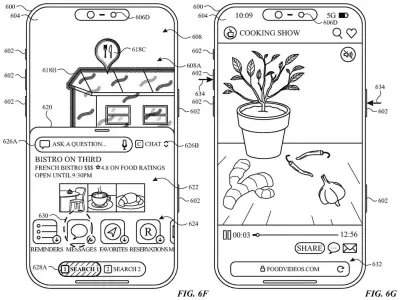
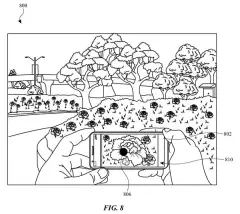
When you tap something in a photo or camera view, the phone opens a panel showing information about the lookup being run, plus a button for changing the service that does it. You can ask a question about the item, run a search, or pick an action, and swiping across the panel replaces placeholder boxes with the results.
The filing also covers a nudge for first-time use. The phone prompts you to use a gesture to mark the part of the picture you care about. If you do nothing for a set stretch of time, it highlights the things it spotted on its own, so you aren't left staring at a blank image.
detecting, via the one or more input devices, an input requesting additional information associated with a feature of interest within respective visual content …
Translation: The system notices when you ask to learn more about something your camera sees.
How the screen hands your photo to a provider
The filing describes a visual analysis user interface (a panel that opens when you ask for more about something in a photo, screenshot or live camera view). The panel shows information about the lookup being run and, at the same time, a button for changing which service provider does the work. Every independent claim rests on that pairing.
Dependent claims add pieces to the panel:
- A question box that gets answers about the item from the currently chosen provider.
- A search button that pulls up results.
- Action buttons that can hand the item to different apps.
- A provider list that changes with the type of item, including a recommended pick.
Results can wait behind placeholder boxes until you swipe across the panel. If your past habits suggest you'd want a lookup, it can start automatically. If you switch providers after seeing results, the phone reruns the lookup with the new one. In a camera view, detected items can animate out of the shutter button, which still takes a photo when tapped.
Before any of that, the filing describes a prompt asking you to use a gesture to mark the part of the image you care about. If you do nothing for a set time, the phone highlights items it spotted itself.
Why a swappable lookup service matters on iPhone
For you, the payoff is control over a feature that usually makes that choice for you. When you point your phone at something and ask what it is, you could see which service is answering and switch to another if the first answer disappoints you, without leaving the screen. The provider list can even change with the type of item the phone detects, so different items could get different recommended services.
For Apple, the design keeps the screen simple while leaving room for several services behind it. The filing's own stated goals are fewer taps, less clutter over the picture you're analyzing, and less battery drain from lookups you didn't mean to run.
That makes this Apple's 727th filing we've tracked in our Apple coverage since May, adding to work like the search bar that runs tasks and widgets on a car screen.
Source: US 2026/0367781 A1 at the USPTO (PDF). Full patent text and figures are in the official publication.
Get our take in your Top Stories
Liked this breakdown? Add Patentlyze as a preferred source on Google, and our plain-English take shows up more often in your Top Stories the next time Apple patent news breaks.
Add Patentlyze on Google
One click.
There are more where this came from
We read every patent application Big Tech publishes and send you the ones worth knowing. Plain English, free, every week.
The drawings · 26 sheets
26 drawing sheets from US 2026/0367781 A1 · click any drawing to enlarge


Show the other 18 sheets


More from Apple
All 748 Apple patents →
More in Software
All 814 Software patents →
Sony
Sony Patent Would Let Your Surroundings Automatically Choose Your Music
Microsoft
Microsoft Patents a System That Runs a Secret Copy of Your Job to Test New Software
Samsung
Samsung Patents a TV Feature That Names the Song Playing in Your Show
Google
No comments yet