
Apple
Apple · AR / VR · Filed Jul 23, 2026 · USPTO published Nov 19, 2026 · This week's release
A New Apple Patent Would Let a Headset Remember Where You Left Your Keys
Apple describes a headset that keeps a running diary of your day, noting when it last saw your keys or watched you brush your teeth. Later, you just ask it.
- Publication number
- US 2026/0369062 A1(US20260369062A1)
- Applicant
- Apple Inc.
- Filed · Published
- Jul 23, 2026 · Nov 19, 2026
- Inventors
- Elizabeth V. Petrov, Devin W. Chalmers, Ioana Negoita
- Status when we published
- Waiting for an examiner
- Document
- 20 claims
- US classification
- 382/103
- Parent application
- Continuation of 18/695,273 (filed Mar 25, 2024)(18695273)
What Apple's headset memory actually does
A water bottle sits on an office desk at 10:47 on a Tuesday morning. By evening, you can't remember where you put it.
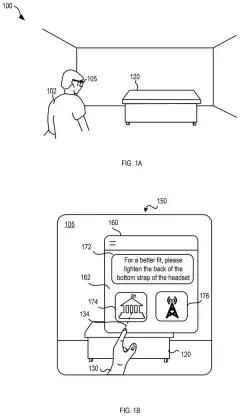
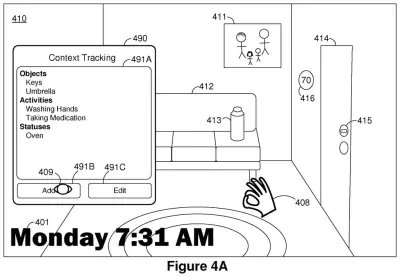
Apple's patent describes a headset that keeps track of moments like that for you. Its camera watches your surroundings. When it spots something from a short list you've chosen, such as your water bottle, a front-door lock, or you brushing your teeth, it writes down what it saw and when. Later you can just ask. "Where is my water bottle?" gets you "Your water bottle is in the office," plus a photo and a timestamp so you can double-check.
You teach it what to watch for by holding an object up to the camera, or by picking from a built-in list. It can also handle counting questions, like how many times you washed your hands today.
detecting a context in the physical environment at a particular time; storing, in a database, an entry including data indicating detection of the context in association with data indicating the particular time; …
Translation: The headset logs what is happening around it and notes the exact time it happened.
How the headset logs and finds past moments
The core claim is simple. A device with a camera detects a context (the filing's word for an object, an activity, or the state of an object, such as a lock being locked) and stores an entry in a database that pairs it with the time. When you ask a question that mentions that context, the device finds the entry, works out the time, and answers.
The filing describes several ways to spot a context:
- Photos run through a neural network (software trained to recognize things in images).
- Sound, such as running water, and the motion of the device, such as the back-and-forth of brushing teeth.
- Text recognition on a display, such as a thermostat reading "72".
Only contexts on a predefined list get logged. You add to that list by picking a built-in option or by showing the device an object, for example a lock in both its locked and unlocked positions so it learns the difference. An entry can also store where the device was and a piece of the image.
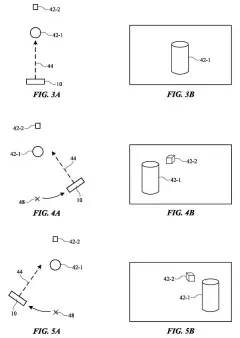
To save battery, the device doesn't have to scan every frame. It can check about once a second or once a minute, and it only runs detection when the scene differs enough from a baseline image (an "interest threshold"). Spotting your hands counts as a stronger signal. The database can live on the device or on a remote server.
… capturing, using the image sensor, an image of an environment at a particular time. The method includes detecting a context based at least in part on the image of the environment.
Translation: The device takes pictures of your surroundings to figure out what you are doing.
Why this matters for your keys and your privacy
The practical payoff is a memory assist. Instead of retracing your steps, you ask your headset where the keys are, whether the front door is locked, or when you last took your medicine. The filing also describes a health app that could check the log on its own and nudge you if you missed a daily dose or your rescue inhaler use is climbing.
The tradeoff is a camera that logs your day. The filing includes language about getting consent, limiting what is collected, and deleting data once it is no longer needed. It also depends on you wearing the hardware for long stretches. The filing describes headsets, phones and tablets, but names no specific product.
This is the 134th Apple filing we've tracked in our AR glasses watchlist since May, building on a sound-follows-camera idea and a fix for jumping virtual hands.
Source: US 2026/0369062 A1 at the USPTO (PDF). Full patent text and figures are in the official publication.
Get our take in your Top Stories
Liked this breakdown? Add Patentlyze as a preferred source on Google, and our plain-English take shows up more often in your Top Stories the next time Apple patent news breaks.
Add Patentlyze on Google
One click.
There are more where this came from
We read every patent application Big Tech publishes and send you the ones worth knowing. Plain English, free, every week.
The drawings · 31 sheets
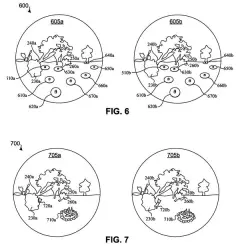
31 drawing sheets from US 2026/0369062 A1 · click any drawing to enlarge


Show the other 23 sheets


More from Apple
All 748 Apple patents →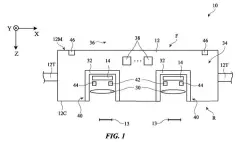
More in AR / VR
All 713 AR / VR patents →
Google
Google Files Patent for Smart Glasses That Remember Where You Left Your Keys
Salesforce
Salesforce Patents an AI Button That Recaps a Customer's Case Across Email, Chat and Phone
Samsung
Samsung Files Patent for a Wearable That Remembers Where You Left Your Wallet
Samsung
No comments yet