
Apple
Apple · Software · Filed Feb 13, 2026 · USPTO published Nov 19, 2026 · This week's release
Apple Files Patent for a Search Bar That Sends Messages and Runs Tasks
A search bar that lets you pick apps, files or tasks before you type a thing, then fills in the blanks for you. That is the idea in this Apple filing.
- Publication number
- US 2026/0367780 A1(US20260367780A1)
- Applicant
- Apple Inc.
- Filed · Published
- Feb 13, 2026 · Nov 19, 2026
- Inventors
- Brendan B. ARONOFF, Christopher P. FOSS, Raymond S. SEPULVEDA, Justin S. TITI, Kenneth S. WHITE
- Status when we published
- Waiting for an examiner
- Document
- 20 claims
- US classification
- 715/825
- Parent application
- Claims priority from a provisional application 63808510 (filed May 19, 2025)
What Apple's three-in-one search bar does
Today, the search bar on your device is mostly a finder. Type a few words and it hunts for matches, but ask it to send a specific message to a specific person, or to compress the files you just selected, and it comes up short.
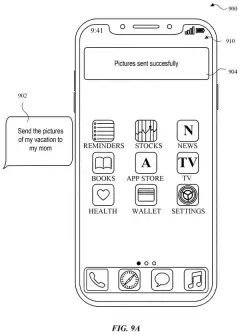
Apple's patent describes a search bar that offers three choices before you type anything: apps, files and tasks. Pick tasks and you get suggestions, each with a short label you can edit. If a task needs more details, like who should get the message, blanks appear right inside the search bar for you to fill in.
The typing can get shorter too. A label under four characters can trigger a task right away, and files you selected beforehand can travel into the search bar with you.
… displaying, via the one or more display generation components, a plurality of search options, wherein the plurality of search options includes an application search, a file search, and a task search; …
Translation: The search bar shows options for finding apps, files, and tasks before you type anything.
How a short label turns into a finished task
The filing covers a search bar that shows a menu of choices before you type anything. The menu includes application search, file search and task search. Tap one and you get a screen built for that job. Ignore the menu and start typing, and the device skips those screens.
Task search is where it goes beyond a normal finder. It lists task suggestions with short task labels, and you can edit a label. When you pick a task that needs more information, the search bar shows the task's text plus a parameter field (a blank to fill in, such as the recipient of a message). The blank can arrive pre-filled using a ranking of likely answers or data from your apps, and it can offer suggestions as you type.
File search lets you narrow results to a file type and shows suggestions and recently opened files. Application search shows suggested and recently used apps. You can also select files in a window first, then open the search bar and see them attached to it.
Two fallbacks round it out. If your text does not match anything, the bar can offer to pass it to a digital assistant. And typing a special character can shift what the search looks through, based on the words that follow it.
… in accordance with a determination that the input includes a selection of a search option from the plurality of search options, displaying an interface corresponding to the selected search option …
Translation: If you tap one of those options, the device opens that specific search interface.
Why your search bar may start doing more
For you, the practical change is fewer hops. Sending a specific message, or bundling a few files into one compressed file, could happen from the same box you already use to open apps, instead of opening each app and digging through menus. The filing's own background says current search tools mostly handle broad searches and fall short on these specific requests.
For Apple, it points at the search bar as a place to act, with the digital assistant as a backup when a typed request does not fit. The description ties the idea to iPhone, iPad, Apple Watch and desktop computers, so it is written to span many devices. As with any patent application, nothing here says when, or whether, it ships.
This is the 12th Apple filing we've tracked since July on AI agents acting for you, following voicemail adding calendar events and on-device AI calling other apps.
Source: US 2026/0367780 A1 at the USPTO (PDF). Full patent text and figures are in the official publication.
Get our take in your Top Stories
Liked this breakdown? Add Patentlyze as a preferred source on Google, and our plain-English take shows up more often in your Top Stories the next time Apple patent news breaks.
Add Patentlyze on Google
One click.
There are more where this came from
We read every patent application Big Tech publishes and send you the ones worth knowing. Plain English, free, every week.
The drawings · 28 sheets
28 drawing sheets from US 2026/0367780 A1 · click any drawing to enlarge


Show the other 20 sheets


More from Apple
All 748 Apple patents →
More in Software
All 814 Software patents →
Google
Google Patents a Way to Search All Your Streaming Apps at Once with a Voice Query
Google
Google Files Patent for One Button That Finishes a Chore Across Several Apps
Samsung
Samsung Patents Voice Control for Apps That Were Never Built for It
Samsung
No comments yet