
Apple · Filed Jan 27, 2026 · Published Oct 8, 2026

Apple Files Patent for a Swipe That Reveals More Controls the Farther You Go

Apple's patent turns one swipe into a dial: swipe a little and you get a few shortcuts, swipe farther and you get more.
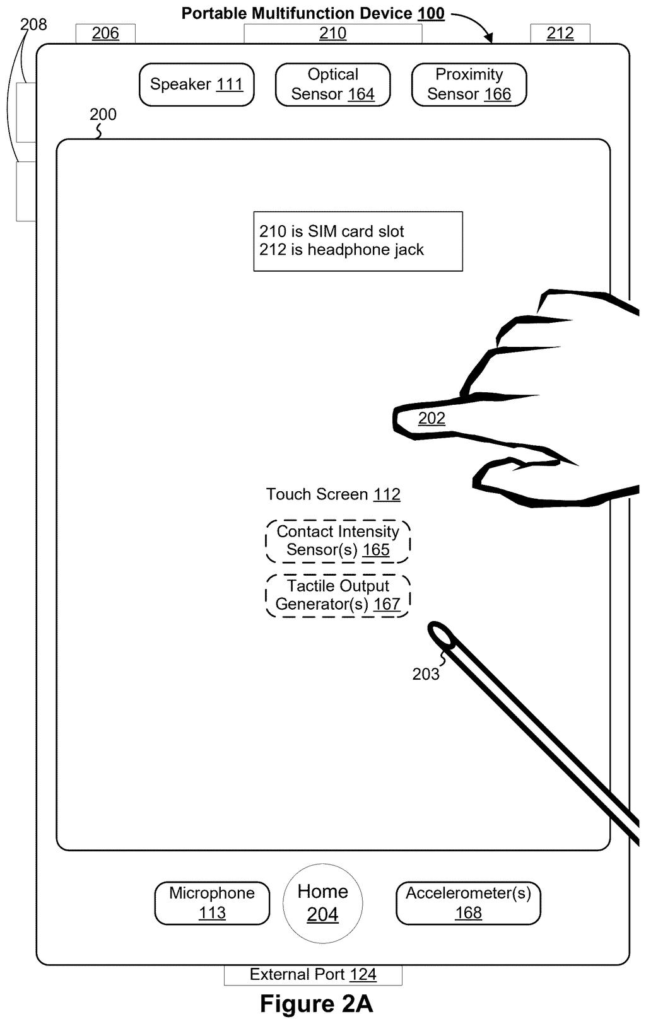
A touchscreen smartphone detecting contact from a user's finger or a stylus. Drawing from patent filing US 2026/0310305 A1.
A touchscreen smartphone detecting contact from a user's finger or a stylus.
See all 103 drawings from this filing ↓
Publication number US 2026/0310305 A1 US20260310305A1
Applicant Apple Inc.
Filing date Jan 27, 2026
Publication date Oct 8, 2026
Inventors Julian K. Missig, Rachel L. Ciavarella, Jeffrey Traer Bernstein, Linda L. Dong
US classification 715/810
Status when we published Waiting for an examiner (Jul 2, 2026)
Parent application is a Continuation of 18202862 (filed 2023-05-26)
Document 14 claims

What Apple's swipe-for-more-shortcuts idea does

Today, a phone with no physical home button has a small gap to fill. The button that used to take you home, and handle a few other chores, is gone. Apple's own filing says dropping it frees up screen space but takes away a convenient shortcut.

This patent describes a gesture to fill that gap. You swipe on the screen and let go. A short swipe shows a small set of controls, such as device settings or app shortcuts. A longer swipe shows a bigger set that includes everything from the short version, plus extras.

In other words, how far or how fast you swipe tells the phone how much you want to see. Tap a control and it does its job, or it opens another set of options tied to it.

From the filing · CLAIM 1
… displaying a first plurality of selectable objects after the termination of the first user input, wherein the first plurality of selectable objects includes at least a first control that corresponds to a first device function …

Translation: Showing a basic set of controls once you finish making your swipe gesture.

How swipe distance and speed pick the menu

The patent covers a method for a touchscreen device. While you are looking at any screen, such as an app, you make a swipe-style gesture and lift your finger. What appears after you let go depends on how far (or how fast) that movement went.

  • Shorter movement: if the movement passes a first threshold (a minimum distance or speed the device checks for), a first set of selectable objects appears. It includes at least one control tied to a device function.
  • Longer movement: if the movement passes a larger second threshold, a second set appears. It holds that first control plus a second control the short version left out.

The filing also describes variations. The gesture can start at a screen edge. A second swipe while the first set is showing can expand it into the bigger set, and a third threshold can bring up a different set altogether. Tapping a control runs its function, and tapping the second control can open yet another set of options. The sets can hold system settings, app launch icons, or both.

The description also gives an example. Inside an app, a medium swipe overlays a row of app icons (a dock), and a longer swipe sends you to the home screen. All of it is framed as a replacement for a physical home button.

From the filing · THE ABSTRACT
… in accordance with a determination that the movement meets a second input threshold that is greater than the first input threshold, the computer system displays a second plurality of selectable objects after the termination of the first user input.

Translation: Dragging your finger further reveals an expanded set of options instead of just the basic ones.

What this means for phones with no home button

If your phone has no front button, every shortcut has to live somewhere on the screen. This patent offers one answer: a single gesture that gives you the amount of menu you ask for. A quick flick stays light, and a longer pull shows more, so you would not need a separate gesture for each tool.

The filing names iPhone, iPod Touch and iPad as example devices, and says the controls can be set up to hold settings or app shortcuts. As with any patent application, nothing here says a product will ship, but it shows how Apple thinks about swapping a button for a gesture.

Apple's 535th filing in our Apple coverage since May joins recent applications like the camera-cutout text layout and the headset keyboard.

Editorial take

For you, the benefit is fewer trips to dig for a setting. A short swipe stays out of your way, and a longer one gives you more when you want it.

You would notice this the first time you reach for a tool mid-app and the phone hands you just the right amount of menu. The risk is the usual one with gestures: if the distance cutoffs feel off, you get the small menu when you wanted the big one, and you swipe again.

As an idea it is modest, a refinement of how swipes already work, and the claims stay narrow. Still, it fixes a real annoyance, and that earns it a nod.

Get our take in your Top Stories

Liked this breakdown? Add Patentlyze as a preferred source on Google, and our plain-English take shows up more often in your Top Stories the next time Apple patent news breaks.

There are more where this came from

We read every patent application Big Tech publishes and send you the ones worth knowing. Plain English, free, every week.

The drawings

103 drawing sheets from US 2026/0310305 A1 · click any drawing to enlarge

Smartphone internal parts and memory, drawing sheet 1 from US 2026/0310305 A1
Sheet 1 Smartphone internal parts and memory
Touch event recognition program, drawing sheet 2 from US 2026/0310305 A1
Sheet 2 Touch event recognition program
Vibration feedback system, drawing sheet 3 from US 2026/0310305 A1
Sheet 3 Vibration feedback system
Touchscreen phone detecting touch inputs, drawing sheet 4 from US 2026/0310305 A1
Sheet 4 Touchscreen phone detecting touch inputs
Exploded view of phone button, drawing sheet 5 from US 2026/0310305 A1
Sheet 5 Exploded view of phone button
Exploded view of button assembly, drawing sheet 6 from US 2026/0310305 A1
Sheet 6 Exploded view of button assembly
Computer memory and attached hardware, drawing sheet 7 from US 2026/0310305 A1
Sheet 7 Computer memory and attached hardware
Smartphone home screen with apps, drawing sheet 8 from US 2026/0310305 A1
Sheet 8 Smartphone home screen with apps
Show the other 52 sheets
Apple Files Patent for a Swipe That Reveals More Controls the Farther You Go patent drawing, sheet 9
Sheet 9
Apple Files Patent for a Swipe That Reveals More Controls the Farther You Go patent drawing, sheet 10
Sheet 10
Apple Files Patent for a Swipe That Reveals More Controls the Farther You Go patent drawing, sheet 11
Sheet 11
Apple Files Patent for a Swipe That Reveals More Controls the Farther You Go patent drawing, sheet 12
Sheet 12
Apple Files Patent for a Swipe That Reveals More Controls the Farther You Go patent drawing, sheet 13
Sheet 13
Apple Files Patent for a Swipe That Reveals More Controls the Farther You Go patent drawing, sheet 14
Sheet 14
Apple Files Patent for a Swipe That Reveals More Controls the Farther You Go patent drawing, sheet 15
Sheet 15
Apple Files Patent for a Swipe That Reveals More Controls the Farther You Go patent drawing, sheet 16
Sheet 16
Apple Files Patent for a Swipe That Reveals More Controls the Farther You Go patent drawing, sheet 17
Sheet 17
Apple Files Patent for a Swipe That Reveals More Controls the Farther You Go patent drawing, sheet 18
Sheet 18
Apple Files Patent for a Swipe That Reveals More Controls the Farther You Go patent drawing, sheet 19
Sheet 19
Apple Files Patent for a Swipe That Reveals More Controls the Farther You Go patent drawing, sheet 20
Sheet 20
Apple Files Patent for a Swipe That Reveals More Controls the Farther You Go patent drawing, sheet 21
Sheet 21
Apple Files Patent for a Swipe That Reveals More Controls the Farther You Go patent drawing, sheet 22
Sheet 22
Apple Files Patent for a Swipe That Reveals More Controls the Farther You Go patent drawing, sheet 23
Sheet 23
Apple Files Patent for a Swipe That Reveals More Controls the Farther You Go patent drawing, sheet 24
Sheet 24
Apple Files Patent for a Swipe That Reveals More Controls the Farther You Go patent drawing, sheet 25
Sheet 25
Apple Files Patent for a Swipe That Reveals More Controls the Farther You Go patent drawing, sheet 26
Sheet 26
Apple Files Patent for a Swipe That Reveals More Controls the Farther You Go patent drawing, sheet 27
Sheet 27
Apple Files Patent for a Swipe That Reveals More Controls the Farther You Go patent drawing, sheet 28
Sheet 28
Apple Files Patent for a Swipe That Reveals More Controls the Farther You Go patent drawing, sheet 29
Sheet 29
Apple Files Patent for a Swipe That Reveals More Controls the Farther You Go patent drawing, sheet 30
Sheet 30
Apple Files Patent for a Swipe That Reveals More Controls the Farther You Go patent drawing, sheet 31
Sheet 31
Apple Files Patent for a Swipe That Reveals More Controls the Farther You Go patent drawing, sheet 32
Sheet 32
Apple Files Patent for a Swipe That Reveals More Controls the Farther You Go patent drawing, sheet 33
Sheet 33
Apple Files Patent for a Swipe That Reveals More Controls the Farther You Go patent drawing, sheet 34
Sheet 34
Apple Files Patent for a Swipe That Reveals More Controls the Farther You Go patent drawing, sheet 35
Sheet 35
Apple Files Patent for a Swipe That Reveals More Controls the Farther You Go patent drawing, sheet 36
Sheet 36
Apple Files Patent for a Swipe That Reveals More Controls the Farther You Go patent drawing, sheet 37
Sheet 37
Apple Files Patent for a Swipe That Reveals More Controls the Farther You Go patent drawing, sheet 38
Sheet 38
Apple Files Patent for a Swipe That Reveals More Controls the Farther You Go patent drawing, sheet 39
Sheet 39
Apple Files Patent for a Swipe That Reveals More Controls the Farther You Go patent drawing, sheet 40
Sheet 40
Apple Files Patent for a Swipe That Reveals More Controls the Farther You Go patent drawing, sheet 41
Sheet 41
Apple Files Patent for a Swipe That Reveals More Controls the Farther You Go patent drawing, sheet 42
Sheet 42
Apple Files Patent for a Swipe That Reveals More Controls the Farther You Go patent drawing, sheet 43
Sheet 43
Apple Files Patent for a Swipe That Reveals More Controls the Farther You Go patent drawing, sheet 44
Sheet 44
Apple Files Patent for a Swipe That Reveals More Controls the Farther You Go patent drawing, sheet 45
Sheet 45
Apple Files Patent for a Swipe That Reveals More Controls the Farther You Go patent drawing, sheet 46
Sheet 46
Apple Files Patent for a Swipe That Reveals More Controls the Farther You Go patent drawing, sheet 47
Sheet 47
Apple Files Patent for a Swipe That Reveals More Controls the Farther You Go patent drawing, sheet 48
Sheet 48
Apple Files Patent for a Swipe That Reveals More Controls the Farther You Go patent drawing, sheet 49
Sheet 49
Apple Files Patent for a Swipe That Reveals More Controls the Farther You Go patent drawing, sheet 50
Sheet 50
Apple Files Patent for a Swipe That Reveals More Controls the Farther You Go patent drawing, sheet 51
Sheet 51
Apple Files Patent for a Swipe That Reveals More Controls the Farther You Go patent drawing, sheet 52
Sheet 52
Apple Files Patent for a Swipe That Reveals More Controls the Farther You Go patent drawing, sheet 53
Sheet 53
Apple Files Patent for a Swipe That Reveals More Controls the Farther You Go patent drawing, sheet 54
Sheet 54
Apple Files Patent for a Swipe That Reveals More Controls the Farther You Go patent drawing, sheet 55
Sheet 55
Apple Files Patent for a Swipe That Reveals More Controls the Farther You Go patent drawing, sheet 56
Sheet 56
Apple Files Patent for a Swipe That Reveals More Controls the Farther You Go patent drawing, sheet 57
Sheet 57
Apple Files Patent for a Swipe That Reveals More Controls the Farther You Go patent drawing, sheet 58
Sheet 58
Apple Files Patent for a Swipe That Reveals More Controls the Farther You Go patent drawing, sheet 59
Sheet 59
Apple Files Patent for a Swipe That Reveals More Controls the Farther You Go patent drawing, sheet 60
Sheet 60

Sheets 61 to 103 are in the full USPTO filing.

Browse all the drawings 103 drawing sheets
Patent filing page

Source. Full patent text and figures from the official USPTO publication PDF.
Reader comments

Be the first to weigh in

Start the discussion

Real name or a handle, either is fine. Comments are read by a person before they appear, so allow a little time. Keep it about the filing.