
Apple Patents Video Call Effects That Slip Behind You or Float in Front
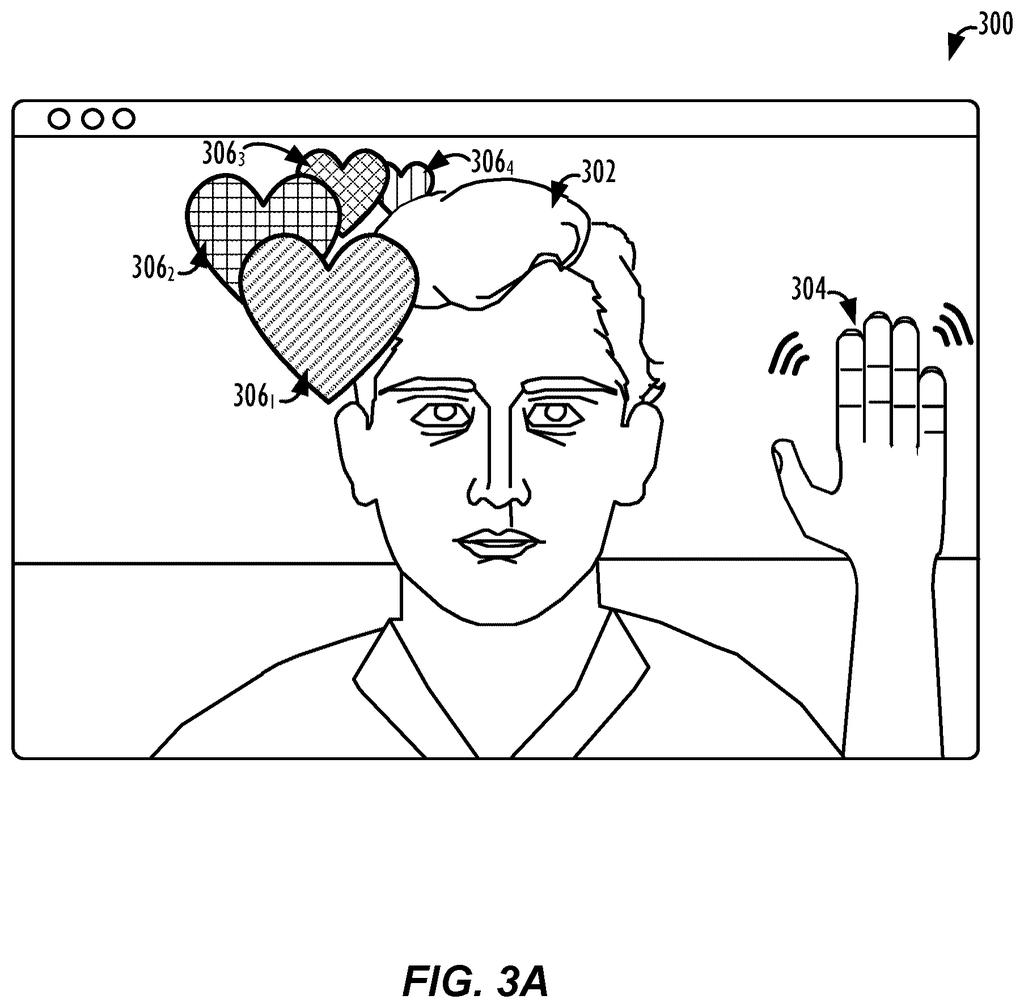
Wave at your camera and Apple's filing has emoji hearts float out around your head, some drifting in front of your face and some behind it. Because the hearts are baked into the video itself, the person on the other end needs nothing special to see them.
What Apple's layered video call effects do
Ever wished you could stand in front of your slides on a video call, like a TV weather forecaster, instead of flipping between your face and a shared screen? Apple's filing describes how a device could do exactly that.
Your device first separates you from everything behind you. It then guesses how far away you are and gives each extra piece, such as a shared window or an emoji, its own distance. Something can sit behind your shoulder, in front of your face, or at your depth. Wave at the camera and hearts can float around your head, some passing in front of you and some behind.
Then it flattens everything into one ordinary video before sending it. The person on the other end doesn't need any special software, because the effects are already baked into the picture.
performing a segmentation operation on the first image to identify at least a foreground portion and a background portion of the first image; assigning a first depth value within the scene for the foreground portion of the first image; assigning a second depth value within the scene for the background portion of the first image; …
Translation: The system separates you from your background and figures out how far away everything is.
How Apple slots effects in front of or behind you
The core method runs on each frame of a live video. First, segmentation (software that labels which pixels are the person and which are the background) splits the frame into a foreground layer and a background layer. The filing says AI models can do this fast enough to run in real time.
Next, each layer gets a depth value, a number for how far from the camera it sits. The person's depth can come from stereo cameras, time-of-flight sensors (which time a bounced pulse of light), or AI that estimates depth from a single camera. The visual effect gets its own third depth value, which can be in front of, behind, between, or equal to the person's depth.
The layers are then composited (stacked into one flat picture) and sent to another device. Examples in the filing:
- Shared window: a slide can sit behind the presenter, or the presenter can shrink to a tight crop around their face beside it.
- Reaction effects: a gesture such as a wave triggers emoji hearts placed relative to the person's head.
- Virtual lighting: using surface normals (a map of which way each patch of skin faces), a light of a chosen color and angle is added to the face and nearby wall.
The filing also keeps shared content sharp by capturing it before it's shrunk on your screen, and it adjusts shared-window audio timing with a moving average so it stays lined up with your voice.
… augmenting live video image streams with visual effects that are composited directly into the video image stream. For example, a first electronic device may obtain a video image stream. Then, for each of one or more images in the video stream, the electronic device may: perform a segmentation operation on the image to identify foreground and background portions of the image; …
Translation: Special effects are mixed right into the moving video frames by telling apart the person and the room behind them.
Why Apple's version works on any video call
If you give presentations over video, this is aimed at your biggest annoyance: choosing between showing your face and showing your slides. The patent lets you do both in one frame, and it adds virtual lighting for people who can't set up studio lights at home. It also keeps shared text crisp for viewers even when your own window is tiny.
The practical hook is compatibility. Since the effects are merged into a standard video stream before sending, the other side doesn't need special software or a matching app. The filing also describes using a better camera on a nearby device for the call, and Apple's own chips for the AI work.
Apple's 633rd filing we've logged since May in our Apple coverage joins work like fixing flaws in 360 video and flat maps going 3D.
Almost nothing here needs new hardware. The filing describes a phone, tablet or laptop using the camera and chip it already has, plus software that cuts you out of the frame and stacks graphics around you. The effects are baked into an ordinary video, so the other side of the call needs no update at all.
The shortest route to a product is a feature inside a video call app or the operating system. The filing limits lighting to your head and nearby walls partly to save processing power and heat, which shows where the hard engineering sits: doing the cutout live without draining the battery.
That puts this close to shippable as a software update. The remaining work is polish, such as clean edges around a moving person and effects that look natural at every depth.
Get our take in your Top Stories
Liked this breakdown? Add Patentlyze as a preferred source on Google, and our plain-English take shows up more often in your Top Stories the next time Apple patent news breaks.
There are more where this came from
We read every patent application Big Tech publishes and send you the ones worth knowing. Plain English, free, every week.
The drawings
10 drawing sheets from US 2026/0350930 A1 · click any drawing to enlarge


Show the other 2 sheets


Want this weekly breakdown for a company we don't cover? Patentlyze Pro →
Be the first to weigh in