
Google
Google · Software · Filed May 12, 2025 · USPTO published Nov 12, 2026 · This week's release
Google Files Patent for Video Call Alerts That Show a Translation Is Still Playing
On a multilingual video call, a speaker can finish a sentence while half the room is still hearing it in another language. Google's patent application adds on-screen cues so you can tell when it is safe to jump in.
- Publication number
- US 2026/0361834 A1(US20260361834A1)
- Applicant
- Google LLC
- Filed · Published
- May 12, 2025 · Nov 12, 2026
- Inventors
- Maria Josefin Karlsson, Huib Victor Kleinhout, Ryan Thomas Fedyk, Henrik Porseland, Carolien Postma
- Status when we published
- Waiting for an examiner
- Document
- 20 claims
- US classification
- 348/14.08
- Examiner
- TRAN, QUOC DUC (Art Unit 2691)
What Google's translation alerts show on a call
Every time a speaker stops talking on a video call, someone jumps in a beat too early. Add live AI translation and it gets worse. You may have heard the original English, while a colleague is still listening to the Spanish version, which takes a different amount of time.
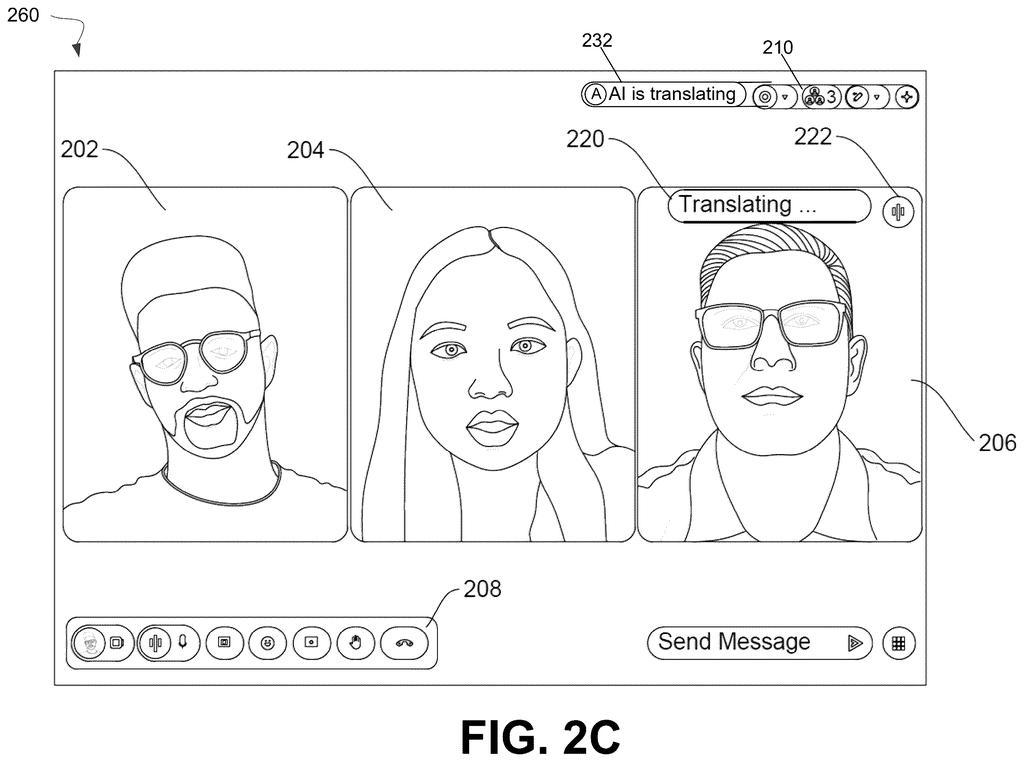
Google's filing tackles that with small on-screen cues. While a translation is playing for anyone in the meeting, a label such as Translating for others appears on the speaker's video tile. If you are the one being translated, you see a private note reading You are being translated. When the last translation finishes, the label disappears.
The point is simple: you can see at a glance when to hold your thought, and speakers can see why the room has gone quiet. A filling bar or a growing border can even show how much translation time is left.
… upon receiving the first notification, providing, for display in the virtual meeting UI on the first user device, a UI feature notifying the first user that the translation of the portion of the audio of the media stream for the second user is ongoing …
Translation: When a translation starts playing, a visual indicator appears on the screen to let participants know it is still active.
How the meeting app tracks each translation
The core claim covers a simple loop inside a video meeting app. The platform sends each participant's screen a notification when playback of a translation begins for another person. Once that notice arrives, the screen shows an indicator that a translation is ongoing. When a second notification says playback has ended, the indicator is removed. The claim also stresses that the translated audio can run a different length than the original speech, which is exactly what creates the gap.
The description lays out several kinds of indicators:
- Speaker tile label: text such as Translating from English or Translating for others, drawn over the speaker's video tile.
- Speaker-only note: a message like You are being translated, shown only to the person talking.
- Meeting-wide banner: a ticker-style message such as AI is translating in this call.
- Translate badge: grayed out when translation is off, colored when it is on, with a hover that reveals the language pair, for example English and Spanish.
To know when to remove a label, the platform can send the length of each translated clip along with the start notice, and the device runs a timer (a countdown that matches that length). The indicator can change color, fill up or grow a border to show time remaining, and it stays up until the last translation finishes. The filing also mentions beeps or vibrations as non-visual alternatives, and it describes consent controls so people can opt in or out of having their speech translated.
The duration of the translation is different from a duration of an untranslated audio portion.
Translation: Because translated speech often takes longer to say, its length will not match the original audio.
Why talking over a translation is a real problem
If you have ever joined a call with colleagues in another country, you know the awkward pause after someone stops talking. With live AI translation, that pause has a cause, but nobody can see it. These indicators tell you a translation is still playing, so you can wait, and they tell the speaker the silence is not a sign that nobody has anything to say.
For Google, the filing is about making live translation feel normal inside a meeting product. The description also frames the labels as a way to be open about AI involvement, since everyone on the call can see that a machine is speaking for someone. If translated meetings become routine, small cues like these decide whether the feature feels polite or chaotic.
Google's 1042nd filing we've tracked since May in our Google coverage follows applications like the thermal camera slowdown and the magnet-based foldable hinge.
Source: US 2026/0361834 A1 at the USPTO (PDF). Full patent text and figures are in the official publication.
Get our take in your Top Stories
Liked this breakdown? Add Patentlyze as a preferred source on Google, and our plain-English take shows up more often in your Top Stories the next time Google patent news breaks.
Add Patentlyze on Google
One click.
There are more where this came from
We read every patent application Big Tech publishes and send you the ones worth knowing. Plain English, free, every week.
The drawings · 8 sheets
8 drawing sheets from US 2026/0361834 A1 · click any drawing to enlarge


More from Google
All 1,079 Google patents →
More in Software
All 753 Software patents →
Sony
Sony Files Patent for Catching Players With Second Accounts by Their Button Habits
Sony
Sony Files Patent for a Digital Ball That Changes as the Game Unfolds
Sony
Sony Patents a Game Helper That Listens for Panic in Your Voice
Samsung
No comments yet