
Lutron
Lutron · Gear · Filed Mar 9, 2026 · USPTO published Nov 19, 2026 · This week's release
Lutron Files Patent for a Wall Keypad With Separate Setup Buttons
Anyone who has tried to set up a room full of lights, shades and sensors knows how confusing one button doing two jobs can be. This Lutron patent application gives setup its own buttons, tucked beside the ones you use every day.
- Publication number
- US 2026/0371456 A1(US20260371456A1)
- Applicant
- Lutron Technology Company LLC
- Filed · Published
- Mar 9, 2026 · Nov 19, 2026
- Inventors
- James P. Steiner
- Status when we published
- Waiting for an examiner
- Document
- 20 claims
- US classification
- 315/237
- Parent application
- Continuation of 17/588,849 (filed Jan 31, 2022)(17588849)
What Lutron's separate programming buttons do
You're standing on a stepladder in a new office, faceplate off the wall, trying to tell six ceiling lights to ignore the motion sensor in the hallway. One button on the keypad turns lights on and off, and somehow the same button is also supposed to run setup. It gets confusing fast.
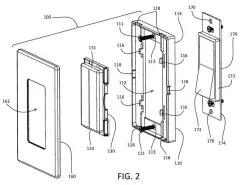
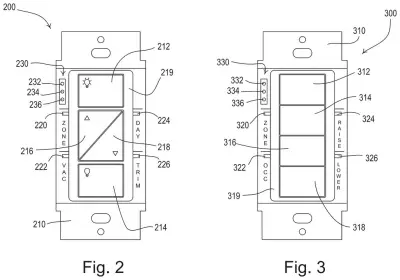
Lutron's patent application splits the two jobs. The keypad keeps its everyday buttons (on, off, brighter, dimmer, or scene presets) inside a frame called a bezel. Next to that frame sit separate programming buttons that only matter during setup. Press one repeatedly and small lights on the keypad show which fixture or shade you've picked, and the picked fixture flashes so you can see it.
Once you finish, the keypad sends the new settings to the chosen devices. For example, you can tell some lights to turn on only when someone is in the room, and others to stay off until you flip them on yourself.
a control button disposed within a bezel, wherein in response to an actuation of the control button, the control device controls the load control device; and a programming button disposed outside and adjacent to the bezel …
Translation: The everyday keypad sits inside a frame while the setup button is placed right outside it.
How the keypad picks which lights to program
The patent application describes a wall keypad that sits in a lighting and shade control system. Besides the keypad, the system has sensors (such as an occupancy sensor that detects people, or a daylight sensor) and load control devices. A load control device is the box that actually delivers power to a light, a motorized shade or a heating and cooling unit.
The key claim is the layout. Control buttons sit inside the bezel (the frame that pokes through the faceplate), and a programming button sits outside and next to it. Pressing a control button runs the room, for example by recalling a preset. Pressing the programming button changes a device's configuration, meaning how it reacts to a sensor. One claim says pressing a control button does not change that configuration.
The description walks through the steps:
- Hold a programming button (the example is three seconds) to enter a programming mode, and the keypad's small LEDs flash.
- Press the same button repeatedly to cycle through devices or groups of devices, with the LEDs showing the current pick.
- The selected fixture flashes its light, or a shade moves, so you can confirm it.
- Hold the button again to exit, and the keypad sends the settings over a wired or wireless link.
One example is switching a device between occupancy mode (lights turn on when someone enters) and vacancy mode (lights only turn off when the room empties). The keypad can also send a sensor's serial number so a device knows which sensor to obey.
The control device may be configured to select one or more load control devices in response to successive actuations of a programming button of the programming interface.
Translation: Pressing the setup button multiple times lets you cycle through different connected light fixtures.
Why this matters to installers and building owners
Lutron makes lighting and shade controls for homes and commercial buildings, and the filing itself says confusing setup adds time and cost to installation. If a keypad has dedicated setup buttons and indicator lights, an electrician could set up zones, sensors and scenes faster and with less guesswork.
For you, the benefit shows up mostly after installation. The keypad on your wall can stay simple for everyday use, while the setup controls hide behind the faceplate. Nothing here says it is headed for a specific product, and the application is a continuation of filings dating back to 2015.
Source: US 2026/0371456 A1 at the USPTO (PDF). Full patent text and figures are in the official publication.
Get our take in your Top Stories
Liked this breakdown? Add Patentlyze as a preferred source on Google, and our plain-English take shows up more often in your Top Stories the next time Lutron patent news breaks.
Add Patentlyze on Google
One click.
There are more where this came from
We read the new patents from Big Tech, carmakers and more and send you the ones worth knowing. Plain English, free, every week.
The drawings · 7 sheets
7 drawing sheets from US 2026/0371456 A1 · click any drawing to enlarge


More from Lutron
All 3 Lutron patents →
More in Gear
All 26 Gear patents →
SharkNinja
SharkNinja Patents a Single Valve That Pours Your Seltzer and Releases Leftover Gas
Roborock
Roborock Files Patent for a Brush Cover That Won't Latch Shut Without the Brush
Roborock
Roborock Patents a Robot Vacuum That Notices When You Pick It Up or Push It
Roborock
No comments yet