
Meta · Filed Jul 2, 2026 · Published Oct 22, 2026

Meta Files Patent for a Wristband That Steers an On-Screen Cursor by Rolling Your Wrist

Meta's patent application teaches a wrist-worn device to tell a wrist roll from a forearm slide, then uses both to move a cursor on glasses, monitors or TVs. Two separate AI models do the sorting.
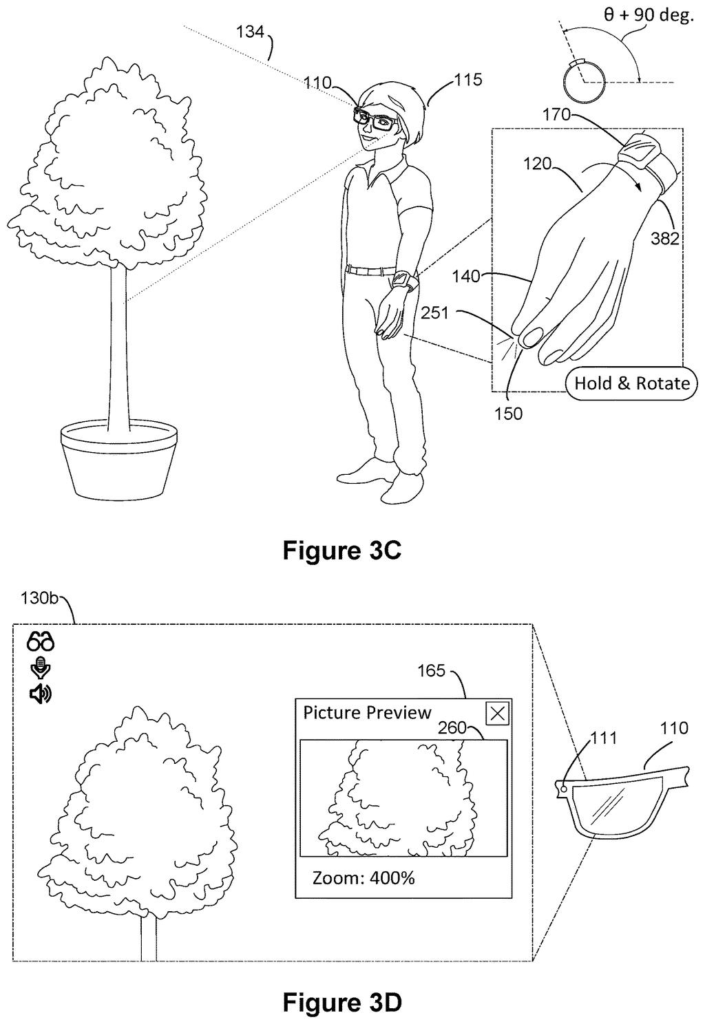
A wristband tracks wrist rotation to control the camera zoom on smart glasses while the wearer pinches their fingers. Drawing from patent filing US 2026/0329390 A1.
A wristband tracks wrist rotation to control the camera zoom on smart glasses while the wearer pinches their fingers.
See all 60 drawings from this filing ↓
Publication number US 2026/0329390 A1 US20260329390A1
Applicant Meta Platforms Technologies, LLC
Filing date Jul 2, 2026
Publication date Oct 22, 2026
Inventors Diogo Manuel Rocha Peixoto, Rahul Arora, Mario Bräcklein, Rishi Rajalingham, Julian Andres Ramos Rojas
US classification 345/158
Status when we published Waiting for an examiner (Aug 4, 2026)
Parent application is a Continuation in-part of 18976173 (filed 2024-12-10)
Document 20 claims

What Meta's wrist-roll cursor control does

Controlling a pair of smart glasses today often means big arm movements, voice commands that everyone nearby can hear, or a chain of taps through menus. Meta's filing describes a wrist-worn device built to skip all of that.

The band picks up two things: faint electrical signals from your forearm muscles and the motion of your arm. From those it works out whether you rolled your wrist (a bit like turning a doorknob) or slid your whole forearm up, down, left or right. Both movements steer an on-screen pointer, so a small turn plus a small slide can land the cursor where you want it.

The screen can be smart glasses, a computer monitor or a TV. A separate hand gesture, such as a pinch, can then select whatever the cursor is sitting on.

From the filing · CLAIM 1
… determine, by a first machine learning model based on the biopotential data and the motion data, a wrist rotation performed by the user; determine, by a second machine learning model based on the biopotential data and the motion data, a forearm translation performed by the user …

Translation: AI algorithms analyze electrical signals and movement to figure out how you are turning and shifting your arm.

How two AI models split roll from arm slide

The system pairs a wrist-worn device with a display. The device carries biopotential sensors (electrodes that pick up the tiny electrical signals your muscles make, often called EMG) and IMU sensors (the same kind of motion and tilt sensors found in a phone).

Both data streams feed two separate machine learning models (software trained on examples to recognize patterns):

  • The first model decides whether you performed a wrist rotation, such as a bend or roll of the wrist.
  • The second decides whether you performed a forearm translation, meaning your whole forearm moved up, down, left or right.

The pointer (the claim calls it a selection indicator) moves in the direction of each movement, and the filing describes giving each one its own scaling factor. If only one movement is detected, the pointer still follows that one. In a "stacked mode" you switch into by command, the wrist moves the pointer while a forearm slide triggers discrete navigation steps instead.

The filing also covers a hand gesture that selects the item under the pointer, screens like head-wearable devices, monitors and TVs, and models calibrated with a person's own training data. The description shows wrist rolls adjusting volume, camera zoom and message scrolling, sometimes only while you hold a pinch.

From the filing · THE ABSTRACT
… cause the cursor to move from a first location to a second location within the user interface based on the wrist rotation and the forearm translation.

Translation: Your arm movements drive the on-screen pointer across the display.

What this means for Meta's glasses controls

If you ever wear smart glasses, you need a way to point at things without a touchscreen or a mouse. A band that reads a roll or a slide lets you navigate with small, low-key movements instead of waving an arm or talking to your glasses in public. The filing itself says voice commands can be unsuitable in some social settings.

For Meta, this fits with how much Meta cares about wrist-based controls: the application continues a chain of earlier filings that began with camera control through hand gestures. It names no product, so treat it as one idea on paper.

Meta's 80th filing we've tracked in our smart glasses watchlist since May builds on earlier applications like microphone shutoff zones and processors behind the display.

Editorial take

Claim 1 is wide in one direction and tight in another. The wide part is the screen: any display that shows a user interface and a selection indicator counts, and claim 12 lists glasses, a computer monitor and a TV. The claim names no brand or screen type.

The tight part is the recipe. It asks for two kinds of sensors on the wrist (muscle-signal sensors and motion sensors) and two separate machine learning models, one to spot a wrist rotation and one to spot a forearm slide, both reading the same data. A setup built on a single model, or on motion sensors alone, would fall outside the wording of that claim.

The later claims fill in the practical picture: scaling each movement differently, a mode where the arm slide steps through menus, and training for each wearer. Together they describe a sensible answer to a real annoyance, which is how to point at things when you have no mouse.

Get our take in your Top Stories

Liked this breakdown? Add Patentlyze as a preferred source on Google, and our plain-English take shows up more often in your Top Stories the next time Meta patent news breaks.

There are more where this came from

We read every patent application Big Tech publishes and send you the ones worth knowing. Plain English, free, every week.

The drawings

60 drawing sheets from US 2026/0329390 A1 · click any drawing to enlarge

Framing a shot through smart glasses before taking a photo, drawing sheet 1 from US 2026/0329390 A1
Sheet 1 Framing a shot through smart glasses before taking a photo
Tapping fingers together while wearing a wristband snaps photos, drawing sheet 2 from US 2026/0329390 A1
Sheet 2 Tapping fingers together while wearing a wristband snaps photos
Wiggling an ear muscle triggers smart glasses to take photos, drawing sheet 3 from US 2026/0329390 A1
Sheet 3 Wiggling an ear muscle triggers smart glasses to take photos
Pinching and holding fingers to open a live camera preview, drawing sheet 4 from US 2026/0329390 A1
Sheet 4 Pinching and holding fingers to open a live camera preview
Tilting your head downward adjusts the smart glasses camera angle, drawing sheet 5 from US 2026/0329390 A1
Sheet 5 Tilting your head downward adjusts the smart glasses camera angle
Releasing the pinched fingers saves the photo to your screen, drawing sheet 6 from US 2026/0329390 A1
Sheet 6 Releasing the pinched fingers saves the photo to your screen
Pinching your fingers to get ready to zoom the camera, drawing sheet 7 from US 2026/0329390 A1
Sheet 7 Pinching your fingers to get ready to zoom the camera
Rotating your wrist zooms in on the camera preview screen, drawing sheet 8 from US 2026/0329390 A1
Sheet 8 Rotating your wrist zooms in on the camera preview screen
Show the other 52 sheets
Rotating while pinching zooms in on the camera preview, drawing sheet 9 from US 2026/0329390 A1
Sheet 9 Rotating while pinching zooms in on the camera preview
Letting go snaps a photo and opens sharing tools, drawing sheet 10 from US 2026/0329390 A1
Sheet 10 Letting go snaps a photo and opens sharing tools
Swiping a wrist sideways moves across the sharing options, drawing sheet 11 from US 2026/0329390 A1
Sheet 11 Swiping a wrist sideways moves across the sharing options
Pinching over contacts opens your messaging list, drawing sheet 12 from US 2026/0329390 A1
Sheet 12 Pinching over contacts opens your messaging list
Rotating the wrist scrolls down through contacts, drawing sheet 13 from US 2026/0329390 A1
Sheet 13 Rotating the wrist scrolls down through contacts
Twisting the wrist back returns to the first contact, drawing sheet 14 from US 2026/0329390 A1
Sheet 14 Twisting the wrist back returns to the first contact
Letting go prompts you to confirm sending the photo, drawing sheet 15 from US 2026/0329390 A1
Sheet 15 Letting go prompts you to confirm sending the photo
Smart glasses display confirmation once the photo is sent, drawing sheet 16 from US 2026/0329390 A1
Sheet 16 Smart glasses display confirmation once the photo is sent
Pinching your fingers selects smart glasses camera modes, drawing sheet 17 from US 2026/0329390 A1
Sheet 17 Pinching your fingers selects smart glasses camera modes
Releasing a pinch switches between photo and video modes, drawing sheet 18 from US 2026/0329390 A1
Sheet 18 Releasing a pinch switches between photo and video modes
Starting a wrist rotation while pinching prepares to zoom video, drawing sheet 19 from US 2026/0329390 A1
Sheet 19 Starting a wrist rotation while pinching prepares to zoom video
Rotating the wrist ninety degrees zooms the live video preview, drawing sheet 20 from US 2026/0329390 A1
Sheet 20 Rotating the wrist ninety degrees zooms the live video preview
Completing a quick pinch stops the active video recording, drawing sheet 21 from US 2026/0329390 A1
Sheet 21 Completing a quick pinch stops the active video recording
Releasing your fingers reveals photo editing and sharing tools, drawing sheet 22 from US 2026/0329390 A1
Sheet 22 Releasing your fingers reveals photo editing and sharing tools
Pointing toward a tabletop to prepare a finger tap gesture, drawing sheet 23 from US 2026/0329390 A1
Sheet 23 Pointing toward a tabletop to prepare a finger tap gesture
Tapping a table surface opens the photo preview, drawing sheet 24 from US 2026/0329390 A1
Sheet 24 Tapping a table surface opens the photo preview
Pressing down on a table brings up a camera preview, drawing sheet 25 from US 2026/0329390 A1
Sheet 25 Pressing down on a table brings up a camera preview
Tilting your head shifts the camera angle during a preview, drawing sheet 26 from US 2026/0329390 A1
Sheet 26 Tilting your head shifts the camera angle during a preview
Lifting a finger takes the photo and opens share options, drawing sheet 27 from US 2026/0329390 A1
Sheet 27 Lifting a finger takes the photo and opens share options
Opening your palm in VR prepares a virtual camera snapshot, drawing sheet 28 from US 2026/0329390 A1
Sheet 28 Opening your palm in VR prepares a virtual camera snapshot
Pinching your fingers saves an in-game screenshot, drawing sheet 29 from US 2026/0329390 A1
Sheet 29 Pinching your fingers saves an in-game screenshot
Relaxing your hand closes the screenshot menu, drawing sheet 30 from US 2026/0329390 A1
Sheet 30 Relaxing your hand closes the screenshot menu
How the system spots intentional camera gestures, drawing sheet 31 from US 2026/0329390 A1
Sheet 31 How the system spots intentional camera gestures
Updating the live viewfinder while a user holds a gesture, drawing sheet 32 from US 2026/0329390 A1
Sheet 32 Updating the live viewfinder while a user holds a gesture
How holding and releasing hand gestures triggers camera capture, drawing sheet 33 from US 2026/0329390 A1
Sheet 33 How holding and releasing hand gestures triggers camera capture
Zooming and snapping photos using mid-air hand controls, drawing sheet 34 from US 2026/0329390 A1
Sheet 34 Zooming and snapping photos using mid-air hand controls
Smart glasses training you to move ear muscles by scrunching, drawing sheet 35 from US 2026/0329390 A1
Sheet 35 Smart glasses training you to move ear muscles by scrunching
Guiding you to activate ear sensors by raising your eyebrows, drawing sheet 36 from US 2026/0329390 A1
Sheet 36 Guiding you to activate ear sensors by raising your eyebrows
Teaching you to twitch only your ears to trigger actions, drawing sheet 37 from US 2026/0329390 A1
Sheet 37 Teaching you to twitch only your ears to trigger actions
Saving a detected ear wiggle as a custom shortcut, drawing sheet 38 from US 2026/0329390 A1
Sheet 38 Saving a detected ear wiggle as a custom shortcut
Steps for calibrating ear muscle movements into wearable controls, drawing sheet 39 from US 2026/0329390 A1
Sheet 39 Steps for calibrating ear muscle movements into wearable controls
Passing photo commands between a smartwatch, phone, and glasses, drawing sheet 40 from US 2026/0329390 A1
Sheet 40 Passing photo commands between a smartwatch, phone, and glasses
Twisting your wrist zooms an image in smart glasses, drawing sheet 41 from US 2026/0329390 A1
Sheet 41 Twisting your wrist zooms an image in smart glasses
Adjusting volume on smart glasses with wrist rotation, drawing sheet 42 from US 2026/0329390 A1
Sheet 42 Adjusting volume on smart glasses with wrist rotation
Scrolling through chat pages using wrist rolls, drawing sheet 43 from US 2026/0329390 A1
Sheet 43 Scrolling through chat pages using wrist rolls
Fast forwarding and rewinding video with wrist turns, drawing sheet 44 from US 2026/0329390 A1
Sheet 44 Fast forwarding and rewinding video with wrist turns
Warning you when an awkward arm reach risks strain, drawing sheet 45 from US 2026/0329390 A1
Sheet 45 Warning you when an awkward arm reach risks strain
How the system separates wrist rolls from arm repositioning, drawing sheet 46 from US 2026/0329390 A1
Sheet 46 How the system separates wrist rolls from arm repositioning
Pointing and rolling your wrist moves an on-screen cursor, drawing sheet 47 from US 2026/0329390 A1
Sheet 47 Pointing and rolling your wrist moves an on-screen cursor
Rotating your arm rolls the pointer across apps, drawing sheet 48 from US 2026/0329390 A1
Sheet 48 Rotating your arm rolls the pointer across apps
Dropping your hand points the cursor at lower apps, drawing sheet 49 from US 2026/0329390 A1
Sheet 49 Dropping your hand points the cursor at lower apps
Twisting your wrist moves the cursor down a page, drawing sheet 50 from US 2026/0329390 A1
Sheet 50 Twisting your wrist moves the cursor down a page
Arm motions scroll pages and jump back to the top, drawing sheet 51 from US 2026/0329390 A1
Sheet 51 Arm motions scroll pages and jump back to the top
How AI combines arm motion and wrist roll to steer, drawing sheet 52 from US 2026/0329390 A1
Sheet 52 How AI combines arm motion and wrist roll to steer
Using wrist rotation to point and arm movement to click, drawing sheet 53 from US 2026/0329390 A1
Sheet 53 Using wrist rotation to point and arm movement to click
Network links connecting the wristband, glasses, and cloud, drawing sheet 54 from US 2026/0329390 A1
Sheet 54 Network links connecting the wristband, glasses, and cloud
Two wristband styles with built-in sensors and displays, drawing sheet 55 from US 2026/0329390 A1
Sheet 55 Two wristband styles with built-in sensors and displays
Front faces of square and rounded watch bodies, drawing sheet 56 from US 2026/0329390 A1
Sheet 56 Front faces of square and rounded watch bodies
Hardware inside the detachable smartwatch and its frame, drawing sheet 57 from US 2026/0329390 A1
Sheet 57 Hardware inside the detachable smartwatch and its frame
Segmented wristband with sensors that detect muscle movements, drawing sheet 58 from US 2026/0329390 A1
Sheet 58 Segmented wristband with sensors that detect muscle movements
Inner strap lined with skin electrodes to read muscle signals, drawing sheet 59 from US 2026/0329390 A1
Sheet 59 Inner strap lined with skin electrodes to read muscle signals
Headsets and smart glasses controlled by wrist gestures, drawing sheet 60 from US 2026/0329390 A1
Sheet 60 Headsets and smart glasses controlled by wrist gestures
Browse all the drawings 60 drawing sheets
Patent filing page

Source. Full patent text and figures from the official USPTO publication PDF.
Reader comments

Be the first to weigh in

Start the discussion

Real name or a handle, either is fine. Comments are read by a person before they appear, so allow a little time. Keep it about the filing.