
Microsoft
Microsoft · AI / ML · Filed May 16, 2025 · USPTO published Nov 19, 2026 · This week's release
Microsoft Patents an AI Assistant That Can Run Third-Party Tools Inside Word and Excel
Thousands of add-ins like DocuSign and Grammarly already live inside Office apps, but Microsoft's AI assistant can't reach most of them today. This patent describes a bridge so you type a request and the AI drives the add-in for you.
- Publication number
- US 2026/0367933 A1(US20260367933A1)
- Applicant
- Microsoft Technology Licensing, LLC
- Filed · Published
- May 16, 2025 · Nov 19, 2026
- Inventors
- Matthew Steven GEIMER, Bryan Joseph REICH, Zhaonan LIU, Ming Fung Philip TAI, Ivan SLASTENIN, Deepesh SATIJA, Akash Kumar GOEL, Amandeep Amandeep, Jaspreet SINGH, Jose Julian ARGIL TORRES, Joshua Alan LEDGARD
- Status when we published
- Waiting for an examiner
- Document
- 20 claims
- US classification
- 719/328
What Microsoft's add-in bridge for Copilot does
Today, the AI chat helper in Office apps can search the web and call outside online services, but it can't reach most of the add-ins you may already use, like DocuSign, Grammarly or Templafy. Those add-ins have their own buttons and tricks, and the AI doesn't know how to press them.
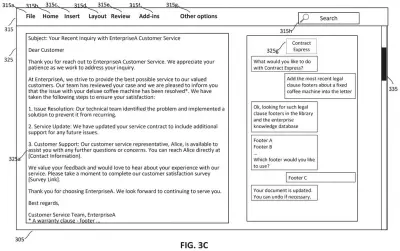
Microsoft's patent describes a bridge. You type a request in the AI chat, such as adding the latest warranty clause to a customer letter. The AI works out which add-in can do that, asks the add-in to do the job inside your document, and then updates the letter on your screen.
The idea is that the AI needs no special training for each add-in. Each add-in comes with a short description of what it can do, and the AI reads that description to decide what to ask for. You can also confirm the plan before anything happens.
… prompting a generative AI model to determine, based on the user query and unified manifest information, a plan of executing one or more actions upon the host-specific digital content item by one or more corresponding add-ins associated with the host application …
Translation: The system asks an AI model to figure out which plugins are needed to handle your request.
How the AI hands a task to the right add-in
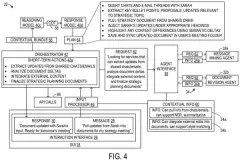
The system starts when you type a request into an AI agent (the chat helper) inside an app like Word or Excel, about something in your open file. The app asks a generative AI model (a large language model, the same kind of tech behind chatbots) to write a plan for the job.
The model builds that plan from a unified manifest, which is a shared catalog. Each entry describes one action and ties it to a pair: a declarative agent (a settings file that tailors the AI to a task) and a specific add-in. The catalog also maps what you seem to want to the actions that can deliver it.
Next, the host app asks the add-in to do the work through the same programming interface (API, a set of agreed-upon commands) that developers used to build the add-in. The add-in runs in a browser sandbox (a walled-off area that limits what it can touch), sends its result back, and the app updates your file on screen.
The filing also describes extras:
- A confirmation card so you can approve the plan first.
- Checks that you have rights to the add-in and that the action is listed in the add-in's own manifest.
- Identifiers and a callback reference that travel with each request so the answer finds its way home.
- Sending results back to the AI for a second, cleaner reply.
- Add-ins shown as separate chat helpers you can pick.
… requesting the add-in(s) by the host application via an API to perform the action(s) and generate output(s) according to the plan, the API being used in building the add-in(s) …
Translation: The host app talks to those plugins through specific programming interfaces to get the work done.
What this means for thousands of Office add-ins
For you, the payoff is skipping the hunt through menus and side panels. If an add-in can add a warranty clause, fill a cell with color or insert a signature block, you could ask in plain words and watch your document change, with the undo button still there, according to the filing.
For Microsoft, the filing frames this as reusing add-ins that already exist instead of building AI into each one or training the AI on each one. It also says work moves to the add-ins running in your app, which lowers the load on AI servers (GPUs). The examples include Grammarly, DocuSign, Adobe Acrobat and Salesforce add-ins, so outside developers could reach AI users without building their own AI.
That makes this Microsoft's 39th filing we've tracked since July in our AI agents that work for you watch, following their work on whiteboard to data systems and AI rewriting its app notes.
Source: US 2026/0367933 A1 at the USPTO (PDF). Full patent text and figures are in the official publication.
Get our take in your Top Stories
Liked this breakdown? Add Patentlyze as a preferred source on Google, and our plain-English take shows up more often in your Top Stories the next time Microsoft patent news breaks.
Add Patentlyze on Google
One click.
There are more where this came from
We read every patent application Big Tech publishes and send you the ones worth knowing. Plain English, free, every week.
The drawings · 12 sheets
12 drawing sheets from US 2026/0367933 A1 · click any drawing to enlarge


Show the other 4 sheets


More from Microsoft
All 681 Microsoft patents →
More in AI assistant & agent
All 436 AI assistant & agent patents →
Google
Google Patents a Multi-Agent AI System That Controls Apps Autonomously
Nvidia
Nvidia Patents a System That Lets AI Assistants Organize and Run Their Own Tasks
Google
Google Files Patent for a TV Assistant That Learns What Your Apps Can Do
Google
No comments yet