
Microsoft
Microsoft · Security · Filed May 19, 2025 · USPTO published Nov 19, 2026 · This week's release
Microsoft Files Patent for Keeping AI Assistants Out of Certain Company Folders
Microsoft's filing describes a single setting that hides a whole group of files from company-wide searches, including the ones its AI assistant runs, even when you personally have permission to open them.
- Publication number
- US 2026/0368348 A1(US20260368348A1)
- Applicant
- Microsoft Technology Licensing, LLC
- Filed · Published
- May 19, 2025 · Nov 19, 2026
- Inventors
- Nikita BANDYOPADHYAY, Craig Joseph Santo, Kristofer D. Hoffman, Sanjoyan Mustafi, Neetha Sumana Tuluri, Amit Kumar Pathak, Connie Yujia Lin, Kunpeng Zhu, Ankush Grover, Jayant Kishorbhai Manglani
- Status when we published
- Abandoned by the company
- Document
- 20 claims
- US classification
- 707/783
- Examiner
- SINGH, AMRESH (Art Unit 2159)
What Microsoft's AI-proof folder switch does
Every time you ask a workplace AI assistant a question, it first searches your company's shared files for something to base its answer on. That search is the step Microsoft's filing wants to control.
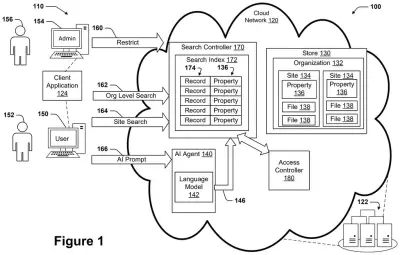
Normally, an assistant can see whatever you are allowed to see. This filing adds a separate marker that an administrator can place on a whole site, which is a company's name for a group of files owned by one team or department. Once the marker is on, company-wide searches leave that site's files out of the results. That includes searches run by an AI assistant, and it applies even if you have permission to open those files.
You are not locked out, though. You can still find the files by searching inside that site or by opening them directly. Files you opened recently can still show up.
obtain a designation of a property associated with a site as protected from organization wide searches, the site being owned by an organization and including multiple files, the property being separate from a user access permission; …
Translation: The system flags certain company folders as off limits to wide searches, independent of who has permission to view them.
How the search trims results before the AI sees them
The system adds a single setting, called a property, to a site, which is a group of files owned by one team or department. An administrator turns it on, and it marks the whole site as protected from organization-wide searches. It is kept separate from ordinary user permissions, which decide who can open which file.
When an AI agent (a chatbot-style assistant built on a large language model) asks for company files to use as grounding data (reference material it reads before answering), the system runs the search across its index, a catalog of every file. Then it trims the results, removing any file from a protected site before handing the list back.
The filing describes several variations:
- Copy the setting onto each file's record in the index ahead of time, so trimming is quick.
- Or check the site's original storage for each result, which is more current but slightly slower.
- Let files you opened within a set time period still appear in your results.
- Record an audit event (a log entry) whenever the setting is switched on or off.
Users with the right permissions can still reach protected files by searching inside the site or opening them directly.
What this means for companies using AI assistants
If your employer rolls out an AI assistant, one of the first questions is what it is allowed to read. This filing offers an answer: an administrator can wall off a sensitive team's folder from AI searches with one setting, instead of rewriting who may open each file. The filing says the AI's handling of data is hard to see inside, so a simple off switch could be easier to trust.
Microsoft has abandoned this application after failing to respond to an office action, so it will not become a patent in this form. The worry it describes, companies unsure what their AI assistants take in, has not gone away, and any workplace AI product has to answer it somehow.
This is the 33rd Microsoft filing we've tracked since July in the AI guardrails race, adding to work like one that rewrites unsafe prompts and one checking summaries against sources.
Source: US 2026/0368348 A1 at the USPTO (PDF). Full patent text and figures are in the official publication.
Get our take in your Top Stories
Liked this breakdown? Add Patentlyze as a preferred source on Google, and our plain-English take shows up more often in your Top Stories the next time Microsoft patent news breaks.
Add Patentlyze on Google
One click.
There are more where this came from
We read every patent application Big Tech publishes and send you the ones worth knowing. Plain English, free, every week.
The drawings · 5 sheets
5 drawing sheets from US 2026/0368348 A1 · click any drawing to enlarge


No comments yet