
Microsoft Patents a System That Adjusts What You Can Do Remotely Based on Your Device's Condition
When you connect to a company computer from home, Microsoft's new patent wants the system to automatically check what kind of device you're using and how secure it is before deciding how much access you actually get.
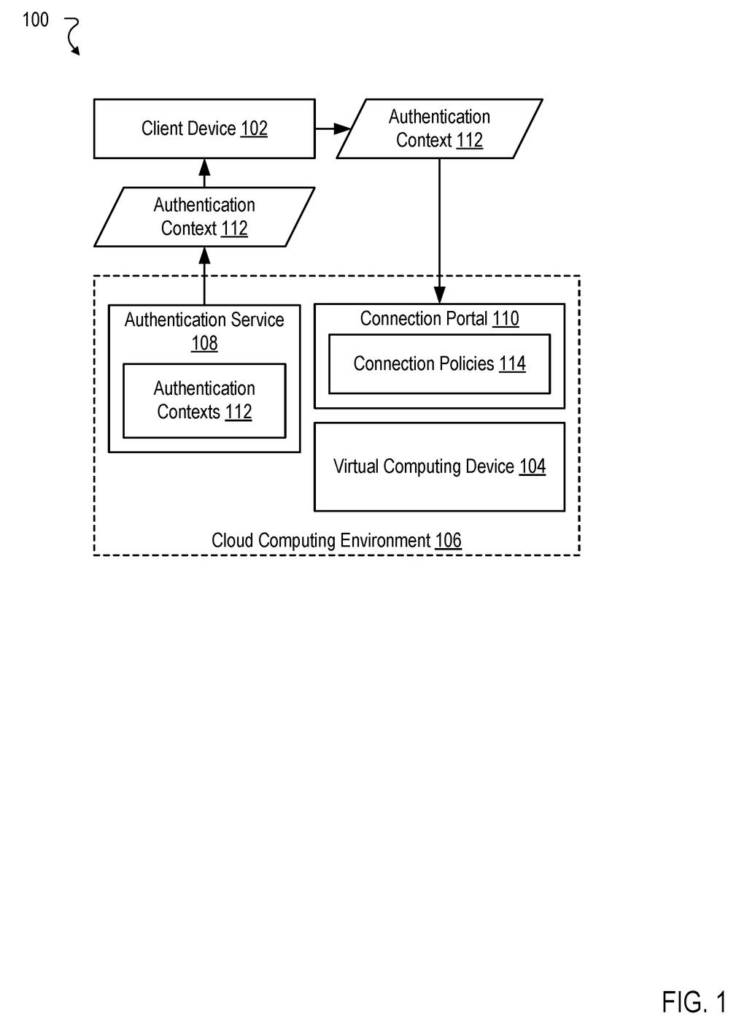
How Microsoft's cloud desktop lock-down actually works
A worker opens a remote desktop app from a personal laptop late on a Friday. That laptop has no company security software installed, and the session it opens grants full clipboard and file-transfer access to sensitive company data. This is a real, common problem.
Microsoft's patent describes a way to fix that by having the remote session read a "passport" your device picks up during login. That passport describes who you are and what shape your device is in, including whether it meets security requirements. The remote session then decides, on the spot, what you're allowed to do.
So if your device passes all the checks, you might get full access to copy files and redirect USB drives. If you're logging in from a personal or unmanaged machine, the session could automatically block those features, keeping company data from leaking out through your hardware.
receiving, from a client device, a request to establish a session with a virtual computing device implemented in a cloud computing environment, wherein the request comprises an authentication context received by the client device from an authentication service …
Translation: Your computer asks to connect to a cloud desktop while sending your login details and device health status.
How the authentication context shapes each session's permissions
The system works in three steps, each tied to claim 1 of the patent.
First, when a user tries to connect to a virtual computing device (a cloud-hosted desktop or workstation), the client app bundles an authentication context into the connection request. That context is a data package issued by a separate authentication service (think of it as a security certificate handed out during login) that records the user's account details and the operational state of the device, meaning facts like whether its disk is encrypted, whether a security agent is running, or whether it is managed by the organization.
Second, the cloud environment establishes the remote session normally.
Third, and most importantly, the system reads that context and controls redirection features based on what it finds. Redirection features are the conduits that let a remote session reach back into your local machine, things like clipboard sharing, local printer access, USB device pass-through, and local drive mapping. By tying those conduits to the device's reported security posture, the system can grant or block them without requiring a human administrator to intervene each time.
- High-trust device: full redirection allowed
- Partially compliant device: limited clipboard only
- Unmanaged personal device: all redirection blocked
The claim is broad in that it covers any redirection feature controlled by any aspect of the authentication context, which gives Microsoft wide latitude over how the enforcement logic is actually implemented.
… controlling one or more redirection features of the session based on the authentication context.
Translation: The system decides which files or peripherals you can access based on how secure your computer is.
What this means for remote workers and IT departments
For IT departments, this is a meaningful shift. Today, remote desktop policies are usually set per user group or per virtual machine, a blunt instrument that ignores whether the person connecting is on a locked-down company laptop or an unpatched home computer. A system like this one could make session permissions dynamic, changing automatically based on real-time device state without a helpdesk ticket.
For you as a remote worker, the practical effect could be invisible on a compliant device and restrictive on a personal one. Microsoft has been filing around cloud identity and remote-access security since at least 2023, and this patent fits that pattern: tighter integration between the identity layer and the session layer, so what you're allowed to do follows the security facts on the ground, not a fixed policy set months ago.
Microsoft's 459th filing in our Microsoft coverage since May adds to a security AI thread that includes a three-AI patch system and behavior-based attack detection.
Claim 1 is written broadly. It covers any method that receives an authentication context describing a user account and device state, establishes a session, and then controls redirection features based on that context. That framing doesn't lock the claim to a specific type of redirection or a specific set of device attributes, which means if granted, it could apply to a wide range of remote desktop implementations.
That breadth has real consequences. Microsoft already operates Azure Virtual Desktop and Windows 365, two large remote-desktop services. A claim this wide, if it survives examination, could give Microsoft leverage over competitors building similar context-aware session controls.
The underlying idea, checking device health before deciding what a remote session can touch, is not new in security thinking. What the claim captures is the specific architecture of bundling that context at the authentication layer and having the session enforce it at runtime. Whether that precise wiring is novel enough to survive a prior art challenge at the patent office is the real question. The business logic, though, is sound: the weakest link in remote work security is often the endpoint, and this is a direct attempt to close that gap automatically.
There are more where this came from
We read every patent application Big Tech publishes and send you the ones worth knowing. Plain English, free, every week.
The drawings
8 drawing sheets from US 2026/0303584 A1 · click any drawing to enlarge


Want this weekly breakdown for a company we don't cover? Patentlyze Pro →
Be the first to weigh in