
A New Microsoft Patent Uses an Interpreter's Eye Gaze to Credit the Right Signer
When one sign language interpreter speaks for two people on a video call, some meeting tools label every word with the interpreter's name. Microsoft's patent filing tracks where the interpreter is looking to put the right name on each sentence.
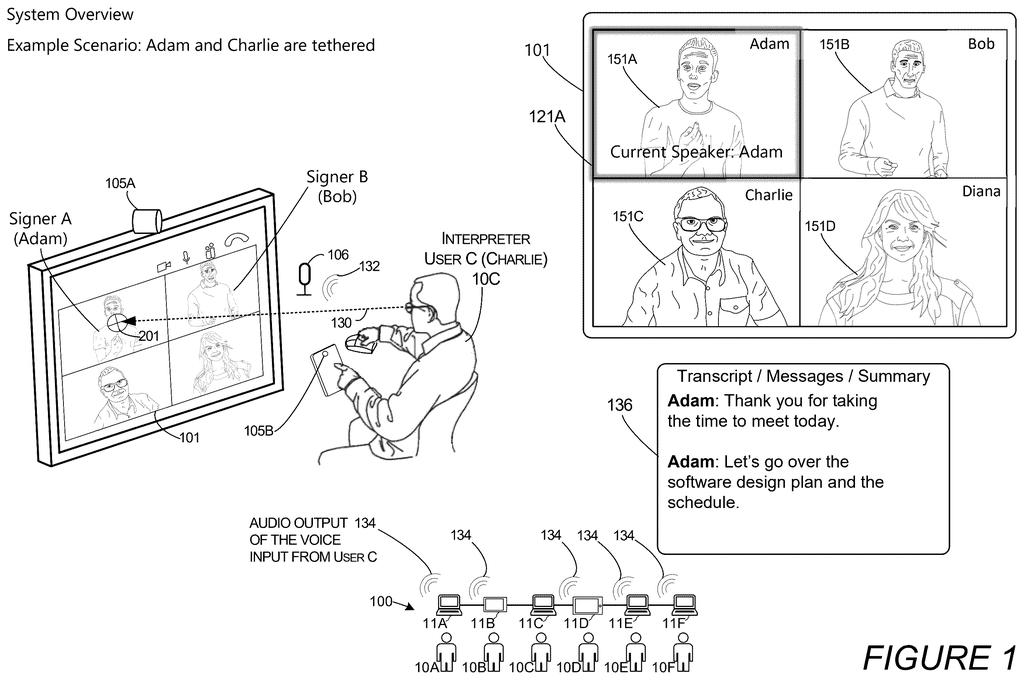
What Microsoft's interpreter eye-tracking patent does
Every time a sign language interpreter speaks up in a video meeting, the captions have to decide whose words those are. Some systems simply print the interpreter's name, even though the ideas came from the person signing.
Microsoft's filing tackles the harder case: one interpreter voicing for two signers. The system watches where the interpreter is looking on screen and checks which signer is actually signing. If the interpreter is looking at Adam while Adam signs, the spoken words are labeled as Adam's, in the on-screen highlight, the captions and the transcript.
When Adam stops and Bob starts, and the interpreter's eyes move to Bob, the credit follows. When nobody is being voiced for, credit returns to the interpreter. No one has to click anything to make the switch.
When the interpreter speaks, their audio will be routed through the signer's own audio channel, which will give the appearance that the signing user is speaking, e.g., providing a verbal input to the meeting audio stream.
Translation: The system makes the interpreter's voice sound like it belongs to the person signing.
How the interpreter's gaze hands off credit
The claims describe a setup with two signers and one interpreter, each shown as a live video tile. A camera or other sensor on the interpreter's device tracks their eye gaze (where on screen they are looking). That gaze moves a "target region" on the interface, and the system checks whether the region sits over a signer's tile, such as overlapping it by a threshold amount or landing within a set distance.
Meanwhile, software analyzes each signer's video for predetermined gestures, such as sign language. The system moves between three operating modes:
- Mode 1: the interpreter gets credit for their own voice, with their own name on the transcript.
- Mode 2: the interpreter looks at the first signer while that person signs, so the highlight and transcript label switch to the first signer, and the interpreter's audio is routed through that signer's audio channel.
- Mode 3: the first signer stops, the interpreter looks at the second signer who is now signing, and credit moves to the second signer.
The filing adds guardrails. Users pick signer or interpreter roles, and permissions limit who can be paired, so the system only analyzes video from permitted people. In some versions, eye tracking runs only while the interpreter is talking, which saves battery on AR and VR headsets. A switch waits for a pause of roughly 3 to 5 seconds, so a quick glance away does not reassign credit.
Why meeting transcripts and AI summaries need this
If you rely on an interpreter, or read a meeting transcript afterward, this is about whether the record shows who actually said what. A transcript that lists the interpreter for every sentence can mislead a reader, and the filing points out it also causes trouble when summaries feed an AI model.
The setup also removes a coordination chore. An interpreter switching between two people would otherwise need spoken or manual cues to tell the room who they are voicing. Here, the interpreter's gaze does that job. The filing also describes avatars in AR and VR headsets, so the idea could apply beyond a flat grid of video tiles. It is a patent application, and nothing in it says a product is coming.
Microsoft's 617th filing in our Microsoft coverage since May continues its AI work, adding to patents like AI that codes from a description and code that checks itself.
A wrong name on a transcript sounds minor until you picture the record people rely on afterward: who agreed to a deadline, who raised an objection, who asked for an accommodation. For deaf and hard-of-hearing people in a meeting, having an interpreter's name stamped on their words removes them from that record.
The fix matches the size of the problem well. Gaze is a sensible signal, because it asks the interpreter for no extra clicking or announcing. The pause of 3 to 5 seconds before a switch handles the obvious worry of a stray glance reassigning credit.
Two signers sharing one interpreter is a narrow case, and the system depends on eye tracking and sign detection working in a messy live call. For the people in that situation, it goes after a frustration they live with, and it does so with a modest amount of machinery.
Get our take in your Top Stories
Liked this breakdown? Add Patentlyze as a preferred source on Google, and our plain-English take shows up more often in your Top Stories the next time Microsoft patent news breaks.
There are more where this came from
We read every patent application Big Tech publishes and send you the ones worth knowing. Plain English, free, every week.
The drawings
14 drawing sheets from US 2026/0349643 A1 · click any drawing to enlarge


Show the other 6 sheets


Want this weekly breakdown for a company we don't cover? Patentlyze Pro →
Be the first to weigh in