
Microsoft Files Patent for Catching Phishing Emails by Reading Them as Images
Scammers hide invisible text and customize every copy of a phishing email, which makes the copies hard to match. Microsoft's filing sidesteps the code and fingerprints what a person would actually see on screen.
What Microsoft's screenshot-style scam filter does
Every time a message lands in your inbox, what you see on screen can differ from what is buried in its code. Scammers exploit that gap. They hide invisible text, swap in your name, and send each target a slightly different copy, so security software struggles to tell that the copies are the same scam.
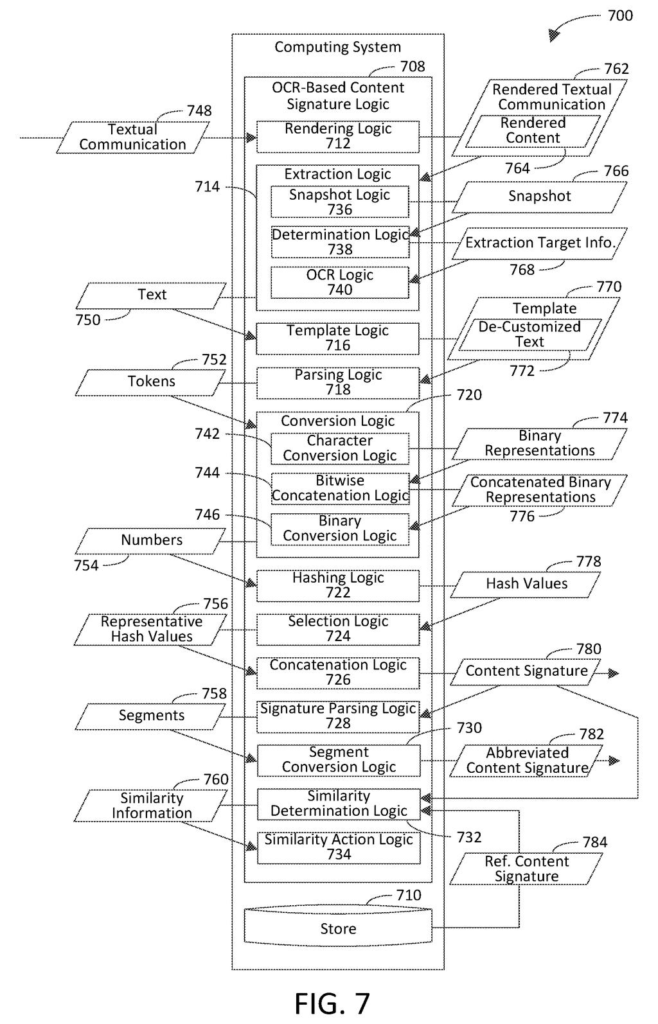
Microsoft's filing takes a different route. It draws the message the way you would see it, reads the words off that picture, and swaps out things like names, dates and links for generic labels. What is left gets boiled down into a short fingerprint.
Two scam emails built from the same template should end up with fingerprints that look alike, even if the names inside them differ. If a new message's fingerprint is close enough to a known scam's, the system could stop it from reaching you.
Customization is removed from the text to provide a templatized version of the rendered textual communication that includes de-customized text.
Translation: The system strips out personalized details to find standard phishing templates.
How a scam email becomes a short fingerprint
The process starts by rendering the message, meaning drawing it as an image the way an email app would. Optical character recognition (OCR, software that reads text out of a picture) pulls out the words, so tricks like zero-size fonts or text colored to match the background drop away. Then customizations such as names, dates, email addresses and links are replaced with generic tags like NAME or URL.
Next, the cleaned text is chopped into overlapping chunks. In the filing's example, three-character pieces turn 'Hello' into 'Hel,' 'ell' and 'llo.' Each chunk becomes a number and goes through many fuzzy hash functions (math recipes that give similar inputs similar outputs, unlike ordinary hashes). The example uses 96 of them.
For each function, the system keeps one representative value, such as the smallest. It then keeps the last few bits of each (four in the example) and strings them together. That produces a 384-bit signature, which can be shown as a short hexadecimal code.
The filing also describes comparing signatures against known scams, blocking matches, and spotting that two messages share a template. The claims center on the hashing and signature steps, while the OCR and cleanup are described as part of the full process.
… generate a content signature of the textual communication by bitwise concatenating at least portions of the respective representative hash values …
Translation: It builds a unique digital fingerprint of the email text by combining smaller code blocks.
Why scammers' mail-merge tricks get less useful
If your email provider adopted something like this, fewer copies of the same scam could reach you, even when each copy carries your name or a one-off link. Scammers have also started sending image-only messages with almost no readable text in the code, and reading the rendered picture is aimed squarely at those.
The filing also describes help for security teams. Matching a new message to a known scam could let them block it fast, and a small difference between two fingerprints could point to what the scammers changed in a shared template. The description names anti-malware programs, including Microsoft Defender, as one place the technique could run.
Microsoft's 528th filing in our Microsoft coverage since May adds to a run that includes sharpening blurry game graphics and characters that change look mid-handoff.
Phishing is a huge, everyday problem, and the cat-and-mouse part is what makes it costly. Scammers send thousands of near-copies of one message, and every small change gives filters a new thing to miss. Fingerprinting what the recipient actually sees goes right at that weakness.
The approach fits the size of the problem. Names, dates and links are exactly what scammers vary, so swapping them for labels before fingerprinting removes their favorite tricks. Reading the picture also covers image-only emails that have almost no text in the code.
The filing gives no accuracy figures, so how well it catches real scams is unknown. It continues an application first filed in November 2022. As a defensive idea, it aims at a real problem with a sensible tool.
Get our take in your Top Stories
Liked this breakdown? Add Patentlyze as a preferred source on Google, and our plain-English take shows up more often in your Top Stories the next time Microsoft patent news breaks.
There are more where this came from
We read every patent application Big Tech publishes and send you the ones worth knowing. Plain English, free, every week.
The drawings
7 drawing sheets from US 2026/0322854 A1 · click any drawing to enlarge


Want this weekly breakdown for a company we don't cover? Patentlyze Pro →
Be the first to weigh in