
Microsoft
Microsoft · Input & haptics · Filed Mar 25, 2025 · USPTO published Oct 1, 2026 · Oct 1 release
Microsoft Patents a Spring-Mounted Trackpad That Clicks More Reliably
Microsoft has filed a patent for a trackpad built around flat metal springs and a precision bracket, a design that aims to make the physical click under your finger more consistent and longer-lasting.
- Publication number
- US 2026/0299715 A1(US20260299715A1)
- Applicant
- Microsoft Technology Licensing, LLC
- Filed · Published
- Mar 25, 2025 · Oct 1, 2026
- Inventors
- Thomas Joseph LONGO, Tianyu ZHAO, Nayeem Sardarsab DESAI, Cecil Tetteh KUMAH
- Status when we published
- Approved; patent expected soon
- Document
- 20 claims
- US classification
- 345/173
- Examiner
- CHOWDHURY, AFROZA Y (Art Unit 2628)
What Microsoft's spring-bracket trackpad actually does
Imagine pressing down on a laptop trackpad and feeling a click that's slightly mushy on one side and crisper on the other. That uneven feel is a real engineering problem, and it comes down to how the circuit board inside the trackpad is held in place.
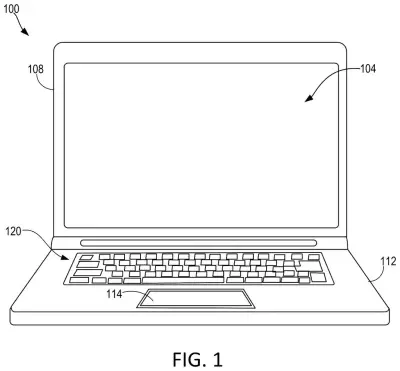
Microsoft's patent describes a mounting system where flat metal springs connect a rigid bracket to the circuit board that registers your click. A small raised nub on the bracket (called a boss) lines up directly with the switch underneath the touch surface, so every press lands in exactly the right spot.
The springs sit entirely within the footprint of the touch surface itself, which keeps the whole assembly compact. The goal is a click that feels the same whether you press in the center or near an edge, and that stays consistent over thousands of presses.
… a plurality of flat springs each comprising a bracket end affixed to the mounting bracket and an opposite end coupled to the printed circuit board …
Translation: Multiple flat springs connect the mounting bracket to the circuit board inside the trackpad.
How the flat springs and boss align the click mechanism
The patent describes a touch input device built around three main parts working together: a touch surface, a printed circuit board carrying a switch, and a mounting bracket that holds everything in precise alignment.
The key engineering piece is a set of flat springs, thin metal strips that each have one end fixed to the mounting bracket and the other end coupled to the circuit board. Both ends stay within the outer edge of the touch surface, keeping the spring mechanism self-contained.
The bracket includes a boss, which is simply a small raised protrusion, positioned directly above the switch on the circuit board. When you press the trackpad, force travels through the boss and hits the switch at the same point every time, regardless of where on the surface your finger lands.
The flat springs serve a dual role: they hold the circuit board in position while also allowing it to flex slightly under finger pressure. That controlled flex is what produces the physical click sensation, and the spring geometry is what keeps the actuation force even across the whole touch surface.
What this means for laptop trackpad feel and durability
Trackpad click quality is one of those things you notice immediately on a new laptop, even if you can't name what's wrong. A poorly mounted circuit board can make the click feel stiff at the top and loose at the bottom, or cause the switch to wear unevenly over time. Microsoft's design tries to solve both problems at once by using springs to control exactly how the board moves.
For everyday users, this is about consistency: the click you feel in year three should feel the same as the click in week one. If this design makes it into a Surface device or any licensed hardware, it would be a quiet but real improvement to one of the most-used parts of any laptop.
Microsoft files its seventh input and haptics application we've tracked since May, adding to work including faking surface textures and splitting a trackpad in two.
Source: US 2026/0299715 A1 at the USPTO (PDF). Full patent text and figures are in the official publication.
Get our take in your Top Stories
Liked this breakdown? Add Patentlyze as a preferred source on Google, and our plain-English take shows up more often in your Top Stories the next time Microsoft patent news breaks.
Add Patentlyze on Google
One click.
There are more where this came from
We read the new patents from Big Tech, carmakers and more and send you the ones worth knowing. Plain English, free, every week.
The drawings · 7 sheets
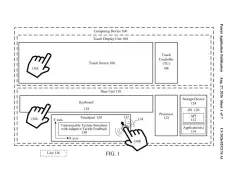
7 drawing sheets from US 2026/0299715 A1 · click any drawing to enlarge


More from Microsoft
All 681 Microsoft patents →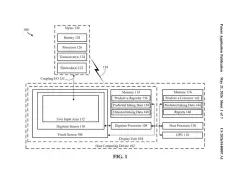
More in Hardware
All 2,375 Hardware patents →
Sony
Sony Patents a System That Gives Your Hands a Physical Jolt Between Actions
Tesla
Tesla Patents a Steering Wheel Button That Pushes Back When You Press It
Apple
Apple Patents a Side Button That Knows Exactly Where You Pressed It
Apple
No comments yet