
Samsung
Samsung · Security · Filed Jan 21, 2026 · USPTO published Jul 23, 2026 · Jul 23 release
Samsung Patent Covers Automatic Secure OS Switching When Trusted App Execution Fails
When the secure vault your phone uses to run a sensitive app fails, Samsung's new patent says the device should try another vault rather than crash or refuse to open the app entirely.
- Publication number
- US 2026/0212000 A1(US20260212000A1)
- Applicant
- Samsung Electronics Co., Ltd.
- Filed · Published
- Jan 21, 2026 · Jul 23, 2026
- Inventors
- Sojin AHN, Hyungchul JUNG, Jihyuk LIM
- Status when we published
- Waiting for an examiner
- Document
- 20 claims
- US classification
- 726/22
- Parent application
- Continuation of PCT/KR2026/000527 (filed Jan 9, 2026)(PCTKR2026000527)
How Samsung's security fallback actually protects your apps
Imagine your phone needs to verify your identity before opening your banking app. To do that safely, it runs a small, locked-down program inside a protected area of your phone that regular apps can't touch. But what if that protected area has a problem and the program fails to run?
Samsung's patent describes a phone that doesn't just give up. Instead, it keeps a ranked list of backup security environments, each capable of running its own version of the verification program. If the first one fails, the phone automatically moves to the next one on the list and tries again.
The result is that your banking or payment app gets a second (or third) chance to open safely, without you ever knowing anything went wrong behind the scenes. It's a bit like having multiple spare keys hidden in different places, so one being broken doesn't lock you out entirely.
How the device cycles through secure environments on failure
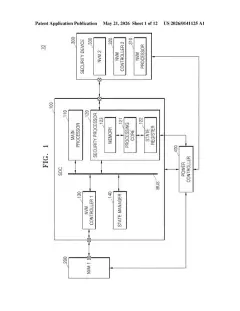
The patent describes a device running two separate computing layers: a Rich Execution Environment (REE), which is the normal Android-style space where your everyday apps live, and a Trusted Execution Environment (TEE), a heavily isolated area of the chip reserved for security-sensitive code like fingerprint processing or payment authentication.
Inside the TEE, the device can run multiple secure operating systems (think of them as separate locked rooms within the vault). Each secure OS hosts its own Trusted Application (TA), a small program that performs the security check needed to launch a normal app in the REE. Each secure OS is assigned a priority ranking, stored in a configuration file tied to the application.
When your device gets a request to launch an app that needs a security check, it follows this process:
- Try the highest-priority secure OS and run its Trusted Application.
- If that TA returns a failure result, move to the next secure OS on the ranked list.
- Keep trying in order until a TA succeeds.
- Once a TA succeeds, allow the normal app to launch in the REE.
The fallback chain means a single point of failure inside the TEE doesn't block the whole app. The specific mechanism for why a TA might fail is not defined in the patent, so it covers hardware faults, version mismatches, or configuration errors equally.
What this means for mobile security and banking apps
Mobile security chips and TEE implementations vary across device generations, carrier configurations, and software updates. A banking app, digital wallet, or enterprise security tool that depends on one specific TEE setup can break silently when that setup changes. Samsung's approach treats the secure environment as something that can fail and builds in recovery logic at the OS level rather than forcing app developers to handle it.
For you as a user, this means fewer mysterious "app not available" errors after a system update. For enterprise and financial app developers, it's a potential way to support multiple TEE implementations (different chip vendors, different security standards) under one deployment, without writing separate fallback logic themselves.
Source: US 2026/0212000 A1 at the USPTO (PDF). Full patent text and figures are in the official publication.
Get our take in your Top Stories
Liked this breakdown? Add Patentlyze as a preferred source on Google, and our plain-English take shows up more often in your Top Stories the next time Samsung patent news breaks.
Add Patentlyze on Google
One click.
There are more where this came from
We read the new patents from Big Tech, carmakers and more and send you the ones worth knowing. Plain English, free, every week.
The drawings · 10 sheets
10 drawing sheets from US 2026/0212000 A1 · click any drawing to enlarge


Show the other 2 sheets


More from Samsung
All 1,662 Samsung patents →
More in Security
All 354 Security patents →
Microsoft
Microsoft Patents a Broker That Routes Workloads to Secure Execution Environments
Google
Google Patents a Sandboxed Ad Auction System Built on Trusted Execution Environments
Google
Google Patents a Fingerprint-Tap Method for Adding Trusted Users to Devices
Sony