
Samsung Files Patent to Explain Why Your Smart Home Hub Went Offline After a Trip
Pack your smart home hub for a work trip and your lights, sensors and routines can go dark with no explanation. Samsung's filing uses the phone sitting on that hub's wireless charger to work out what happened and tell you.
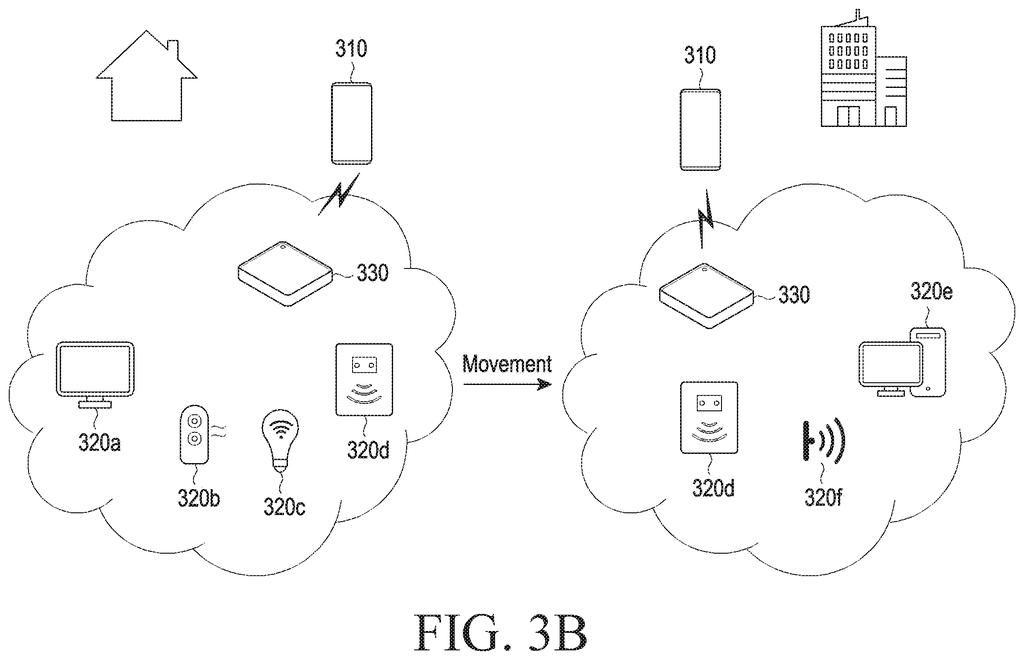
What Samsung's moving smart home hub patent does
Ever carried a gadget to a new place and watched its app insist it's "offline," with no hint why? Smart home setups hit that wall when a hub, the little box that links your lights, sensors and plugs to the internet, gets packed in a bag. Some hubs double as wireless charging pads, which makes them easy to take along.
Samsung's filing uses your phone to solve the mystery. Set your phone on the hub to charge, and the hub sends its ID to the phone through the charging connection itself. Your phone knows where it is, so it tells Samsung's server: this hub is here now. The server sees that the location changed, and your phone shows a plain note saying the hub moved, so its devices may be unreachable.
The filing goes further. It also shows which of your home routines paused because of the move, and it keeps the hub's button working while the hub is offline.
… receive, from the hub device through the wireless charging circuitry, a wireless signal including a device identifier (ID), transmit the device ID and location information of the hub device through the communication circuitry to a server …
Translation: The device picks up an ID and location from the hub while charging and sends that data to a server.
How a charging pad passes IDs through your phone
The patent describes a phone working with a hub that has a wireless charger built in. The hub is registered with a server under your user account (the filing calls this onboarding), along with the smart home devices it manages. The claims cover both the phone's side and the hub's side.
When the hub has been moved and your phone starts charging on it, this happens:
- The hub sends your user ID, and the phone asks for the hub's device ID (a unique label), all through the charging signal.
- The phone asks the server to confirm the hub belongs to your account.
- The phone sends the hub's ID plus the phone's own location, so the server treats the hub as sitting wherever the phone is.
- The server marks the hub, and devices wired or linked directly to it, as offline because of movement, and your phones show it, even as a pop-up.
The hub's button still works offline. In the filing's example, one press switches off a smart light and a double press makes your registered devices ring. The hub hands the press to the phone through the charging signal, and the phone forwards it to the server. The same press can control different gadgets at home and at the office.
The filing also describes the phone sharing its internet as a hotspot (its network name and password pass through the charging signal), and routines that stop working being shown as deactivated, with a reason.
… display, on the basis of the information about the connection state, information related to a location change of the hub device and information related to an online/offline status of at least one of the hub device or one or more Internet of things (IoT) devices operatively coupled to the hub device through a display …
Translation: It shows you whether your hub moved and why your smart devices are currently offline.
Why a hub that travels needs to explain itself
Smart home apps are good at showing "offline" and bad at saying why. If you travel with a charging hub, this would give you a plain explanation on your phone instead of a reason to unplug, reset and re-pair gear that was never broken. Your routines would show as paused for a stated reason, and the hub's button could still trigger something while you are away.
For a company that sells phones and smart home gear, a hub and phone that cooperate away from home give people one more reason to keep both in the same family of products. It is a patent application, so nothing here says it will ship, but the problem it describes is one anyone who has packed a hub will recognize.
Samsung's 279th filing in the cell phone patents we've tracked since May adds to a run that includes keeping a folding screen flat and a smart toothbrush coaching app.
If you travel with a hub, you would notice this in a hotel room or at an office desk, when your app suddenly lists your gadgets as offline. Today that looks like something broke, and you may spend an evening resetting gear that works fine. One line saying the hub moved prevents that.
The button relay is the part you would feel most. Press once and a smart light can still switch off, even though the hub has no internet of its own, because your charging phone carries the message. The same press can also control different gadgets depending on where you are.
You only benefit if your hub is a charger you pack and your phone sits on it. That is a narrow slice of smart home owners, so most people would never see these screens. For that slice, it turns a confusing failure into a clear message.
Get our take in your Top Stories
Liked this breakdown? Add Patentlyze as a preferred source on Google, and our plain-English take shows up more often in your Top Stories the next time Samsung patent news breaks.
There are more where this came from
We read every patent application Big Tech publishes and send you the ones worth knowing. Plain English, free, every week.
The drawings
17 drawing sheets from US 2026/0332680 A1 · click any drawing to enlarge


Show the other 9 sheets


Want this weekly breakdown for a company we don't cover? Patentlyze Pro →
Be the first to weigh in