
Samsung Files Patent to Sort Your Unread Texts by Topic Instead of Sender
Your phone says 29 unread, and nothing about which ones matter. Samsung's patent application sorts them by topic, so delivery alerts, payment receipts and login codes land in their own piles.
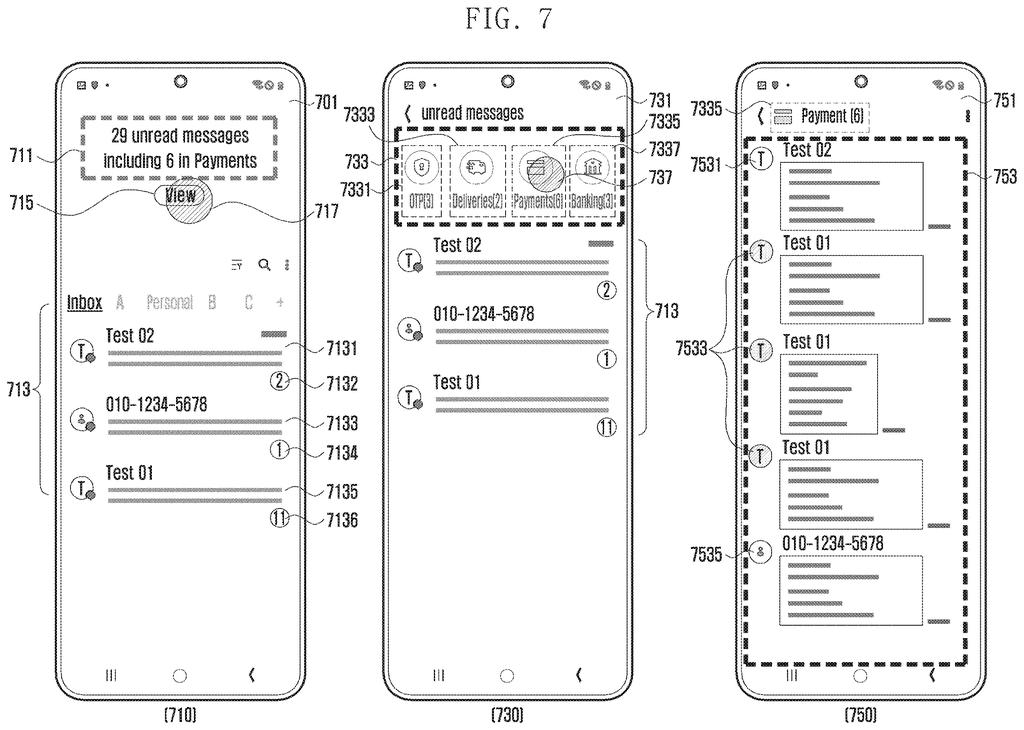
What Samsung's topic-sorted unread texts do
You pick up your phone after a long weekend and the messages app says 29 unread. Somewhere in that pile are a package alert, a few bank notices, a login code and one text from a friend. Today you tap through sender by sender to find the one that matters.
Samsung's patent application has the phone read each text the moment it arrives and file it under a topic, such as payments, delivery, banking, promotion or family. Open the app and you see a one-line summary above your usual list, like "29 unread messages including 6 in Payments."
Tap to show only unread texts and a row of topic buttons appears, each with a count. Tap Payments and all six payment texts show up together, no matter who sent them. Mark one as read and it drops off the list.
… displaying a third user interface on the display, the third user interface including at least one message mapped to category information corresponding to the selected object.
Translation: Tapping a category button shows only the texts belonging to that specific topic.
How the phone files each text by topic
When a text arrives, the phone pulls out its contents (words, images, even emoji) and sends them to an AI model along with a threshold number. The model scores how well the message fits each topic, and the phone keeps the topic whose score clears the threshold. The filing says the model can run on the phone itself or on a server.
Sometimes two topics score almost the same. Then the phone gathers up to 50 recent messages from the same sender, from roughly the last 30 days, scores each one, and adds up the scores per topic. The highest total wins. The threshold can also move: higher when several topics compete, lower when nothing fits.
The display side is three screens:
- Screen one: opening the app shows a summary for one topic, plus your normal list. The filing lists ways to pick that topic: most unread, most recently tapped, most often tapped, or most often tapped at that time of day.
- Screen two: asking for unread texts only shows topic buttons with counts.
- Screen three: tapping a button lists every message in that topic, regardless of sender.
The filing also describes a reminder topic for read texts you may need again, such as tickets, reservations, coupons or large transactions. You can move texts out of an "other" pile and add your own topics.
Why your unread texts could get easier to clear
If your inbox fills with shipping updates, bank alerts, one-time codes and coupons, texts from real people get buried. Sorting by topic lets you clear a whole pile in one go, or jump straight to the topic you care about. The phone can even pick which topic to show first based on what you open most.
The filing is a continuation of an international application that claims Korean priority from January 2024, and it names no specific product. It describes the idea for phones and other devices with a messaging app. It says the sorting model can run on the device, though it also allows a server.
Samsung's 1506th filing in our Samsung coverage since May adds to a run that includes a glasses-free 3D screen and squeezing better video from phone chips.
Claim 1 is broader than the AI angle suggests. It says only that the phone works out a topic from what a message says, then shows three screens: a summary of the unread pile, a row of topic buttons with counts, and a list of every message under the button you tap. It never mentions artificial intelligence, never names a single topic, and never says how the summary topic is chosen. Those details arrive in later claims.
As written, that would cover any messaging app that sorts unread texts by topic and lets you drill in, however the sorting is done. If granted, it would make this three-step flow hard for others to copy.
The flow is still specific: summary first, buttons second, one topic's messages third. An app that skipped the summary screen might fall outside the wording. The idea is modest and easy to picture, and for anyone buried in automated texts it is useful.
Get our take in your Top Stories
Liked this breakdown? Add Patentlyze as a preferred source on Google, and our plain-English take shows up more often in your Top Stories the next time Samsung patent news breaks.
There are more where this came from
We read every patent application Big Tech publishes and send you the ones worth knowing. Plain English, free, every week.
The drawings
16 drawing sheets from US 2026/0332694 A1 · click any drawing to enlarge


Show the other 8 sheets


Want this weekly breakdown for a company we don't cover? Patentlyze Pro →
Be the first to weigh in