
Samsung
Samsung · AR / VR · Filed Jun 30, 2026 · USPTO published Nov 19, 2026 · This week's release
Samsung Patents a VR Headset That Pauses the Game When You Step Out of Bounds
A virtual world can look wide open while a real bookshelf sits a step away. Samsung describes a headset that treats each edge of your play area differently, depending on what is waiting on the other side.
- Publication number
- US 2026/0369191 A1(US20260369191A1)
- Applicant
- Samsung Electronics Co., Ltd.
- Filed · Published
- Jun 30, 2026 · Nov 19, 2026
- Inventors
- Sanga YOO, Minkyu PARK, Soojin JUNG
- Status when we published
- Waiting for an examiner
- Document
- 20 claims
- US classification
- 345/592
- Parent application
- Continuation of PCT/KR2024/020270 (filed Dec 11, 2024)(PCTKR2024020270)
What Samsung's VR safety zone patent does
Right now, a virtual world can look wide open while the real room around you has a bookshelf a step or two away. Your eyes say keep walking, and your shins disagree. Samsung's patent application describes a headset that treats the edge of your marked-out play area as a set of different kinds of edges.
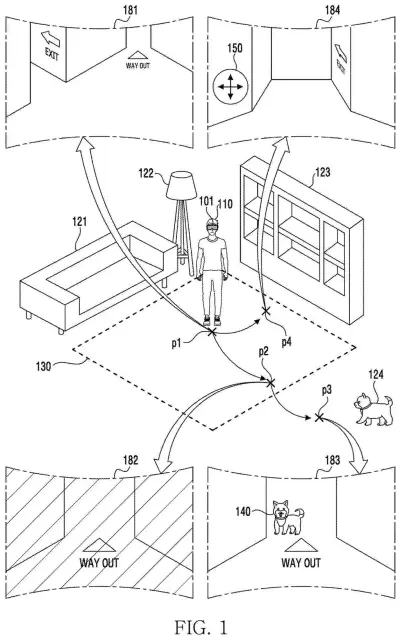
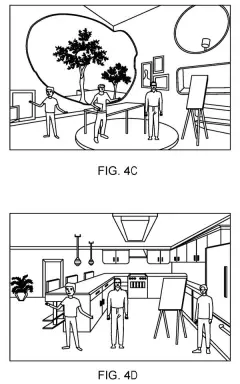
You start by marking a safe patch of floor. The headset then checks what sits just beyond each part of that border. Where a bookshelf or lamp is close, crossing the line ends the virtual world and shows you the room through the headset's cameras. Where the floor is clear, crossing can keep your game going, with the real room blended in so you can spot a dog wandering past.
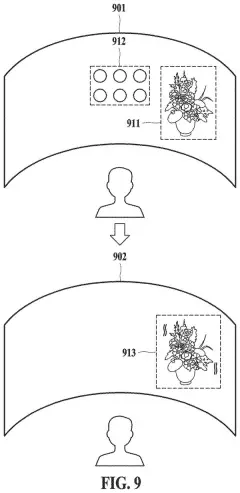
There is also a fix for virtual worlds that are bigger than your living room: a button that turns the whole virtual world so the part you were heading toward lands back inside your safe area.
set a safety zone with respect to a space of the external environment for safety of the user wearing the wearable device …
Translation: The headset defines a safe physical boundary for the user to move around in.
How the headset sorts safe and risky edges
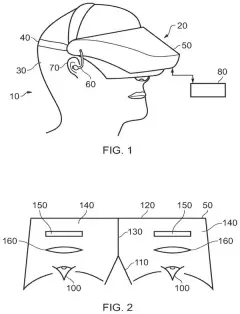
The filing describes a head-worn display with cameras and sensors facing the room. You first set a safety zone, an area of floor where a fully virtual scene is allowed. In the examples, you trace a closed loop on the floor with a handheld controller or hand gestures.
The headset then sorts each stretch of the zone's edge into one of two types, based on how close an outside object sits beyond it:
- First type (high risk): a bookshelf, lamp or sofa is within a set distance. Crossing here ends the virtual world and switches to pass-through (a live camera view of the room).
- Second type (low risk): open space lies beyond. Crossing here can keep the virtual world running if it extends that far, with the camera video mixed in by making the virtual scene more transparent.
Warnings match the risk. Nearing a risky edge draws a red virtual plane (a see-through wall) plus stronger vibration and louder sound. A safer edge gets a smaller blue or green plane and gentler feedback. Distance can be measured from the headset, your hand or the controller.
If you approach a risky edge while the virtual world continues past it, the headset can offer a button that rotates the virtual world's alignment with the room, then shows a prompt such as "TURN LEFT."
… based on identifying the wearable device being moved out of the safety zone, cease to provide the virtual space …
Translation: The headset turns off the game or virtual world if the user walks past the boundary line.
What this means for living room VR
Anyone who has worn a headset and walked around has felt the tension between a world that looks endless and a room that is not. A system that only has one setting, a boundary that always breaks the experience, gets annoying fast. Splitting edges into risky and clear ones could mean fewer interruptions in open floor and quicker, firmer warnings near furniture.
The rotate-the-world option matters for bigger virtual spaces. Instead of walking into a wall to reach something, you turn the virtual scene so the thing you want comes to you. For the company, it is a way to let apps build large worlds without assuming every player has a huge empty room.
This is the 88th Samsung filing we've tracked since May in the AR glasses race, adding to earlier work like one adjusting content to devices and one pulling real screens into view.
Source: US 2026/0369191 A1 at the USPTO (PDF). Full patent text and figures are in the official publication.
Get our take in your Top Stories
Liked this breakdown? Add Patentlyze as a preferred source on Google, and our plain-English take shows up more often in your Top Stories the next time Samsung patent news breaks.
Add Patentlyze on Google
One click.
There are more where this came from
We read every patent application Big Tech publishes and send you the ones worth knowing. Plain English, free, every week.
The drawings · 27 sheets
27 drawing sheets from US 2026/0369191 A1 · click any drawing to enlarge


Show the other 19 sheets


No comments yet