
Sony
Sony · Display · Filed May 11, 2026 · USPTO published Sep 17, 2026 · Sep 17 release
Sony Patents a Projector That Reroutes Its Image Around Obstructions
A hand drifting through a projected menu usually breaks the whole interaction. Sony's new patent describes a projector smart enough to detect what's in the way and adjust what it shows around the obstruction.
- Publication number
- US 2026/0277366 A1(US20260277366A1)
- Applicant
- Sony Group Corporation
- Filed · Published
- May 11, 2026 · Sep 17, 2026
- Inventors
- Hiroyuki Mizunuma, Ikuo Yamano, Shunichi Kasahara, Ken Miyashita, Kazuyuki Yamamoto
- Status when we published
- Waiting for an examiner
- Document
- 20 claims
- US classification
- 345/175
- Parent application
- Continuation of 18/369,467 (filed Sep 18, 2023)(18369467)
What Sony's obstacle-aware projector actually does
Every time something crosses a projected beam, the image turns into a shadow-covered mess. That's not just annoying; it makes projected menus and controls nearly unusable in busy environments where people are constantly moving around.
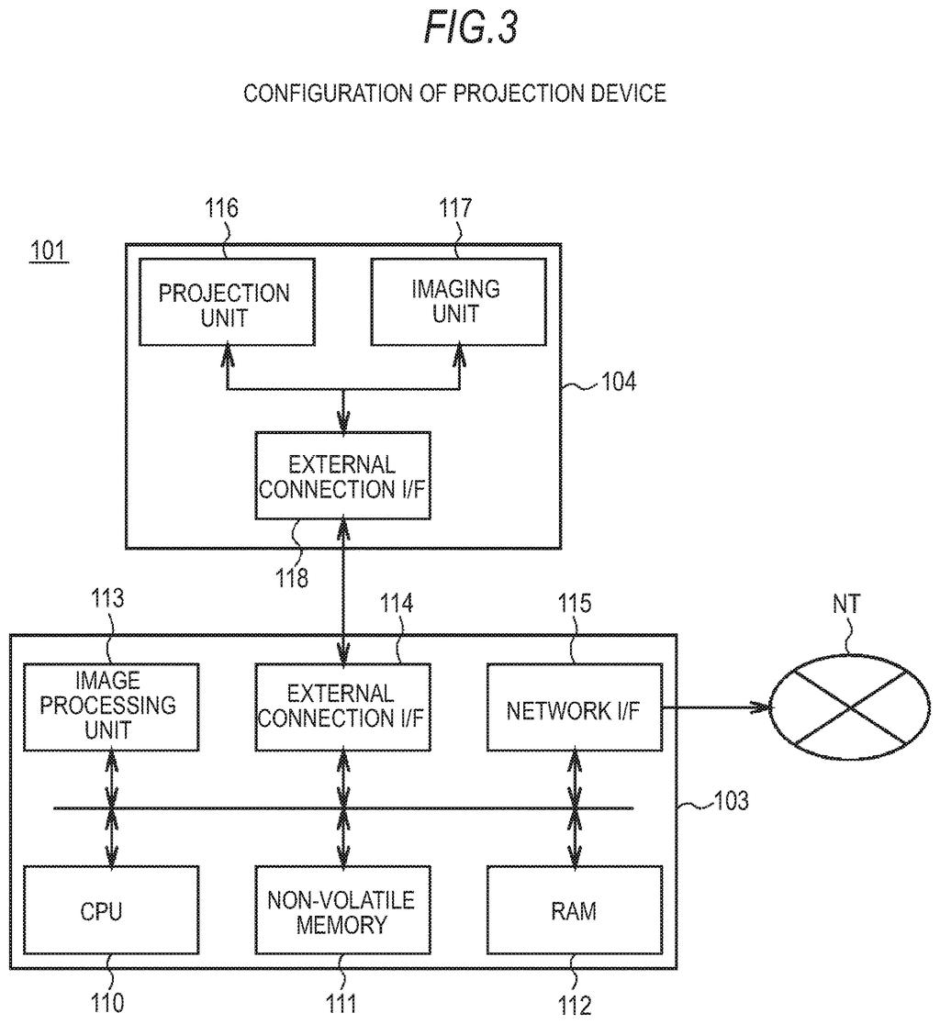
Sony's patent describes a projector that watches for objects blocking the beam between itself and the surface it's projecting onto. When something appears in that path, the system figures out where the blockage is and generates a modified version of the image that works around it.
The bigger picture here is a full gesture-based interface projected into three-dimensional space. You can reach out, select an item from a floating menu with a hand gesture, and the system copies your selection to a kind of clipboard and shows a follow-up image in a different part of the space. The obstruction detection is what keeps that interaction from falling apart the moment your arm crosses the beam.
output a first image in a first area of a three-dimensional space, the first image including a plurality of selectable items; acquire, in response to detection of a user's first gesture corresponding to selection of an item from the plurality of selectable items, a user selection result corresponding to the selected item; …
Translation: It displays items in mid-air and lets you pick one using hand gestures.
How the system detects objects and reshapes the image
The patent describes an information processing apparatus built around a projection unit that throws images into three-dimensional space rather than onto a traditional flat screen.
The core interaction loop works like this:
- A first image, containing a set of selectable menu items, is projected into a defined area of 3D space.
- A sensor layer watches for the user's hand gestures. When the system detects a gesture matching a selection motion, it captures the user's choice and stores it on a clipboard (a temporary memory buffer, the same concept as copy-paste on a computer).
- A second image tied to the selected item then appears in a different area of the 3D space, separating the menu from the result.
Running in parallel with all of this is the obstruction detection layer described in the abstract. The processor continuously checks whether any physical object has moved into the projection path between the projector and the target surface. When it detects one, it calculates the shape and position of the obstruction and generates a modified image that accounts for the blocked area, rather than simply letting shadows destroy the projected content.
The combination means the interface tries to stay readable and interactive even when hands, arms, or other objects pass through the beam during normal use.
… detecting that an object exists between a projector unit and the target, wherein when an object exists between the projector unit and the target, the apparatus determines an area of the object and generates a modified first image, based on the area of the object, for projection toward the target.
Translation: When something blocks the light, the system measures the obstacle and instantly warps the projection to bypass it.
What this means for projected interfaces in shared spaces
Projected interfaces have been a fixture of sci-fi for decades, but real deployments keep running into the same basic problem: people block the light. A system that can adapt its output in real time when an obstruction appears would make projected controls far more practical in public kiosks, collaborative workspaces, or any setting where multiple people interact with the same projection at once.
For you as a user, this would mean that reaching toward a projected menu to make a selection doesn't automatically break the display for everyone else around you. The gesture-plus-clipboard model also hints at a workflow where projected interfaces could chain actions together, moving information from one area of a room to another without any physical screen involved.
Sony's 87th filing in the Display patents we've tracked since May follows one on mid-stream resolution shifts and one on mismatched camera settings.
Source: US 2026/0277366 A1 at the USPTO (PDF). Full patent text and figures are in the official publication.
Get our take in your Top Stories
Liked this breakdown? Add Patentlyze as a preferred source on Google, and our plain-English take shows up more often in your Top Stories the next time Sony patent news breaks.
Add Patentlyze on Google
One click.
There are more where this came from
We read every patent application Big Tech publishes and send you the ones worth knowing. Plain English, free, every week.
The drawings · 18 sheets
18 drawing sheets from US 2026/0277366 A1 · click any drawing to enlarge


Show the other 10 sheets


More from Sony
All 707 Sony patents →
More in Display
All 730 Display patents →
Samsung
Samsung Patents a Tougher Pen-Input Layer for Foldable Phones
Intel
Intel Patents a GPU Memory System That Fetches Only the Texture Tiles a Scene Actually Needs
Intel
Intel Patents an AI System That Picks the Right Chip for Every Car Screen Task
Apple
No comments yet