
Qualcomm Files Patent for Pinching a Photo to Add What the Camera Missed
You framed the shot too tight and the moment is gone. This Qualcomm patent application has your phone invent the missing edges after the fact when you pinch the screen.
What Qualcomm's pinch-to-widen photo patent does
Once your phone snaps a photo, the edges are final. The camera only recorded what its lens could see, so if you cut off a friend's elbow or the top of a building, there is nothing extra to pull back in.
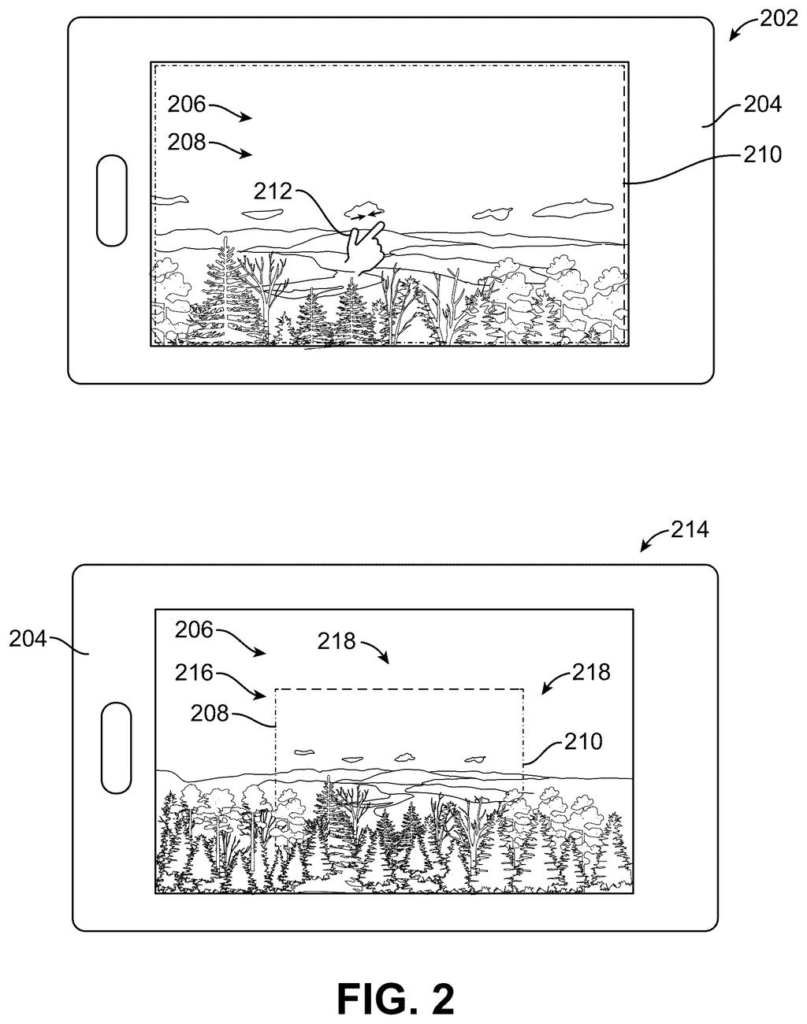
Qualcomm's patent application tries a different fix. You would open the photo and pinch the screen, the same gesture you use to zoom out on a map. An AI image model would then invent new scenery around your original picture, so it looks as if you had stood farther back. Drag to slide the view sideways, or twist to tilt it, and the AI fills in whatever the new frame needs.
While the AI works, you would see your photo surrounded by blurry placeholder pixels, which later get replaced by sharper ones.
… receive an input relative to the first image; output, in response to the input, a second image including a plurality of the first set of pixels and a second set of pixels; obtain, in response to the input, a third set of pixels from a trained machine-learning model …
Translation: The system takes your zoom gesture and uses artificial intelligence to fill in the blank space.
How the phone fills in pixels it never captured
The core of the filing is a three-step display sequence. Your phone shows the original photo, which covers one field of view (the slice of the scene the lens captured). After you touch the screen, it shows your photo surrounded by extra placeholder pixels, which one dependent claim says are blurry. Then a trained AI model supplies new pixels depicting parts of the scene outside the original view, and the phone shows your photo plus that new content.
The description calls this outpainting (generating image content beyond a picture's borders) and names a diffusion model (an AI that builds images by gradually cleaning up random noise) as one option. Its example grows a 1000 by 1000 pixel photo into a 2000 by 2000 one, with the original in the center.
Different inputs map to different edits:
- Pinch: widen the view, adding pixels on all sides.
- Drag: pan, adding pixels on one side.
- Twist: rotate the view and fill the corners that would otherwise be blank.
- Turning the phone: switch between portrait and landscape, adding pixels at the sides or above and below.
To hide the seam between real and invented pixels, the filing describes averaging neighboring pixels with a small filter. It also describes feeding in a second photo, such as one from an ultra-wide camera, as extra reference.
provide at least part of the image and an indication of the desired change as inputs to a generative machine-learning model; obtain an altered image from the generative machine-learning model, wherein the altered image comprises at least part of the image of the field of view and generated pixels outside of the field of view.
Translation: The AI looks at your photo and your zoom request to invent realistic new details for the edges.
What this means for photos you framed too tight
If it ever reached a phone, the practical win is rescuing photos you framed badly. A shot with a chopped-off edge, or a portrait photo you wish were landscape, could be reworked with a gesture you already know instead of a trip to an editing app. The filing says the AI model might run on the device itself or on another computer such as a server, so the work could happen on your phone or off it.
There is a catch the filing itself names: the AI hallucinates the new pixels. What appears around your photo is a plausible guess, and the camera never saw it. A wider photo made this way would look real without being a record of what was actually there.
Qualcomm's 11th filing we've tracked in our AI photo editing race watch since July builds on earlier ideas like one that isolates objects and one on reframing shots.
Claim 1 is wide. It asks for any device with a memory and a processor, an image on screen, and some input about that image, and it never says pinch, never says touch and never names a type of AI, only a trained model. Touch input and blurry placeholders appear only in the narrower dependent claims.
The specific part is the order of events: the screen first shows your photo with extra pixels around it, then shows a final version where a trained model has supplied new pixels for scenery outside the original view. If granted, that sequence is what the claim would cover, which is a wide net for any feature that extends a photo past its edges in response to a user input.
A broad claim like this works as an opening bid, and patent examiners will decide how much of it holds up.
Get our take in your Top Stories
Liked this breakdown? Add Patentlyze as a preferred source on Google, and our plain-English take shows up more often in your Top Stories the next time Qualcomm patent news breaks.
There are more where this came from
We read every patent application Big Tech publishes and send you the ones worth knowing. Plain English, free, every week.
The drawings
18 drawing sheets from US 2026/0323153 A1 · click any drawing to enlarge


Show the other 10 sheets


Want this weekly breakdown for a company we don't cover? Patentlyze Pro →
Be the first to weigh in