
Adobe Files Patent for a Photo Editor That Suggests Fixes Based on What's in Your Picture
Adobe's filing sketches a photo app that looks at your picture, decides whether it's a portrait, a church or a sunset, and offers a short list of edits to match, plus a caption written for wherever you usually post.
What Adobe's context-aware photo editing does
Every time you open a photo to fix it up, you hit the same wall of sliders, filters and menus, and most of them have nothing to do with the picture in front of you. A sunset and a night sky need very different treatment, but a generic editor offers the same tools for both.
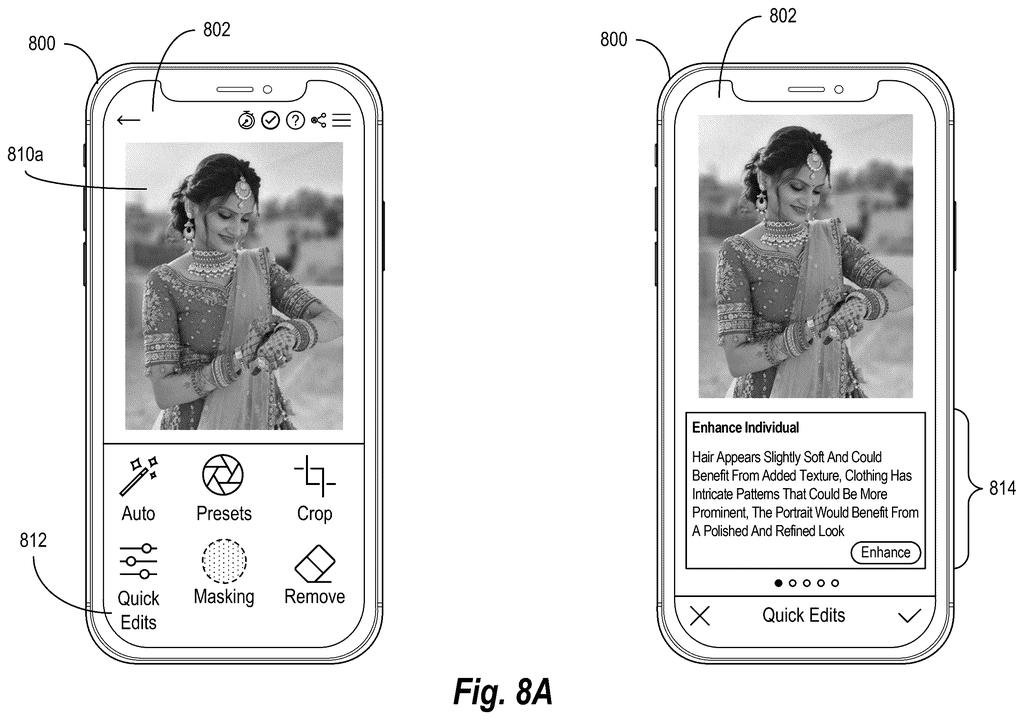
This Adobe patent application describes an editor that looks at the photo first. It works out whether the shot is mainly a person, a specific subject like a building, or just an overall mood, then offers a short list of edits that fit. For a portrait, that might be softer skin or a blurred background. For a sunset, warmer tones.
It also adds a short reason for each suggestion, uses names from your account (like Emily), and can draft captions in the style of the app where you usually post.
determining, utilizing a classification model, a recommendation classification for a digital image by analyzing the digital image to identify one or more distinguishable features displayed in the digital image …
Translation: An AI scans your photo to figure out what is inside it.
How the system sorts a photo before suggesting
The process runs in a few steps. First, a classification model (an AI that labels what is in a picture) scans the image and picks a recommendation type: person-specific, subject-specific, or global.
- Person: the system cuts each person out with an object mask (a pixel-by-pixel outline that separates them from the background) and pairs the cutout with portrait retouching options such as skin smoothing, shine reduction or eye brightening.
- Subject: it labels regions like sky, architecture, plants or water, then picks edit options (color grading, contrast, sharpening) that suit each one.
- Global: for images with no clear focus, it uses a map linking overall styles such as Gritty Urban, Retro or Cinematic to the kinds of photos they suit.
Next, those pieces are packed into a text prompt and sent to a multimodal large language model (a chatbot-style AI that reads both pictures and words). It writes the recommendation along with an explanation of how and why the photo would benefit.
The filing also covers typed requests. Say you write 'I'd like black and white only': the system trims the words down, maps them to editing actions like converting to grayscale and boosting contrast, and finds matching presets in a database. Separately, it can predict where you'll post from your sharing history and draft captions to match.
… generate context-specific modification recommendations for the digital image based on the context-aware image features …
Translation: The software creates tailored editing tips that fit the subject of your picture.
Why fewer menus matter on a phone screen
If you edit photos on your phone, the pitch is fewer taps. Instead of digging through menus built for every possible photo, you would see a few suggestions for the one you're holding, each with a one-line reason. That could help people who aren't sure what 'shine reduction' or 'grain' would do to their picture. The filing says the suggestions would appear as small cards to fit a phone screen.
The sharing piece is where it gets personal. Using names and posting history means the app has to know who is in your photos and where you post. The filing includes options to remove personal details from captions and to label a post as AI-generated. It also lists Photoshop, Lightroom and Photoshop Express as apps the system could work with.
Adobe's 46th filing we've tracked since May in the AI photo editing race builds on earlier applications like swapping video food by country and one describing selected photo areas.
Every shortcut here costs something. By picking a handful of edits for you, the system hides the rest of the menu, and if its first guess about your photo is wrong (a portrait read as a street scene, say), every suggestion after that starts from a bad premise.
The bigger price is personal data. Names, account details and your posting history are what make the suggestions and captions feel tailored, and that means the app has to know who your friends are and where you share. The filing's own sample captions ('two stunning ladies,' '#BeachBabes') show how generic machine-written text can sound, even with names added.
For a quick phone edit, the trade looks worth it, since most people want two good options instead of two hundred. The personalization opt-out described in the filing matters a lot here, and whether it ships on or off by default would decide how fair this trade really is.
Get our take in your Top Stories
Liked this breakdown? Add Patentlyze as a preferred source on Google, and our plain-English take shows up more often in your Top Stories the next time Adobe patent news breaks.
There are more where this came from
We read every patent application Big Tech publishes and send you the ones worth knowing. Plain English, free, every week.
The drawings
14 drawing sheets from US 2026/0320849 A1 · click any drawing to enlarge


Show the other 6 sheets


Want this weekly breakdown for a company we don't cover? Patentlyze Pro →
Be the first to weigh in