
Meta · Filed Apr 16, 2026 · Published Oct 29, 2026

Meta Files Patent for a Wristband That Reads Finger Taps on Whatever You're Holding

Your hands are full, your wrist buzzes, and this Meta patent application says a tap on the cup you're holding could be enough to answer. The wristband in the filing treats that tap like a pinch.
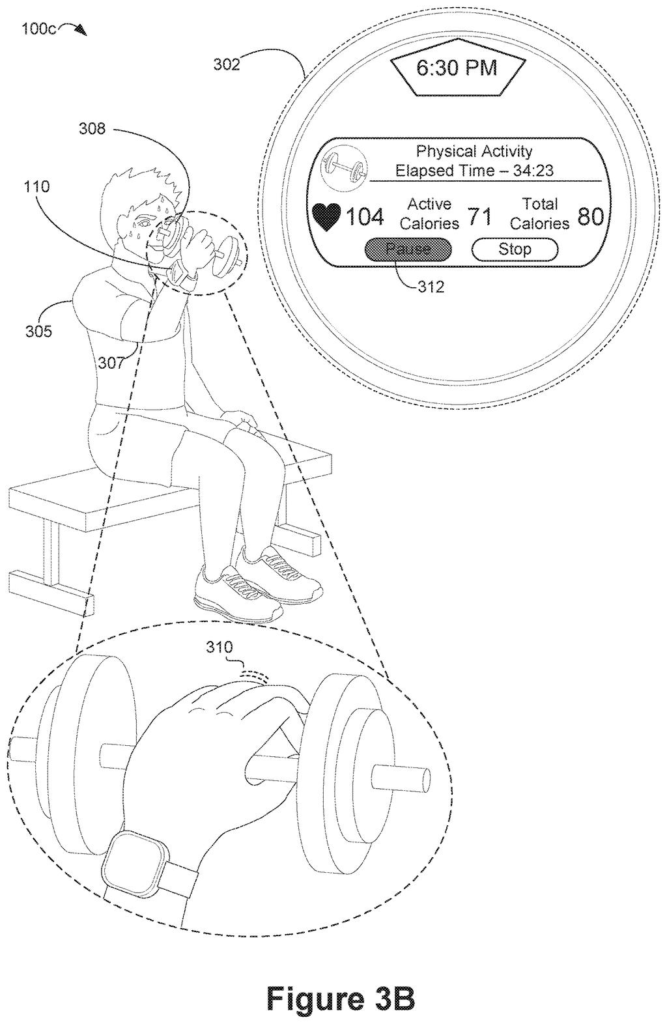
A sensor wristband detects finger taps against a handheld dumbbell to pause an exercise routine on a smart display. Drawing from patent filing US 2026/0339435 A1.
A sensor wristband detects finger taps against a handheld dumbbell to pause an exercise routine on a smart display.
See all 47 drawings from this filing ↓
Publication number US 2026/0339435 A1 US20260339435A1
Applicant Meta Platforms Technologies, LLC
Filing date Apr 16, 2026
Publication date Oct 29, 2026
Inventors Emanuele Formento, Diego Adrian Gutnisky, Shaker Monirul Islam, Ken Brian Koh, Jesse Duncan Marshall, Najja Marshall, Niru Nahesh, David Sussillo, Peter Walkington, Claire Warriner
US classification 340/384.5
Status when we published Waiting for an examiner (May 26, 2026)
Parent application Claims priority from a provisional application 63980739 (filed 2026-02-11)
Document 20 claims

What Meta's wristband does when your hands are full

Every time you carry a coffee cup in one hand and your phone buzzes, you face the same small puzzle: put the cup down, or ignore the message. Smart glasses and smartwatches have the same problem, because many of their hand controls, like pinching your thumb and finger together, need a free hand.

This Meta patent application describes a wristband that notices when you press or tap a finger against whatever you're holding, and treats that as the same command as a pinch. A tap on a can could pause your music. A press on a book could pull up a translation.

The wristband reads the faint electrical signals your muscles give off, so the movement can be tiny. You squeeze the object a little, nothing visibly moves, and your device gets the message. The filing also says the system should ignore ordinary moves, like lifting a can to take a sip.

From the filing · CLAIM 1
while a hand of a user is holding a physical object having a surface: in accordance with a determination, using data from one or more biopotential-signal sensors of a wrist-wearable device worn by the user, that the user is performing a gesture on the surface: causing performance of an action at the wrist-wearable device or a communicatively coupled device …

Translation: The wristband triggers an action when it detects you tapping on a physical object you are holding.

How the wristband tells a tap from a sip

The wristband carries biopotential-signal sensors (electrodes that pick up the tiny electrical activity of your muscles, the same family as the EMG sensors used in medical tests). Claim 1 covers two cases. While your hand is holding an object, the device checks whether you made a gesture on the object's surface, such as a tap, press or squeeze with your fingers. It also checks whether you made a digit-to-digit gesture, meaning fingers touching each other, like a pinch. Either one triggers the same action on the wristband or a connected device.

The filing describes how detection works:

  • The device looks for a sequence of muscle pulses above a baseline level that matches a set pattern, such as a double tap.
  • That pattern can be effector-agnostic (it counts no matter which finger or wrist muscle makes the pulses), so you can use whichever finger your grip leaves free.
  • The description says the baseline can be lower when your hand is full, so lighter presses still register.

Dependent claims add extras: glasses with a camera that work out what you are holding and offer an action for that type of object, like a translation for a foreign-language book, and screenless glasses that confirm with a sound. The description also says the system should ignore ordinary motions, such as lifting a can to drink.

What this means for glasses with no screen

Wearables that need a free hand fall short exactly when you most want them, like when you are carrying groceries, holding a leash or lifting weights. If a tap on whatever is in your hand works like a pinch, you could pause a song, dismiss a call or log a set without stopping what you are doing, and without waving your hand around in public.

It also suits glasses that have no screen, since the claims cover an audio confirmation. The filing pairs a wrist sensor with glasses: the wrist reads your intent, and the glasses show or say the result. Whether it works reliably on a real wrist, with real grips, is the open question.

That makes this Meta's 22nd filing we've tracked since May in our muscle-reading wristband watchlist, building on earlier applications covering wrist-roll cursor steering and muscle coaching for controls.

Editorial take

The hardware has to come first. A wristband that reads muscle signals through the skin needs to exist and work before any of this software runs on top of it, so the starting line is already further out than a pure app idea.

Once that wristband exists, teaching it to treat a tap on a coffee cup the same as a finger pinch is mostly a question of updating how it reads signals, not building anything physical and new. That is a real shortcut to a product.

The catch the document itself names is that tapping a held object misfires more often than pinching fingers together, and every proposed fix adds a small daily friction. A version that also uses glasses to recognize what you are holding adds a second device entirely, which puts it much further from any shelf.

Get our take in your Top Stories

Liked this breakdown? Add Patentlyze as a preferred source on Google, and our plain-English take shows up more often in your Top Stories the next time Meta patent news breaks.

There are more where this came from

We read every patent application Big Tech publishes and send you the ones worth knowing. Plain English, free, every week.

The drawings

47 drawing sheets from US 2026/0339435 A1 · click any drawing to enlarge

Receiving a notification alert through smart glasses and a wristband, drawing sheet 1 from US 2026/0339435 A1
Sheet 1 Receiving a notification alert through smart glasses and a wristband
Tapping one finger on a desk opens the message, drawing sheet 2 from US 2026/0339435 A1
Sheet 2 Tapping one finger on a desk opens the message
Flicking another finger chooses an action from the menu, drawing sheet 3 from US 2026/0339435 A1
Sheet 3 Flicking another finger chooses an action from the menu
Touring a museum with smart glasses and a sensor band, drawing sheet 4 from US 2026/0339435 A1
Sheet 4 Touring a museum with smart glasses and a sensor band
Pausing audio playback by pinching a finger to your thumb, drawing sheet 5 from US 2026/0339435 A1
Sheet 5 Pausing audio playback by pinching a finger to your thumb
Opening an app wheel with a different subtle finger tap, drawing sheet 6 from US 2026/0339435 A1
Sheet 6 Opening an app wheel with a different subtle finger tap
Selecting the camera app using a quick finger motion, drawing sheet 7 from US 2026/0339435 A1
Sheet 7 Selecting the camera app using a quick finger motion
Snapping a photo with a discreet finger gesture, drawing sheet 8 from US 2026/0339435 A1
Sheet 8 Snapping a photo with a discreet finger gesture
Show the other 39 sheets
Tapping fingers together to pause a virtual museum tour, drawing sheet 9 from US 2026/0339435 A1
Sheet 9 Tapping fingers together to pause a virtual museum tour
Resuming playback after the fingers return to rest, drawing sheet 10 from US 2026/0339435 A1
Sheet 10 Resuming playback after the fingers return to rest
Checking workout stats on a display while lifting weights, drawing sheet 11 from US 2026/0339435 A1
Sheet 11 Checking workout stats on a display while lifting weights
A single finger tap on the barbell selects pause, drawing sheet 12 from US 2026/0339435 A1
Sheet 12 A single finger tap on the barbell selects pause
Another quick tap confirms pausing the active workout, drawing sheet 13 from US 2026/0339435 A1
Sheet 13 Another quick tap confirms pausing the active workout
Pinching on the bar opens a circular app menu, drawing sheet 14 from US 2026/0339435 A1
Sheet 14 Pinching on the bar opens a circular app menu
Shifting your grip moves the selector across menu icons, drawing sheet 15 from US 2026/0339435 A1
Sheet 15 Shifting your grip moves the selector across menu icons
Double tapping logs a completed set in your journal, drawing sheet 16 from US 2026/0339435 A1
Sheet 16 Double tapping logs a completed set in your journal
Looking at foreign storefronts while holding a coffee cup, drawing sheet 17 from US 2026/0339435 A1
Sheet 17 Looking at foreign storefronts while holding a coffee cup
Tapping the cup prompts smart glasses to offer translation, drawing sheet 18 from US 2026/0339435 A1
Sheet 18 Tapping the cup prompts smart glasses to offer translation
Translated signs appear directly over the foreign text, drawing sheet 19 from US 2026/0339435 A1
Sheet 19 Translated signs appear directly over the foreign text
Asking for directions while tapping the cup again, drawing sheet 20 from US 2026/0339435 A1
Sheet 20 Asking for directions while tapping the cup again
Smart glasses display walking guidance alongside wrist vibrations, drawing sheet 21 from US 2026/0339435 A1
Sheet 21 Smart glasses display walking guidance alongside wrist vibrations
Steps for detecting finger gestures through wrist muscle signals, drawing sheet 22 from US 2026/0339435 A1
Sheet 22 Steps for detecting finger gestures through wrist muscle signals
Baseline muscle readings before picking up a snack bag, drawing sheet 23 from US 2026/0339435 A1
Sheet 23 Baseline muscle readings before picking up a snack bag
Grabbing the bag changes baseline muscle activity on the wrist, drawing sheet 24 from US 2026/0339435 A1
Sheet 24 Grabbing the bag changes baseline muscle activity on the wrist
Holding a snack bag brings up a nutritional info prompt, drawing sheet 25 from US 2026/0339435 A1
Sheet 25 Holding a snack bag brings up a nutritional info prompt
Tapping the bag prompts the assistant to read nutrition facts, drawing sheet 26 from US 2026/0339435 A1
Sheet 26 Tapping the bag prompts the assistant to read nutrition facts
Setting the snack down ends the interaction automatically, drawing sheet 27 from US 2026/0339435 A1
Sheet 27 Setting the snack down ends the interaction automatically
Picking up a book sets a baseline for hand gestures, drawing sheet 28 from US 2026/0339435 A1
Sheet 28 Picking up a book sets a baseline for hand gestures
Quick finger motions offer an option to translate the cover, drawing sheet 29 from US 2026/0339435 A1
Sheet 29 Quick finger motions offer an option to translate the cover
Swiping across the book switches the menu prompt to reviews, drawing sheet 30 from US 2026/0339435 A1
Sheet 30 Swiping across the book switches the menu prompt to reviews
Another tap makes smart glasses read the summary aloud, drawing sheet 31 from US 2026/0339435 A1
Sheet 31 Another tap makes smart glasses read the summary aloud
Grabbing a drink can while browsing a floating video menu, drawing sheet 32 from US 2026/0339435 A1
Sheet 32 Grabbing a drink can while browsing a floating video menu
Raising a drink moves a video selector cursor, drawing sheet 33 from US 2026/0339435 A1
Sheet 33 Raising a drink moves a video selector cursor
Tapping a held can selects a video to play, drawing sheet 34 from US 2026/0339435 A1
Sheet 34 Tapping a held can selects a video to play
Drinking from the can while video playback begins, drawing sheet 35 from US 2026/0339435 A1
Sheet 35 Drinking from the can while video playback begins
Listening to music while holding a can, drawing sheet 36 from US 2026/0339435 A1
Sheet 36 Listening to music while holding a can
Pausing music with a thumb tap on the can, drawing sheet 37 from US 2026/0339435 A1
Sheet 37 Pausing music with a thumb tap on the can
Moving a can without triggering music controls, drawing sheet 38 from US 2026/0339435 A1
Sheet 38 Moving a can without triggering music controls
Resuming music with a double thumb tap, drawing sheet 39 from US 2026/0339435 A1
Sheet 39 Resuming music with a double thumb tap
Skipping to the next song with an index tap, drawing sheet 40 from US 2026/0339435 A1
Sheet 40 Skipping to the next song with an index tap
Matching finger taps to actions based on the held item, drawing sheet 41 from US 2026/0339435 A1
Sheet 41 Matching finger taps to actions based on the held item
Deciding which menu actions to show for tiny finger squeezes, drawing sheet 42 from US 2026/0339435 A1
Sheet 42 Deciding which menu actions to show for tiny finger squeezes
Checking your gaze to generate queries about a held item, drawing sheet 43 from US 2026/0339435 A1
Sheet 43 Checking your gaze to generate queries about a held item
Triggering actions from muscle pulse timing on any finger, drawing sheet 44 from US 2026/0339435 A1
Sheet 44 Triggering actions from muscle pulse timing on any finger
Smart glasses and a wristband connecting to virtual meetings, drawing sheet 45 from US 2026/0339435 A1
Sheet 45 Smart glasses and a wristband connecting to virtual meetings
Swiping a small handheld tool across a virtual keyboard, drawing sheet 46 from US 2026/0339435 A1
Sheet 46 Swiping a small handheld tool across a virtual keyboard
Playing a mixed reality game using nearby physical objects, drawing sheet 47 from US 2026/0339435 A1
Sheet 47 Playing a mixed reality game using nearby physical objects
Browse all the drawings 47 drawing sheets
Patent filing page

Source. Full patent text and figures from the official USPTO publication PDF.
Reader comments

Be the first to weigh in

Start the discussion

Real name or a handle, either is fine. Comments are read by a person before they appear, so allow a little time. Keep it about the filing.