
Samsung Files Patent to Shorten the Wait When You Connect a New Home Appliance
Setting up a new connected appliance can leave you staring at a loading bar for 8 to 10 seconds, and some people quit. Samsung's patent application tries to hand you a simple confirm step the moment your phone connects.
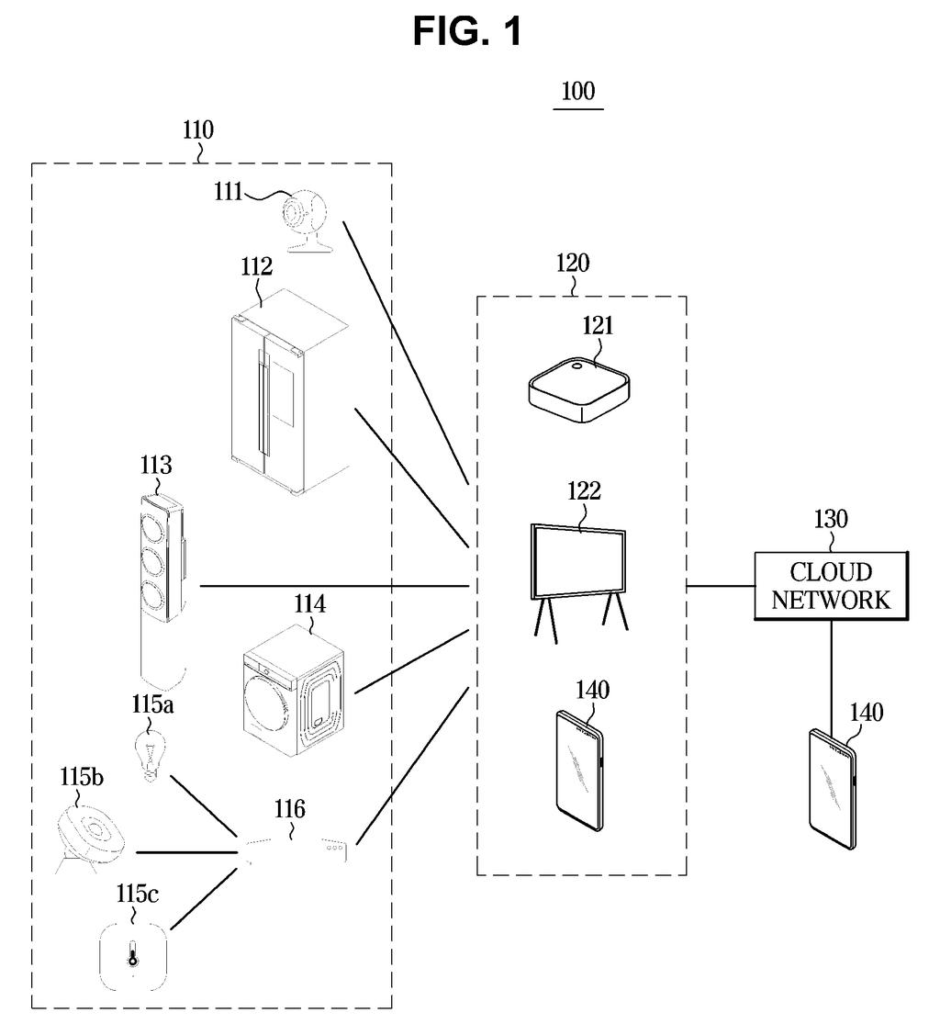
What Samsung's quick-confirm setup does
Ever stood in front of a brand-new fridge, phone in hand, watching a progress bar crawl and wondering if anything is happening? Samsung's filing says that wait can run roughly 8 to 10 seconds, and some people cancel the setup before it finishes.
The patent application skips the dead time. As soon as your phone and the appliance connect, your phone can show instructions, such as open and close the fridge door once. The appliance can also show its own signal, like a blinking indicator, saying it is ready for your confirmation. That helps a lot if your home has several similar devices and you can't tell which one is being set up.
Behind the scenes, the two devices still work out the proper security check. If the final check matches the quick one you already did, your confirmation counts. If it demands something stricter, the quick one is thrown out and you do the stricter step.
… process a confirmation of a device authentication by controlling at least one of the user interface to output a first guide on the confirmation or the communication circuitry to transmit a control signal to the electronic device to output a second guide indicating that the electronic device is in a state for receiving the confirmation …
Translation: The device handles security checks and guides the user through the setup process on screen.
How the phone and fridge agree on a check
Claim 1 covers a user device (such as a phone) that connects to another electronic device and then handles a device authentication confirmation, meaning the step where you prove you are standing at the right gadget. It can do this in two ways, alone or together:
- Show a first guide on its own screen, explaining what to do for the confirmation.
- Send a control signal that makes the other device show a second guide, telling you it is ready to receive the confirmation.
The confirmation depends on a "condition" the phone identifies for that specific device. Per the dependent claims, the phone can learn that condition from information the device shares while connecting. The link can run over Wi-Fi, Bluetooth, Bluetooth Low Energy or Zigbee.
The description fills in the speedup. The phone starts with a preset, simple method, such as pressing a button for a set time or opening a refrigerator door once. It records in memory that this quick check passed (as a single 1-bit flag) while the longer negotiation over the final method continues. When that negotiation ends, the phone compares the final condition with the quick one. If they match, the saved result stays. If they differ, the saved result is cancelled and the final method is performed. Stricter final methods listed include an ultrasonic signal, a serial number, a QR code, a PIN, a fingerprint or a face scan.
Why faster setup matters for Samsung appliances
The practical payoff is a shorter, less confusing setup. If the screen tells you what to do right away, and the appliance itself shows a ready signal, you are less likely to stall, tap cancel or poke the wrong device in a home with two similar ones.
The description points to a SmartThings server and a Bespoke refrigerator on screen, so the setting is Samsung's own connected-home world. Setup friction is a quiet reason people leave smart features unused. Trimming even a few seconds of waiting, and keeping stricter security checks in place for devices that need them, speaks to both convenience and trust.
That makes this Samsung's 1548th filing in our Samsung coverage since May, adding to work like the dim-room headset idea and the one-camera touch projector.
Claim 1 is written wide. It covers any phone-like device that, right after connecting to another gadget, either shows you a how-to-confirm message, or tells that gadget to show a ready signal, or does both.
The wait-cutting idea that fills most of the description never appears in claim 1. The claim says only that the confirmation depends on a condition the phone identifies for that particular gadget. The keep-or-cancel comparison between a quick check and the final one shows up in the narrower follow-up claims (7 through 10).
If granted, the broad wording could reach many setup flows that show a prompt after pairing. Samsung's specific idea lives in those narrower claims, and they are the ones to watch if you care how much of the speedup trick is actually covered.
Get our take in your Top Stories
Liked this breakdown? Add Patentlyze as a preferred source on Google, and our plain-English take shows up more often in your Top Stories the next time Samsung patent news breaks.
There are more where this came from
We read every patent application Big Tech publishes and send you the ones worth knowing. Plain English, free, every week.
The drawings
13 drawing sheets from US 2026/0343045 A1 · click any drawing to enlarge


Show the other 5 sheets


Want this weekly breakdown for a company we don't cover? Patentlyze Pro →
Be the first to weigh in