
Apple
Apple · Software · Filed May 8, 2026 · USPTO published Nov 12, 2026 · This week's release
A New Apple Patent Makes Virtual Instruments Sound Less Repetitive While Using Less Storage
Every time you tap the same key on a software instrument, you usually hear the exact same recording. Apple's patent application splits each note into two layers and shuffles them, so 40 recordings can behave like 400.
- Publication number
- US 2026/0360337 A1(US20260360337A1)
- Applicant
- Apple Inc.
- Filed · Published
- May 8, 2026 · Nov 12, 2026
- Inventors
- Patchen L. Preston, Ari Brown, Andrew R. Barrett
- Status when we published
- Waiting for an examiner
- Document
- 20 claims
- US classification
- 84/603
- Parent application
- Claims priority from a provisional application 63803508 (filed May 9, 2025)
What Apple's two-layer note recording does
Imagine you're writing a bass line in GarageBand and you play the same note ten times in a row. On most software instruments, you hear the same recording ten times, and the song starts to sound like a machine is playing it.
Apple's patent application goes after this by recording each note two ways: once with a dark, round tone, and once with a bright, lively tone. When you hit a key, your device plays one of each at the same moment, picked at random. Because any dark recording can pair with any bright one, a small pile of recordings makes a large number of slightly different sounds.
The bonus is storage. The filing's example needs about 150 megabytes, where the usual approach for the same variety can take several gigabytes.
obtaining a first set of fundamental layer audio samples comprising respective fundamental layer recordings of individual musical notes played by a physical instrument; obtaining a second set of harmonic layer audio samples comprising respective harmonic layer recordings of the individual musical notes played by the physical instrument; …
Translation: The system records basic notes and rich harmonic tones separately from a real instrument.
How the bright layer gets filtered and aligned
The claims cover one core idea: record every musical note in two separate layers, then put them back together when you play. The fundamental layer (the lowest frequency, which sets the pitch you hear) comes from an instrument adjusted to sound as dark and round as possible. The harmonic layer (higher frequencies that are multiples of the pitch, which give a note its brightness) comes from the same instrument in its natural, livelier state.
Three steps make the mix work:
- Phase alignment: remove pitch offset and extra pitch wobble so the two sound waves rise and fall together instead of fighting.
- Filtering: run the bright layer through a hipass filter (lets high frequencies through, blocks low ones) or a notch filter (cuts one narrow band), so it doesn't repeat what the dark layer already supplies.
- Pairing: when a note is chosen, play one fundamental and one harmonic recording together through the speaker. The filing's example picks each at random.
Because the layers stay separate, the system can turn the bright layer's volume anywhere from inaudible to loud, or reshape how its volume rises and fades, to vary each note.
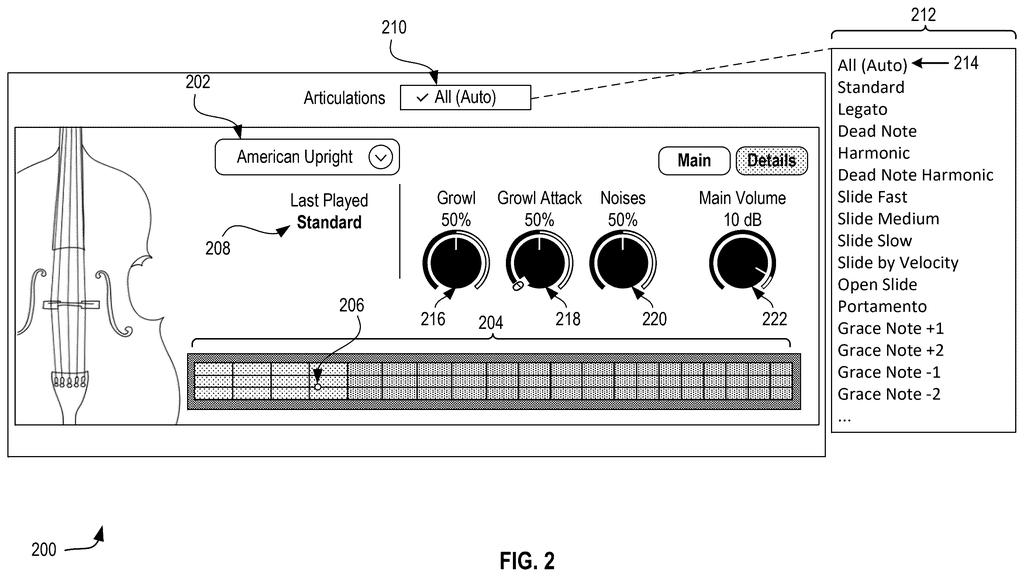
The filing also describes upright bass extras, like slide sounds, finger noises and automatic switching between single notes and chords, but the claims center on the layered notes.
By combining various pairs of fundamental and harmonic samples, realism of the virtual instrument is enhanced, while providing a sampling method with a smaller memory footprint than that found in conventional sampling methods.
Translation: Mixing and matching these separate audio layers creates more realistic sounds while using less device storage.
Why 150 megabytes beats several gigabytes
If you make music on a phone or tablet, the practical win would be fewer samey notes without a giant instrument download. The filing names GarageBand and Logic Pro as example music apps and lists phones and tablets among the devices that could run this. Smaller instrument libraries mean less storage and memory used.
The filing's numbers show the trade: 20 recordings per layer, 40 in total, about 150 megabytes, and 400 possible pairings. The conventional route to similar variety needs 400 separate recordings and multiple gigabytes. The layers also give you dials, since the bright layer's volume can be raised or lowered. The filing's example screen for an upright bass includes knobs for growl and handling noise, so you could shape the tone yourself.
Apple's 659th filing in our Apple coverage since May follows applications like the virtual bass patent and the dual-charger case.
Source: US 2026/0360337 A1 at the USPTO (PDF). Full patent text and figures are in the official publication.
Get our take in your Top Stories
Liked this breakdown? Add Patentlyze as a preferred source on Google, and our plain-English take shows up more often in your Top Stories the next time Apple patent news breaks.
Add Patentlyze on Google
One click.
There are more where this came from
We read every patent application Big Tech publishes and send you the ones worth knowing. Plain English, free, every week.
The drawings · 19 sheets
19 drawing sheets from US 2026/0360337 A1 · click any drawing to enlarge


Show the other 11 sheets


More from Apple
All 672 Apple patents →
More in Software
All 753 Software patents →
Sony
Sony Files Patent for Catching Players With Second Accounts by Their Button Habits
Microsoft
A New Microsoft Patent Uses an Interpreter's Eye Gaze to Credit the Right Signer
Google
Google Files Patent for Video Call Blur That Doesn't Flicker When You Move

Wing (Google)
No comments yet