
Apple
Apple · AR / VR · Filed May 5, 2026 · USPTO published Nov 12, 2026 · This week's release
Apple Patents a Headset Setup That Floats Your Video Above Your Laptop Screen
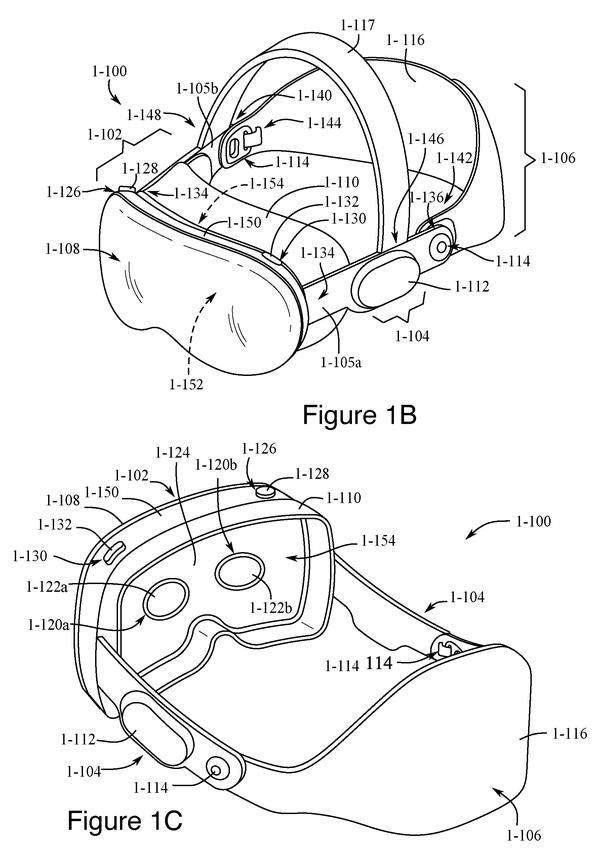
Apple describes a headset that treats your laptop like a control panel. The 3D video floats in the air above the screen, while the editing tools stay on the sharp laptop display.
- Publication number
- US 2026/0360095 A1(US20260360095A1)
- Applicant
- Apple Inc.
- Filed · Published
- May 5, 2026 · Nov 12, 2026
- Inventors
- Luis R. DELIZ CENTENO, Joshua J. FROST, Rahul NAIR, Devin W. CHALMERS
- Status when we published
- Waiting for an examiner
- Document
- 24 claims
- US classification
- 345/633
- Parent application
- Claims priority from a provisional application 63804511 (filed May 12, 2025)
What Apple's laptop-plus-headset patent does
Ever tried to edit a video when the preview and the toolbars are crammed onto one laptop screen? Apple's patent describes a way to give each its own space. If you wear a headset linked to your laptop, the video can hang in the air above your keyboard while the editing tools stay on the laptop.
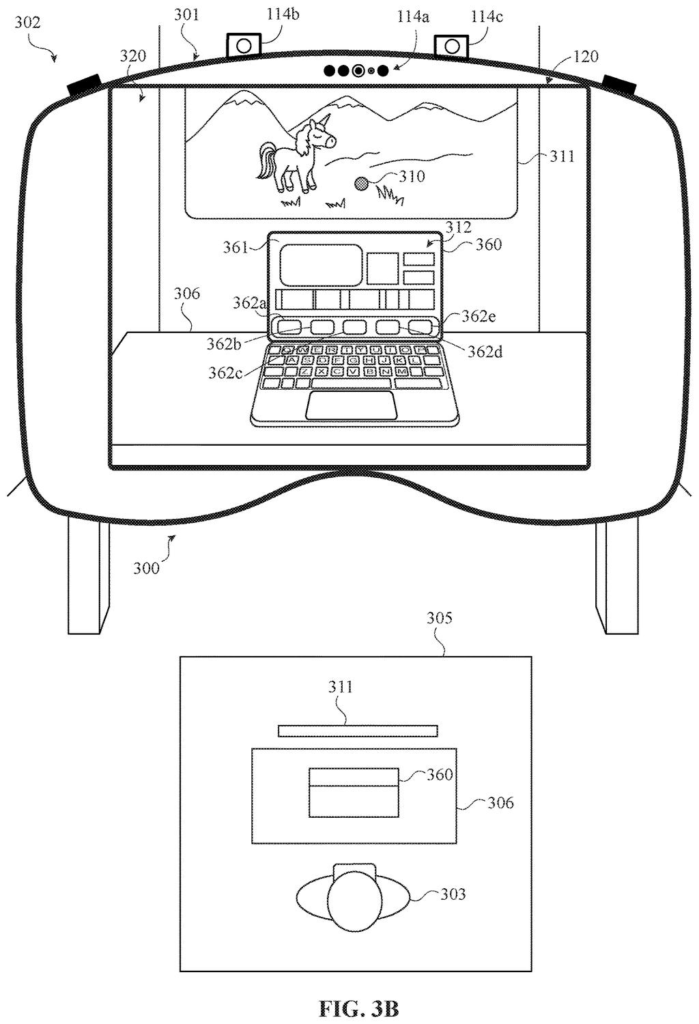
Here's the flow. You open a video editing app on the laptop, and the headset takes over the 3D video, placing it as a panel above the screen so it never blocks your view of the laptop. The laptop keeps the timeline and controls, since its screen is sharper. Look back at the laptop display, and the floating content drops back onto it.
The filing also describes dimming the laptop screen so the floating video is easier to see, and a photo gallery where picking a 3D photo makes it pop up above the laptop so you can spin it with a pinch of your fingers.
presenting, via the one or more displays of the wearable device, a first set of one or more features associated with the content in a location within the three-dimensional environment different from the location of the display of the second electronic device …
Translation: The headset shows part of your video floating in the virtual space away from your laptop.
How the headset decides what floats and what stays
The claims cover a method run by a wearable device (the filing's main example is a head-mounted display) that shows you a 3D view of your surroundings, including a second device with a screen, such as a laptop, that is linked to it. The headset gets a signal that something is showing on the laptop's screen, then checks whether that content meets certain criteria (conditions the claims leave open).
The filing's examples use two: you selected the content on the laptop, and the content is spatial content (video or photos that carry depth information, so they can be shown in 3D). If both pass, the headset presents one set of features, such as the 3D video, in a spot away from the laptop's screen. At the same time, the laptop shows a different set, such as editing controls.
The filing and the dependent claims add several variations:
- Looking at the laptop screen makes the headset stop showing the floating items and tells the laptop to show them instead.
- Choosing an app on the laptop can push its controls out into the air, where you work them with an air pinch (a finger pinch the headset's cameras detect).
- Picking a 3D photo from a gallery on the laptop makes it float above the laptop, where you can rotate it.
- The floating content stays in place as you move around.
… the wearable device detects content displayed on the second electronic device's display via the one or more input devices.
Translation: The glasses use cameras or sensors to watch what is happening on your laptop screen.
What this means for editing video in a headset
If you wear a headset for real work, the awkward part is using a laptop at the same time. This patent tries to give each device the job it does best. The headset supplies depth and size, while the laptop's sharp, high-resolution screen handles fine controls like a video timeline. Toolbars no longer crowd the preview, and where you look decides where things appear, so you skip a lot of manual window shuffling.
It also shows how headset apps could treat the gear around you. Most people will keep reaching for a keyboard and trackpad for detailed work, so a headset that cooperates with the laptop on your desk fits how people already work.
Apple's 130th filing we've tracked since May in our AR glasses work, it builds on one nudging users to look and one sharpening nearby focus.
Source: US 2026/0360095 A1 at the USPTO (PDF). Full patent text and figures are in the official publication.
Get our take in your Top Stories
Liked this breakdown? Add Patentlyze as a preferred source on Google, and our plain-English take shows up more often in your Top Stories the next time Apple patent news breaks.
Add Patentlyze on Google
One click.
There are more where this came from
We read every patent application Big Tech publishes and send you the ones worth knowing. Plain English, free, every week.
The drawings · 16 sheets
16 drawing sheets from US 2026/0360095 A1 · click any drawing to enlarge


Show the other 8 sheets


More from Apple
All 672 Apple patents →
More in AR / VR
All 690 AR / VR patents →
Apple
A New Apple Patent Has Headset Lenses Slide Themselves to Fit Your Eyes
Apple
Apple Files Patent for Headset Images That Don't Lag When You Turn Your Head
Apple
Apple Files Patent for a Headset Forehead Pad That Slides to Fit Your Face
Apple
No comments yet