
Microsoft
Microsoft · Sensor · Filed May 8, 2025 · USPTO published Nov 12, 2026 · This week's release
Microsoft Files Patent for a Laptop Touchpad That Adjusts as It Wears Out
Many laptop touchpads fake the click you feel, and the sensors behind that fake wear out over time. A new Microsoft patent application describes a touchpad that checks each sensor against its factory readings and corrects itself as you use it.
- Publication number
- US 2026/0358920 A1(US20260358920A1)
- Applicant
- Microsoft Technology Licensing, LLC
- Filed · Published
- May 8, 2025 · Nov 12, 2026
- Inventors
- Lior ZAGIEL, Roei Shlomo MENASHOF, Oren ISTRIN
- Status when we published
- Approved; patent expected soon
- Document
- 20 claims
- US classification
- 345/173
- Examiner
- JANSEN II, MICHAEL J (Art Unit 2626)
What Microsoft's self-correcting touchpad does
Many laptop touchpads don't actually click. The surface stays still, and tiny sensors underneath measure how far it gets pressed, then a buzz or a sound tells you the click registered. The catch is that the springy material under those sensors wears with use, heat and humidity, so the same press starts to read as a different amount of force. Clicks get misread, and the usual fix is a repair or a new laptop.
Microsoft's patent application describes a touchpad that corrects for that wear on its own. When the laptop is new, it records what each sensor reads for known pressures. Later, it compares how you press now with that factory baseline and adjusts each sensor separately, since the spot you press most often wears fastest.
It can even keep a separate profile for each person who uses the laptop, so the correction matches your touch.
Adaptive calibration of force sensors in haptic touchpads compensates performance degradation in real-time to maintain like-new performance.
Translation: The system automatically adjusts the touchpad as it ages so it keeps feeling brand new.
How each pressure sensor gets tuned on its own
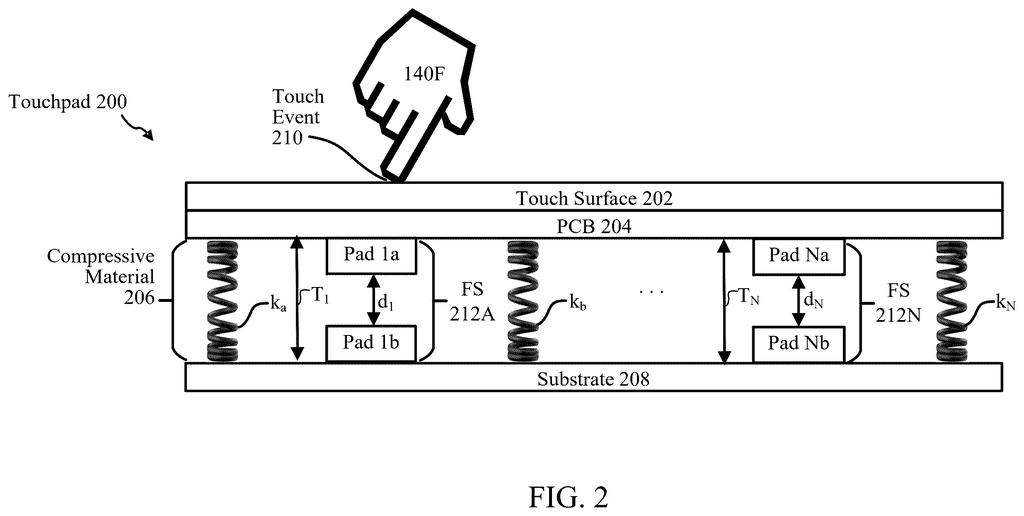
The touchpad carries an array of force sensors spread across its surface. In the example design, each one is a pair of metal pads separated by a compressible layer: press down, the gap shrinks, and the electrical signal changes. As that layer ages, the same press produces a different signal.
A collector gathers readings from your touches, plus reference data: readings recorded with known forces (for example 100 to 180 grams) when the device was new. A compensator compares the two for each sensor to estimate how far it has drifted, using up to four methods:
- Recursive least squares (a fast-updating curve fit that favors recent data)
- Kalman filter (a way to estimate the true value from noisy readings)
- Neural network (a trained model that handles sensors whose response is uneven across different forces)
- Exponential moving average (smooths short-term wobble while following long-term trends)
A determiner blends those outputs as a weighted average, giving less weight to results built on little data and discarding extreme values. An adapter then applies the result region by region by adjusting each sensor's scaling. The process can start after a set number of touches, after a period of time, or for a new user.
A monitor keeps checking the corrected readings against the reference and can roll back to an earlier calibration if the error grows too large. The filing also covers separate calibrations for each person using the laptop.
… a compensator configured to determine compensation for each of the plurality of force sensors based on determined haptic touchpad degradation associated with each of the plurality of force sensors using the sensor data and the reference data for a corresponding one of the plurality of force sensors; …
Translation: Specialized software figures out how much wear and tear each individual pressure sensor has experienced.
Why a longer-lasting touchpad matters to you
If you keep a laptop for years, a touchpad that holds its click accurate means fewer mistaken taps, fewer undo steps and less battery spent on them, according to the filing. Because it runs in the background, you would not have to recalibrate anything by hand or send the machine in for service. The same idea is described for other devices with touchpads, such as 2-in-1 laptops and tablet cases.
The patent office has approved this application and Microsoft has paid the fee to have it issued, so it should become a granted patent soon. The filing describes a technique and names no product or release plan, so there is nothing to buy yet.
Microsoft's second filing in our Sensor coverage since September follows one on stylus tilt tracking in the two applications we've tracked.
Source: US 2026/0358920 A1 at the USPTO (PDF). Full patent text and figures are in the official publication.
Get our take in your Top Stories
Liked this breakdown? Add Patentlyze as a preferred source on Google, and our plain-English take shows up more often in your Top Stories the next time Microsoft patent news breaks.
Add Patentlyze on Google
One click.
There are more where this came from
We read every patent application Big Tech publishes and send you the ones worth knowing. Plain English, free, every week.
The drawings · 7 sheets
7 drawing sheets from US 2026/0358920 A1 · click any drawing to enlarge


More from Microsoft
All 646 Microsoft patents →
More in Hardware
All 2,316 Hardware patents →
Samsung
Samsung Files Patent for a TV That Turns Off When You Fall Asleep
Samsung
Samsung Patents an Air Conditioner That Adjusts Based on Where You Move

Samsung
Samsung Patents a Projector That Knows If It's Pointing at a Wall or Floor
Samsung
No comments yet