
Adobe Files Patent for a Tool That Writes Background Music to Match Your Video's Mood
Adobe's new patent lets you tell an AI the feeling you want, then writes several original songs scored to your video's dialogue and scenes.
What Adobe's vibe-based music tool does
Imagine you've just finished editing a travel vlog, and all it needs is a soundtrack. Instead of scrolling through thousands of stock tracks and worrying about licensing, you type a few words: "warm, adventurous, a little nostalgic."
Adobe's patent describes a tool that does the listening for you. It reads what people say in your video, looks at what's on screen scene by scene, and combines that with your note about the feeling you want. Then it writes up a "vibe" (genre, instruments, mood, energy, tempo) and offers several original songs to match.
You can preview each song against your footage, change a setting such as swapping piano for drums, and ask for a fresh version. You can even work one scene at a time, so your opening and your finale get different music.
… receiving a vibe summary, the vibe summary including text describing a vibe desired to be evoked by music to be output during playback of the video data …
Translation: Users type out the emotional feel they want the background music to have.
How Adobe turns scenes and speech into a vibe
The system starts by building two text records of your video. A speech recognition engine (software that turns spoken words into written text) produces a timestamped transcript. A second step splits the video into scenes: it samples frames at a set rate (the filing gives two per second as an example), turns each frame into a numeric fingerprint using an image-and-text model, then groups similar fingerprints with a clustering method called affinity propagation. Each scene is described by feeding its middle frame to a vision-language model (an AI that writes captions for images).
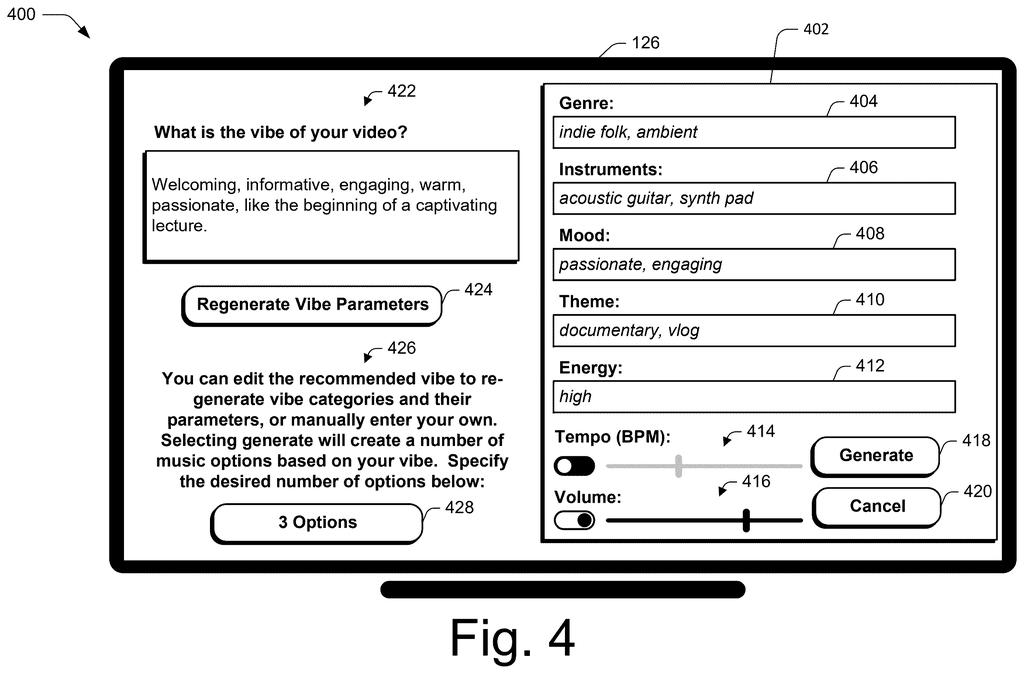
Those captions, the transcript and any note from you go into a templated prompt (a fill-in-the-blank instruction) for a language model. In the filing's example, it asks for five adjectives describing the vibe, each with descriptors. The result is a "vibe description" with editable categories:
- Genre and instruments
- Mood and theme
- Energy level, tempo and volume
You can edit any field and choose how many options to make. The system then builds several music prompts and sends each to a text-to-music model (AI that turns written instructions into audio). Each song gets a random seed (a starting number) so a regenerated version stays related to the original. The filing also describes extending, condensing and looping tracks, regenerating just one section, and a similarity slider.
The audio generation system provides an interface for users to preview, adjust, and refine generated music compositions.
Translation: Editors can listen to the AI music and tweak it until it fits just right.
Why this could change stock music for editors
If you make videos, the pain point is familiar: scrolling through endless stock libraries for a track that almost fits, then worrying about licensing. This patent aims at that chore by generating music built around your footage, with the mood spelled out in words you can edit. Because it works scene by scene, one video could carry a gentle opening and an energetic middle without you stitching clips together by hand.
For Adobe, the interesting part is where this lives: inside a timeline editor, right next to the video itself. Previewing options against your footage, flipping between versions, and stretching or looping a track to fit all happen in one place. It is a patent application, so nothing here promises a product, but it shows how AI music could fit into everyday editing.
Adobe's 39th filing in the AI image and video work we've tracked since May adds to a run that includes a brush intensity control and a cheaper model training method.
The smartest choice here is the middle step. Instead of jumping straight from video to music, the system first writes the mood out in plain words (genre, instruments, energy) that you can read and edit. That adds one step before you hear anything, and in return you get a steering wheel that a one-click "make music" button would lack.
The price is accuracy. Each scene is described from a single frame, the middle one, so a scene that starts calm and turns tense could be read as calm throughout. Words are also a clumsy way to specify music: "passionate and engaging" fits a hundred different songs, so expect a few rounds of regenerating before one clicks.
The filing pitches an escape from licensing headaches, yet the description never says how the music model learned to compose. For a hobbyist scoring a vlog, the trade looks fair. Anyone who needs a precise score will keep tweaking.
Get our take in your Top Stories
Liked this breakdown? Add Patentlyze as a preferred source on Google, and our plain-English take shows up more often in your Top Stories the next time Adobe patent news breaks.
There are more where this came from
We read every patent application Big Tech publishes and send you the ones worth knowing. Plain English, free, every week.
The drawings
13 drawing sheets from US 2026/0321231 A1 · click any drawing to enlarge


Show the other 5 sheets


Want this weekly breakdown for a company we don't cover? Patentlyze Pro →
Be the first to weigh in