Get the newsletter
Apple · Software · Filed Jul 22, 2026 · USPTO published Nov 19, 2026 · This week's release

Apple Patents a Button That Asks Someone to Share Their Screen With You

Apple's patent adds a button for asking someone to share their screen with you, then lets you ask for control of it, too.
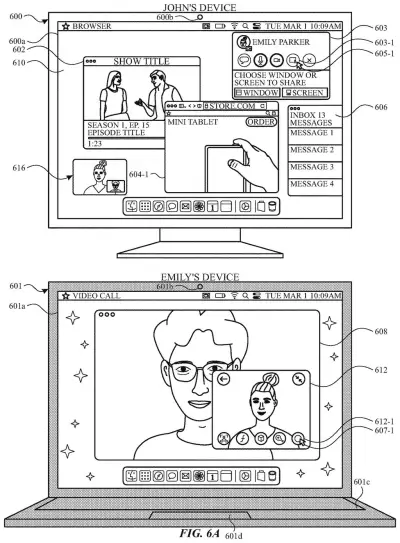
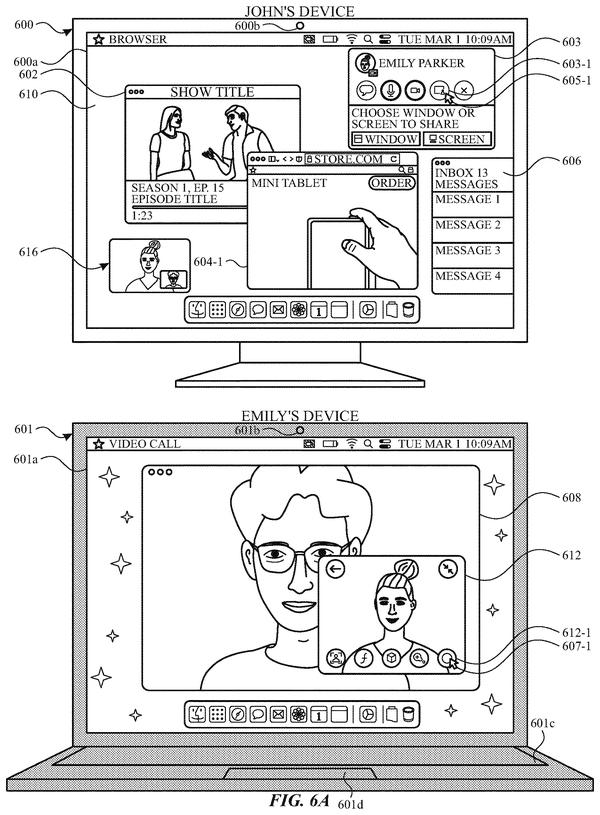
Two computers on a video call display controls for choosing whether to share a single window or an entire screen. Drawing from patent filing US 2026/0367858 A1.
Two computers on a video call display controls for choosing whether to share a single window or an entire screen.All 72 drawings ↓
Publication number
US 2026/0367858 A1(US20260367858A1)
Applicant
Apple Inc.
Filed · Published
Jul 22, 2026 · Nov 19, 2026
Inventors
Jae Woo CHANG, Nicolas V. SCAPEL, Raymond S. SEPULVEDA, Chun Kin Minor WONG
Status when we published
Waiting for an examiner
Document
12 claims
US classification
345/156
Parent application
Continuation of 19/040,719 (filed Jan 29, 2025)(19040719)

What Apple's ask-to-share-screen button does

You're on a call with your dad, and he can't find the setting he needs. You could talk him through it, menu by menu. This patent adds a simpler move: a button that asks his device to share its screen with you.

He sees a prompt with an accept button. Say yes, and his screen shows up on yours in a smaller window than your usual view. Until he accepts, you get a cancel button in case you change your mind.

If watching isn't enough, you can ask for control, and he has to approve it first. The filing also describes a visual effect once control is granted, and a way to hide one kind of content in the shared view while the rest stays clear. Even without control, your taps on his screen can show up as markers on both ends, so he sees exactly what you mean.

From the filing · CLAIM 1
… initiating a process for requesting the external computer system to share screen content in a shared-content session with the computer system.

Translation: Starting a request so another device shares its screen with you.

How the request, accept and control steps fit

Claim 1 covers a device that shows a set of sharing options, including a sharing request element. Selecting it starts a process that asks another device to share its screen with yours in a shared-content session (a live link where one device's screen appears on the other).

The dependent claims add the details:

  • A cancel button that works until the other device accepts.
  • An accept prompt that appears on the other person's device.
  • A shared-screen view that is smaller than your normal interface.
  • A visual effect that hides one type of content in the shared view but not another.
  • A control access button to request control of the other screen.
  • The option to reach all of this from a messaging conversation.
  • An identity check (authentication) on the other person's device before sharing begins.

The description covers more than the claims shown here. It also describes picking what to share during a video call (the whole screen, one app window, or several windows of one app), approving a control request, and showing a marker of your input over the shared screen on both devices.

This is a continuation of an application filed in January 2025, which itself claims priority to two provisional filings from 2024.

From the filing · THE ABSTRACT
… user interfaces are provided for requesting a computer system to share screen content.

Translation: Screens let you ask another device to share its display.

Why Apple's screen-share request matters for you

The practical win goes to whoever ends up as the family or office helper. Instead of waiting for a parent or coworker to work out how to start sharing, you send the request from your end, and they only have to tap accept. Apple says existing approaches can be cumbersome, with many key presses, and that is the gap this aims at.

Control follows the same ask-first habit. The other person approves before you can operate their screen. The filing also describes a visual effect once that happens, plus a way to hide one kind of content in the shared view. If you've ever worried about what's visible while someone looks at your screen, those guardrails matter as much as the convenience.

That makes this Apple's 33rd filing we've tracked since May in our device-to-device handoff watchlist, adding to work like sharing display settings across devices and borrowing a phone camera on TV.

Source: US 2026/0367858 A1 at the USPTO (PDF). Full patent text and figures are in the official publication.

Get our take in your Top Stories

Liked this breakdown? Add Patentlyze as a preferred source on Google, and our plain-English take shows up more often in your Top Stories the next time Apple patent news breaks.

There are more where this came from

We read every patent application Big Tech publishes and send you the ones worth knowing. Plain English, free, every week.

The drawings · 72 sheets

72 drawing sheets from US 2026/0367858 A1 · click any drawing to enlarge

Hardware parts and software built into the touchscreen phone, drawing sheet 1 from US 2026/0367858 A1
Sheet 1 Hardware parts and software built into the touchscreen phone
How apps detect and respond to your screen taps, drawing sheet 2 from US 2026/0367858 A1
Sheet 2 How apps detect and respond to your screen taps
External sensors and physical controls on the phone, drawing sheet 3 from US 2026/0367858 A1
Sheet 3 External sensors and physical controls on the phone
Internal parts of a computer running applications, drawing sheet 4 from US 2026/0367858 A1
Sheet 4 Internal parts of a computer running applications
Basic steps apps use to share information with system tools, drawing sheet 5 from US 2026/0367858 A1
Sheet 5 Basic steps apps use to share information with system tools
How apps connect to the operating system, drawing sheet 6 from US 2026/0367858 A1
Sheet 6 How apps connect to the operating system
Messages sent back and forth between apps and system software, drawing sheet 7 from US 2026/0367858 A1
Sheet 7 Messages sent back and forth between apps and system software
Standard home screen showing app icons and status indicators, drawing sheet 8 from US 2026/0367858 A1
Sheet 8 Standard home screen showing app icons and status indicators
Show the other 52 sheets
Moving fingers across a trackpad to control screen content, drawing sheet 9 from US 2026/0367858 A1
Sheet 9 Moving fingers across a trackpad to control screen content
Front view of a smartwatch with touch controls, drawing sheet 10 from US 2026/0367858 A1
Sheet 10 Front view of a smartwatch with touch controls
Internal parts and sensors that power the watch, drawing sheet 11 from US 2026/0367858 A1
Sheet 11 Internal parts and sensors that power the watch
Three callers connected in a shared video call, drawing sheet 12 from US 2026/0367858 A1
Sheet 12 Three callers connected in a shared video call
Starting a screen share during a video chat, drawing sheet 13 from US 2026/0367858 A1
Sheet 13 Starting a screen share during a video chat
Selecting a single app window to stream, drawing sheet 14 from US 2026/0367858 A1
Sheet 14 Selecting a single app window to stream
Choosing between one browser window or every open tab, drawing sheet 15 from US 2026/0367858 A1
Sheet 15 Choosing between one browser window or every open tab
Grid view of all open windows ready for sharing, drawing sheet 16 from US 2026/0367858 A1
Sheet 16 Grid view of all open windows ready for sharing
Sharing a single browser window during a video call, drawing sheet 17 from US 2026/0367858 A1
Sheet 17 Sharing a single browser window during a video call
Choosing to share one window or an entire app, drawing sheet 18 from US 2026/0367858 A1
Sheet 18 Choosing to share one window or an entire app
Broadcasting all open browser windows together in a call, drawing sheet 19 from US 2026/0367858 A1
Sheet 19 Broadcasting all open browser windows together in a call
Browsing through extra open windows to find one to share, drawing sheet 20 from US 2026/0367858 A1
Sheet 20 Browsing through extra open windows to find one to share
Paging through additional app windows to select for sharing, drawing sheet 21 from US 2026/0367858 A1
Sheet 21 Paging through additional app windows to select for sharing
Connecting a computer to a blank external monitor, drawing sheet 22 from US 2026/0367858 A1
Sheet 22 Connecting a computer to a blank external monitor
Prompting to mirror a specific window to a second monitor, drawing sheet 23 from US 2026/0367858 A1
Sheet 23 Prompting to mirror a specific window to a second monitor
Selecting one presentation window to mirror to an external screen, drawing sheet 24 from US 2026/0367858 A1
Sheet 24 Selecting one presentation window to mirror to an external screen
Mirroring a selected window onto an external monitor, drawing sheet 25 from US 2026/0367858 A1
Sheet 25 Mirroring a selected window onto an external monitor
Streaming your entire desktop view to a remote caller, drawing sheet 26 from US 2026/0367858 A1
Sheet 26 Streaming your entire desktop view to a remote caller
Opening a menu during full screen sharing reveals it immediately, drawing sheet 27 from US 2026/0367858 A1
Sheet 27 Opening a menu during full screen sharing reveals it immediately
Sharing just one app window instead of the entire desktop, drawing sheet 28 from US 2026/0367858 A1
Sheet 28 Sharing just one app window instead of the entire desktop
Widening the shared window to include an open popup menu, drawing sheet 29 from US 2026/0367858 A1
Sheet 29 Widening the shared window to include an open popup menu
Adjusting the shared screen area to show an active menu, drawing sheet 30 from US 2026/0367858 A1
Sheet 30 Adjusting the shared screen area to show an active menu
Outlining the shared screen to prevent accidental leaks, drawing sheet 31 from US 2026/0367858 A1
Sheet 31 Outlining the shared screen to prevent accidental leaks
Choosing which part of your screen to share, drawing sheet 32 from US 2026/0367858 A1
Sheet 32 Choosing which part of your screen to share
Tapping the camera icon inside a text conversation, drawing sheet 33 from US 2026/0367858 A1
Sheet 33 Tapping the camera icon inside a text conversation
Choosing to broadcast your display from a menu, drawing sheet 34 from US 2026/0367858 A1
Sheet 34 Choosing to broadcast your display from a menu
Answering an incoming call that starts the connection, drawing sheet 35 from US 2026/0367858 A1
Sheet 35 Answering an incoming call that starts the connection
An alert invites the other caller to watch, drawing sheet 36 from US 2026/0367858 A1
Sheet 36 An alert invites the other caller to watch
Unlocking with face recognition before video begins, drawing sheet 37 from US 2026/0367858 A1
Sheet 37 Unlocking with face recognition before video begins
Watching a contact browse their phone in real time, drawing sheet 38 from US 2026/0367858 A1
Sheet 38 Watching a contact browse their phone in real time
Selecting an option to request the other screen, drawing sheet 39 from US 2026/0367858 A1
Sheet 39 Selecting an option to request the other screen
Prompting a contact to approve showing their display, drawing sheet 40 from US 2026/0367858 A1
Sheet 40 Prompting a contact to approve showing their display
Alerting a contact when you request to view their screen, drawing sheet 41 from US 2026/0367858 A1
Sheet 41 Alerting a contact when you request to view their screen
Floating a shared screen over an ongoing chat, drawing sheet 42 from US 2026/0367858 A1
Sheet 42 Floating a shared screen over an ongoing chat
Showing a shared home screen alongside a live video call, drawing sheet 43 from US 2026/0367858 A1
Sheet 43 Showing a shared home screen alongside a live video call
Masking sensitive account numbers while sharing an app, drawing sheet 44 from US 2026/0367858 A1
Sheet 44 Masking sensitive account numbers while sharing an app
Expanding the shared app view across the caller's display, drawing sheet 45 from US 2026/0367858 A1
Sheet 45 Expanding the shared app view across the caller's display
Steps for requesting to view another person's screen, drawing sheet 46 from US 2026/0367858 A1
Sheet 46 Steps for requesting to view another person's screen
Tapping the remote control button to request full access, drawing sheet 47 from US 2026/0367858 A1
Sheet 47 Tapping the remote control button to request full access
Asking permission before taking control of someone's screen, drawing sheet 48 from US 2026/0367858 A1
Sheet 48 Asking permission before taking control of someone's screen
Notifications confirm that remote control access has been granted, drawing sheet 49 from US 2026/0367858 A1
Sheet 49 Notifications confirm that remote control access has been granted
Banners show who is able to control the shared screen, drawing sheet 50 from US 2026/0367858 A1
Sheet 50 Banners show who is able to control the shared screen
Tapping an app remotely opens it on the other phone, drawing sheet 51 from US 2026/0367858 A1
Sheet 51 Tapping an app remotely opens it on the other phone
A button lets the owner end remote control anytime, drawing sheet 52 from US 2026/0367858 A1
Sheet 52 A button lets the owner end remote control anytime
Swiping takes back control and locks out the other caller, drawing sheet 53 from US 2026/0367858 A1
Sheet 53 Swiping takes back control and locks out the other caller
Selecting an app icon launches it across both screens, drawing sheet 54 from US 2026/0367858 A1
Sheet 54 Selecting an app icon launches it across both screens
Striped borders show when remote control is active, drawing sheet 55 from US 2026/0367858 A1
Sheet 55 Striped borders show when remote control is active
Rotating one phone adjusts the remote view to match orientation, drawing sheet 56 from US 2026/0367858 A1
Sheet 56 Rotating one phone adjusts the remote view to match orientation
Notifications confirm that remote control is active on both devices, drawing sheet 57 from US 2026/0367858 A1
Sheet 57 Notifications confirm that remote control is active on both devices
A tablet controls a shared phone screen during video calls, drawing sheet 58 from US 2026/0367858 A1
Sheet 58 A tablet controls a shared phone screen during video calls
Screen sharing adapts when devices are held in different orientations, drawing sheet 59 from US 2026/0367858 A1
Sheet 59 Screen sharing adapts when devices are held in different orientations
A countdown prompt asks to confirm continued remote access, drawing sheet 60 from US 2026/0367858 A1
Sheet 60 A countdown prompt asks to confirm continued remote access

Sheets 61 to 72 are in the full USPTO filing.

Patent filing page

Watchlists this filing belongs to

All watchlists →
Reader comments

No comments yet

Start the discussion

Real name or a handle, either is fine. Comments are read by a person before they appear, so allow a little time. Keep it about the filing.