Get the newsletter
Apple · Software · Filed May 13, 2026 · USPTO published Nov 19, 2026 · This week's release

A New Apple Patent Gives Messages Backgrounds That React to Your Taps and Shakes

Apple's filing imagines the picture behind your text conversation coming alive when you shake your phone, tap it, or react to a message. It also describes a safety check that can switch a background off when a chat looks unsafe.
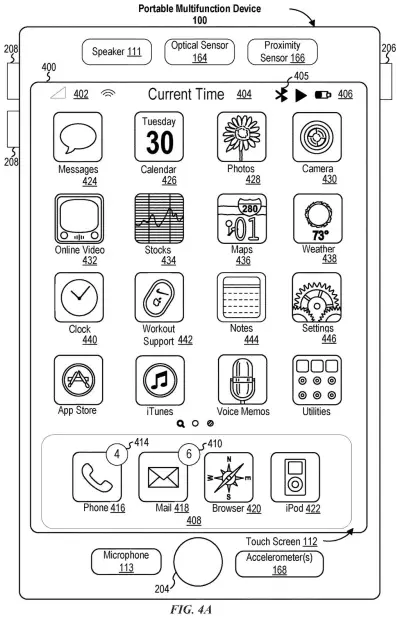
An iPhone home screen displaying app icons, camera sensors, and speakers used to detect how someone holds and touches the device. Drawing from patent filing US 2026/0367747 A1.
An iPhone home screen displaying app icons, camera sensors, and speakers used to detect how someone holds and touches the device.All 58 drawings ↓
Publication number
US 2026/0367747 A1(US20260367747A1)
Applicant
Apple Inc.
Filed · Published
May 13, 2026 · Nov 19, 2026
Inventors
Christian X. DALONZO, Grant R. PAUL
Status when we published
Waiting for an examiner
Document
20 claims
US classification
715/753
Parent application
Claims priority from a provisional application 63808288 (filed May 19, 2025)

What Apple's reactive chat backgrounds do

Right now, the backdrop behind your text conversations is a plain color or a preset picture. Apple's own filing calls it generic: it just sits there while the messages scroll over it.

The filing describes a background that responds to what is happening in the chat. Tap it, shake your phone, or add a reaction to someone's message, and the backdrop can switch to a new look or start an animation. It can settle back down afterward, and it can change again on the next event.

The filing also covers two other ideas. One is a "safe" check: the phone can decide not to show a background based on who sent it, what is in it, or your own settings. The other is a background that an automatic image-making app creates for you from what the conversation is about.

From the filing · CLAIM 1
displaying, via the one or more display generation components, a messaging user interface associated with a messaging application, including: a visual representation of a messaging conversation that includes a first user of the first electronic device and a second user; and a first visual representation of a background layer …

Translation: The app shows a chat screen between two people with a backdrop image.

How a shake or a tap changes the backdrop

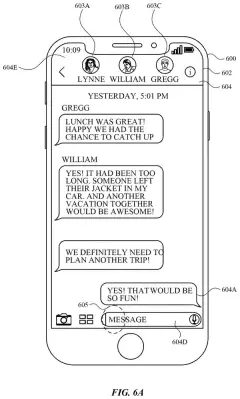
The claimed core is a simple loop. The messaging screen shows your conversation on top of a background layer (the picture or pattern behind the message bubbles). While that screen is open, the phone watches for an event. If the event meets certain criteria, the background switches to a second look tied to that event. If it does not, the background stays as it was.

The filing lists several things that can count as an event:

  • An input aimed at the background itself
  • The phone moving past a set threshold, such as a shake
  • Adding a reaction to a message
  • An input detected on a second device

Other claims add detail. The change can start an animation, and after a set amount of time the background can move on to yet another look. Opening a conversation can automatically play an animation, and when it ends the background returns to its resting state. Picking colors can change the background's content, and dragging a message to a new spot can change how that message is drawn against the background, as if it sits at a different depth.

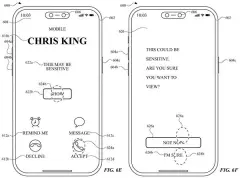
Two other embodiments appear in the description. One decides when a conversation is not "safe" using the sender, the background's content, and a preference you set. The other asks an automatic visual-media app to generate a background from what the conversation says.

From the filing · THE ABSTRACT
… an electronic device displays one or more visual representations of a background layer based on a detected event, such as to provide response to user interaction with the messaging conversation.

Translation: The chat background changes when the phone detects user actions or gestures.

Why your chat wallpaper might start moving

If you text a lot, this is about making the screen you stare at all day react to you. A background that animates when you add a reaction or shake your phone would give a group chat a bit of play, and the filing describes it for conversations with two people or more.

The safety idea may matter more. Once chats can carry custom or animated backgrounds that get shared, someone else has a say in what shows up on your screen. Apple's filing describes checks on the sender, the background content and your own settings, so you could skip a background you don't want without digging through menus. It is a filing, not a product, and nothing in it says when or whether anything ships.

This is the 740th Apple filing in our Apple coverage since May, adding to work like the pen-aware hand tracking and the steady floating screens.

Source: US 2026/0367747 A1 at the USPTO (PDF). Full patent text and figures are in the official publication.

Get our take in your Top Stories

Liked this breakdown? Add Patentlyze as a preferred source on Google, and our plain-English take shows up more often in your Top Stories the next time Apple patent news breaks.

There are more where this came from

We read every patent application Big Tech publishes and send you the ones worth knowing. Plain English, free, every week.

The drawings · 58 sheets

58 drawing sheets from US 2026/0367747 A1 · click any drawing to enlarge

Hardware parts that run the phone and detect gestures, drawing sheet 1 from US 2026/0367747 A1
Sheet 1 Hardware parts that run the phone and detect gestures
How apps recognize and sort incoming screen taps, drawing sheet 2 from US 2026/0367747 A1
Sheet 2 How apps recognize and sort incoming screen taps
A touchscreen phone detecting finger presses and stylus taps, drawing sheet 3 from US 2026/0367747 A1
Sheet 3 A touchscreen phone detecting finger presses and stylus taps
Memory and display parts inside a connected computer, drawing sheet 4 from US 2026/0367747 A1
Sheet 4 Memory and display parts inside a connected computer
Basic steps for sharing data between software tools, drawing sheet 5 from US 2026/0367747 A1
Sheet 5 Basic steps for sharing data between software tools
Software parts that let apps ask the system for help, drawing sheet 6 from US 2026/0367747 A1
Sheet 6 Software parts that let apps ask the system for help
Two ways apps request and receive system actions, drawing sheet 7 from US 2026/0367747 A1
Sheet 7 Two ways apps request and receive system actions
Home screen showing built-in apps like Messages and Photos, drawing sheet 8 from US 2026/0367747 A1
Sheet 8 Home screen showing built-in apps like Messages and Photos
Show the other 50 sheets
Moving fingers across a trackpad to control an external screen, drawing sheet 9 from US 2026/0367747 A1
Sheet 9 Moving fingers across a trackpad to control an external screen
Front view of a smartwatch with physical buttons, drawing sheet 10 from US 2026/0367747 A1
Sheet 10 Front view of a smartwatch with physical buttons
Internal parts that power a wearable computer, drawing sheet 11 from US 2026/0367747 A1
Sheet 11 Internal parts that power a wearable computer
Measuring pressure at each corner of the screen, drawing sheet 12 from US 2026/0367747 A1
Sheet 12 Measuring pressure at each corner of the screen
Calculating the force of individual fingertip presses, drawing sheet 13 from US 2026/0367747 A1
Sheet 13 Calculating the force of individual fingertip presses
Hovering over an app using light trackpad pressure, drawing sheet 14 from US 2026/0367747 A1
Sheet 14 Hovering over an app using light trackpad pressure
Pressing down harder opens a file preview, drawing sheet 15 from US 2026/0367747 A1
Sheet 15 Pressing down harder opens a file preview
Pushing with full force reveals more recent documents, drawing sheet 16 from US 2026/0367747 A1
Sheet 16 Pushing with full force reveals more recent documents
Pressing harder on a touchpad reveals recent documents, drawing sheet 17 from US 2026/0367747 A1
Sheet 17 Pressing harder on a touchpad reveals recent documents
Matching animated backgrounds appear across two phones in a chat, drawing sheet 18 from US 2026/0367747 A1
Sheet 18 Matching animated backgrounds appear across two phones in a chat
Tapping a message bubble makes the background ripple around it, drawing sheet 19 from US 2026/0367747 A1
Sheet 19 Tapping a message bubble makes the background ripple around it
Adding a reaction triggers background vibrations on both phones, drawing sheet 20 from US 2026/0367747 A1
Sheet 20 Adding a reaction triggers background vibrations on both phones
Swiping across the chat stirs up ripples toward another bubble, drawing sheet 21 from US 2026/0367747 A1
Sheet 21 Swiping across the chat stirs up ripples toward another bubble
Ripples bounce off chat bubbles across both users screens, drawing sheet 22 from US 2026/0367747 A1
Sheet 22 Ripples bounce off chat bubbles across both users screens
Dragging down the chat thread scrolls back through message history, drawing sheet 23 from US 2026/0367747 A1
Sheet 23 Dragging down the chat thread scrolls back through message history
Scrolling back displays older texts while retaining reaction ripples, drawing sheet 24 from US 2026/0367747 A1
Sheet 24 Scrolling back displays older texts while retaining reaction ripples
Matching wavy backgrounds shown inside a shared chat, drawing sheet 25 from US 2026/0367747 A1
Sheet 25 Matching wavy backgrounds shown inside a shared chat
Tilting one phone shifts its background independently, drawing sheet 26 from US 2026/0367747 A1
Sheet 26 Tilting one phone shifts its background independently
Two phones share a synchronized glitter background pattern in chat, drawing sheet 27 from US 2026/0367747 A1
Sheet 27 Two phones share a synchronized glitter background pattern in chat
Shaking a phone causes its background particles to scatter, drawing sheet 28 from US 2026/0367747 A1
Sheet 28 Shaking a phone causes its background particles to scatter
Swiping across the screen pushes background clouds into new spots, drawing sheet 29 from US 2026/0367747 A1
Sheet 29 Swiping across the screen pushes background clouds into new spots
Another swipe darkens the sky background on the local device, drawing sheet 30 from US 2026/0367747 A1
Sheet 30 Another swipe darkens the sky background on the local device
Only the sender sees the darker sky after their gesture, drawing sheet 31 from US 2026/0367747 A1
Sheet 31 Only the sender sees the darker sky after their gesture
Dragging downward moves underwater sea creatures beneath chat bubbles, drawing sheet 32 from US 2026/0367747 A1
Sheet 32 Dragging downward moves underwater sea creatures beneath chat bubbles
Swiping up to scroll through earlier messages in the chat, drawing sheet 33 from US 2026/0367747 A1
Sheet 33 Swiping up to scroll through earlier messages in the chat
Hiding message bubbles to show only the animated wallpaper, drawing sheet 34 from US 2026/0367747 A1
Sheet 34 Hiding message bubbles to show only the animated wallpaper
Tapping a contact header to open chat details, drawing sheet 35 from US 2026/0367747 A1
Sheet 35 Tapping a contact header to open chat details
Picking a new wallpaper theme from the conversation settings menu, drawing sheet 36 from US 2026/0367747 A1
Sheet 36 Picking a new wallpaper theme from the conversation settings menu
Updating the shared chat background across both participants' screens, drawing sheet 37 from US 2026/0367747 A1
Sheet 37 Updating the shared chat background across both participants' screens
How gestures change a chat background, drawing sheet 38 from US 2026/0367747 A1
Sheet 38 How gestures change a chat background
Texting a new number using a custom background, drawing sheet 39 from US 2026/0367747 A1
Sheet 39 Texting a new number using a custom background
Receiving an incoming text notification on the conversation list screen, drawing sheet 40 from US 2026/0367747 A1
Sheet 40 Receiving an incoming text notification on the conversation list screen
Asking permission to show backgrounds from unknown numbers, drawing sheet 41 from US 2026/0367747 A1
Sheet 41 Asking permission to show backgrounds from unknown numbers
Updating the sender's wallpaper as the chat continues, drawing sheet 42 from US 2026/0367747 A1
Sheet 42 Updating the sender's wallpaper as the chat continues
Tapping the sender's phone number to open their contact card, drawing sheet 43 from US 2026/0367747 A1
Sheet 43 Tapping the sender's phone number to open their contact card
Saving a new contact name to approve shared backgrounds, drawing sheet 44 from US 2026/0367747 A1
Sheet 44 Saving a new contact name to approve shared backgrounds
Accepting the saved contact's shared wallpaper inside the chat, drawing sheet 45 from US 2026/0367747 A1
Sheet 45 Accepting the saved contact's shared wallpaper inside the chat
Showing the same background on both phones after approval, drawing sheet 46 from US 2026/0367747 A1
Sheet 46 Showing the same background on both phones after approval
Browsing suggested background themes in contact settings, drawing sheet 47 from US 2026/0367747 A1
Sheet 47 Browsing suggested background themes in contact settings
Warning the recipient before displaying sensitive custom artwork, drawing sheet 48 from US 2026/0367747 A1
Sheet 48 Warning the recipient before displaying sensitive custom artwork
Two phones displaying different backgrounds for the same chat, drawing sheet 49 from US 2026/0367747 A1
Sheet 49 Two phones displaying different backgrounds for the same chat
Deciding whether to show an incoming chat background, drawing sheet 50 from US 2026/0367747 A1
Sheet 50 Deciding whether to show an incoming chat background
Suggesting a new wallpaper based on keywords in text messages, drawing sheet 51 from US 2026/0367747 A1
Sheet 51 Suggesting a new wallpaper based on keywords in text messages
Updating the chat backdrop as the conversation changes topics, drawing sheet 52 from US 2026/0367747 A1
Sheet 52 Updating the chat backdrop as the conversation changes topics
Picking generated artwork from a conversation settings menu, drawing sheet 53 from US 2026/0367747 A1
Sheet 53 Picking generated artwork from a conversation settings menu
Leaving a themed conversation to view the full message list, drawing sheet 54 from US 2026/0367747 A1
Sheet 54 Leaving a themed conversation to view the full message list
Offering floral wallpaper options based on mentions of roses, drawing sheet 55 from US 2026/0367747 A1
Sheet 55 Offering floral wallpaper options based on mentions of roses
Generating animated artwork inside a dedicated creative app, drawing sheet 56 from US 2026/0367747 A1
Sheet 56 Generating animated artwork inside a dedicated creative app
Creating a custom animated background from typed prompts and suggestions, drawing sheet 57 from US 2026/0367747 A1
Sheet 57 Creating a custom animated background from typed prompts and suggestions
How the phone automatically generates chat wallpapers from your texts, drawing sheet 58 from US 2026/0367747 A1
Sheet 58 How the phone automatically generates chat wallpapers from your texts
Patent filing page

Reader comments

No comments yet

Start the discussion

Real name or a handle, either is fine. Comments are read by a person before they appear, so allow a little time. Keep it about the filing.