Get the newsletter
Apple · Software · Filed May 15, 2026 · USPTO published Nov 19, 2026 · This week's release

Apple Files Patent for Setting Up Widgets on a Second Screen Like a Car Display

Apple describes an editing screen that rearranges the widget stacks on a second display, such as one in your car, plus a reminder to use it when your drive ends.
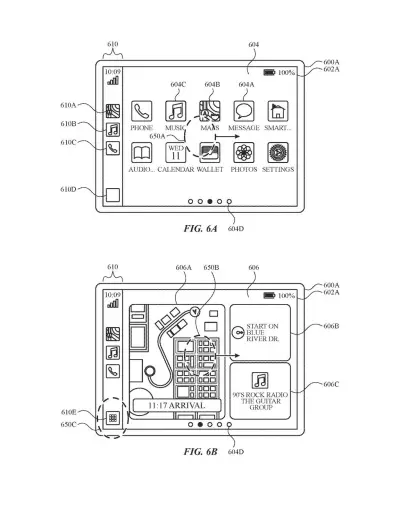
A car dashboard screen displays navigation directions, media playback controls, and quick-launch app shortcuts. Drawing from patent filing US 2026/0367857 A1.
A car dashboard screen displays navigation directions, media playback controls, and quick-launch app shortcuts.All 54 drawings ↓
Publication number
US 2026/0367857 A1(US20260367857A1)
Applicant
Apple Inc.
Filed · Published
May 15, 2026 · Nov 19, 2026
Inventors
Richard R. DELLINGER
Status when we published
Waiting for an examiner
Document
14 claims
US classification
715/761
Parent application
Claims priority from a provisional application 63819872 (filed Jun 8, 2025)

What Apple's widget-stack editor actually does

Imagine you finish a drive and realize the screen in your car keeps showing a widget you never look at, while the one you want is buried several swipes deep. Fiddling with that on the car's own screen is awkward.

Apple's filing describes an editing screen on one device, such as your phone, that controls what shows up on a different screen. Widgets (small panels that show things like weather or music) are grouped into stacks, and each stack gets its own setup. You can add a widget, remove one, or change the order in one stack without touching the other. When you finish, both stacks appear on the second screen with your changes.

The filing also describes a notification on your first device when a drive ends, pointing you back to the editing screen.

From the filing · CLAIM 1
displaying, via the first set of one or more display generation components, a widget editing user interface that includes one or more options corresponding to a first stack of widgets and one or more options corresponding to a second stack of widgets …

Translation: Users can edit different stacks of widgets using an interface on the primary screen.

How each widget stack gets its own layout

The core claim covers a widget editing interface shown on a first screen. It lists options for at least two stacks of widgets (a stack is a pile of small info panels where you flip through one at a time). Each stack has its own configuration, meaning its own saved arrangement, and that arrangement controls how the stack looks on a different, second screen.

Inputs on the editing screen change the first stack's configuration, and separate inputs change the second stack's. Afterward, the second screen shows both stacks at once using the modified arrangements. The dependent claims add detail:

  • You can add a widget to a stack, remove one, or change the order.
  • Widgets in one stack can come from different apps.
  • Widgets in a stack can share the same display size.
  • A widget suggestion setting, when turned on, puts a different suggested widget in each stack, and turning it off takes those suggestions back out.
  • The second screen can be built into a vehicle, and the first device can post a notification about the editing screen when a drive ends.

The description also covers related ideas: a map screen that gives way to a widgets screen where swiping one stack leaves the others alone, a way to send video playback from the first screen to the second, and a way to fit a layout to a screen's size and resolution.

From the filing · THE ABSTRACT
The present disclosure generally relates to user interfaces. In some embodiments, the user interfaces are displayed on a secondary display.

Translation: The patent covers software layouts that appear on an extra screen like a dashboard monitor.

Why your car screen could get less fiddly

If you have ever tried to change a setting on a car's screen, you know it is a poor place for it. This patent moves the fiddly part to a calmer spot: an editing page where you set up each stack of widgets, then see the result on the second screen. The after-drive notification in the claims points to a sensible moment to tidy up, once you have parked.

For Apple, the filing shows how much thought goes into the handoff between a personal device and a separate screen. The description also covers sending video to the second screen and fitting layouts to different screen sizes. Whether any of it reaches your dashboard depends on products that this document does not announce.

That makes this Apple's 725th filing in our Apple coverage since May, adding to a run that includes the voice assistant dialog patent and the screen-share button patent.

Source: US 2026/0367857 A1 at the USPTO (PDF). Full patent text and figures are in the official publication.

Get our take in your Top Stories

Liked this breakdown? Add Patentlyze as a preferred source on Google, and our plain-English take shows up more often in your Top Stories the next time Apple patent news breaks.

There are more where this came from

We read every patent application Big Tech publishes and send you the ones worth knowing. Plain English, free, every week.

The drawings · 54 sheets

54 drawing sheets from US 2026/0367857 A1 · click any drawing to enlarge

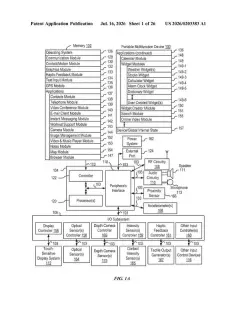
Hardware parts and software programs inside a smartphone, drawing sheet 1 from US 2026/0367857 A1
Sheet 1 Hardware parts and software programs inside a smartphone
How the system routes screen taps to apps, drawing sheet 2 from US 2026/0367857 A1
Sheet 2 How the system routes screen taps to apps
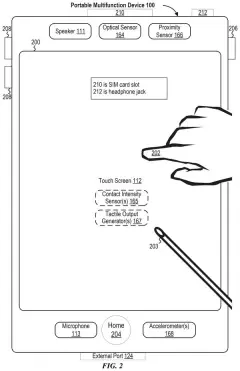
Touchscreen layout showing finger and stylus input, drawing sheet 3 from US 2026/0367857 A1
Sheet 3 Touchscreen layout showing finger and stylus input
Internal parts of a computer running widgets and apps, drawing sheet 4 from US 2026/0367857 A1
Sheet 4 Internal parts of a computer running widgets and apps
Steps for apps to share data and trigger actions, drawing sheet 5 from US 2026/0367857 A1
Sheet 5 Steps for apps to share data and trigger actions
Software bridges that allow apps to talk to the system, drawing sheet 6 from US 2026/0367857 A1
Sheet 6 Software bridges that allow apps to talk to the system
Data passing between apps and the operating system, drawing sheet 7 from US 2026/0367857 A1
Sheet 7 Data passing between apps and the operating system
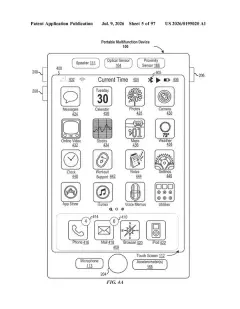
Classic home screen displaying apps and an icon dock, drawing sheet 8 from US 2026/0367857 A1
Sheet 8 Classic home screen displaying apps and an icon dock
Show the other 46 sheets
Touchpad gestures mapped to a separate screen, drawing sheet 9 from US 2026/0367857 A1
Sheet 9 Touchpad gestures mapped to a separate screen
A wearable device with physical input buttons, drawing sheet 10 from US 2026/0367857 A1
Sheet 10 A wearable device with physical input buttons
Hardware parts that track motion and handle inputs, drawing sheet 11 from US 2026/0367857 A1
Sheet 11 Hardware parts that track motion and handle inputs
Switching from car app icons to navigation and audio widgets, drawing sheet 12 from US 2026/0367857 A1
Sheet 12 Switching from car app icons to navigation and audio widgets
Swiping up to replace the clock with stock updates, drawing sheet 13 from US 2026/0367857 A1
Sheet 13 Swiping up to replace the clock with stock updates
Flipping through sports scores and swiping the calendar, drawing sheet 14 from US 2026/0367857 A1
Sheet 14 Flipping through sports scores and swiping the calendar
Browsing past reminders to reveal podcast controls, drawing sheet 15 from US 2026/0367857 A1
Sheet 15 Browsing past reminders to reveal podcast controls
Scrolling deliveries and tapping home to leave widget view, drawing sheet 16 from US 2026/0367857 A1
Sheet 16 Scrolling deliveries and tapping home to leave widget view
Switching between dashboard views and apps on a car screen, drawing sheet 17 from US 2026/0367857 A1
Sheet 17 Switching between dashboard views and apps on a car screen
A phone lock screen prompt to edit car widgets, drawing sheet 18 from US 2026/0367857 A1
Sheet 18 A phone lock screen prompt to edit car widgets
Reordering car screen widgets directly from a phone, drawing sheet 19 from US 2026/0367857 A1
Sheet 19 Reordering car screen widgets directly from a phone
Removing an unwanted widget from the car display stack, drawing sheet 20 from US 2026/0367857 A1
Sheet 20 Removing an unwanted widget from the car display stack
Tapping to add a new widget to the car layout, drawing sheet 21 from US 2026/0367857 A1
Sheet 21 Tapping to add a new widget to the car layout
Browsing a menu of available widgets on the phone, drawing sheet 22 from US 2026/0367857 A1
Sheet 22 Browsing a menu of available widgets on the phone
Selecting a second stack to customize for the car, drawing sheet 23 from US 2026/0367857 A1
Sheet 23 Selecting a second stack to customize for the car
Managing a secondary list of widgets for the car screen, drawing sheet 24 from US 2026/0367857 A1
Sheet 24 Managing a secondary list of widgets for the car screen
Toggling car wallpaper settings from a phone menu, drawing sheet 25 from US 2026/0367857 A1
Sheet 25 Toggling car wallpaper settings from a phone menu
Swiping across app pages on the car display, drawing sheet 26 from US 2026/0367857 A1
Sheet 26 Swiping across app pages on the car display
Panning across a map displayed on the car screen, drawing sheet 27 from US 2026/0367857 A1
Sheet 27 Panning across a map displayed on the car screen
Flipping through stacked sports and calendar widgets, drawing sheet 28 from US 2026/0367857 A1
Sheet 28 Flipping through stacked sports and calendar widgets
Navigating between widget pages on the dashboard screen, drawing sheet 29 from US 2026/0367857 A1
Sheet 29 Navigating between widget pages on the dashboard screen
Moving back to the map screen with a side swipe, drawing sheet 30 from US 2026/0367857 A1
Sheet 30 Moving back to the map screen with a side swipe
Selecting a video app on the connected phone, drawing sheet 31 from US 2026/0367857 A1
Sheet 31 Selecting a video app on the connected phone
Opening phone videos while car dashboard stays on apps, drawing sheet 32 from US 2026/0367857 A1
Sheet 32 Opening phone videos while car dashboard stays on apps
Playing a phone video while connected to a car, drawing sheet 33 from US 2026/0367857 A1
Sheet 33 Playing a phone video while connected to a car
Asking to send phone video to the car screen, drawing sheet 34 from US 2026/0367857 A1
Sheet 34 Asking to send phone video to the car screen
Playing full video on the car screen with phone controls, drawing sheet 35 from US 2026/0367857 A1
Sheet 35 Playing full video on the car screen with phone controls
Switching video playback back to the phone screen, drawing sheet 36 from US 2026/0367857 A1
Sheet 36 Switching video playback back to the phone screen
Resuming phone playback while showing car audio info, drawing sheet 37 from US 2026/0367857 A1
Sheet 37 Resuming phone playback while showing car audio info
Scaling the app grid across different vehicle screen sizes, drawing sheet 38 from US 2026/0367857 A1
Sheet 38 Scaling the app grid across different vehicle screen sizes
Adding more app rows on larger vehicle displays, drawing sheet 39 from US 2026/0367857 A1
Sheet 39 Adding more app rows on larger vehicle displays
Setting up widget stacks on a second screen, drawing sheet 40 from US 2026/0367857 A1
Sheet 40 Setting up widget stacks on a second screen
Switching between widgets in stacked collections on a screen, drawing sheet 41 from US 2026/0367857 A1
Sheet 41 Switching between widgets in stacked collections on a screen
Checking if an app can stream video to the car, drawing sheet 42 from US 2026/0367857 A1
Sheet 42 Checking if an app can stream video to the car
Moving video playback from a phone to a car screen, drawing sheet 43 from US 2026/0367857 A1
Sheet 43 Moving video playback from a phone to a car screen
Starting a car engine while navigation runs on the phone, drawing sheet 44 from US 2026/0367857 A1
Sheet 44 Starting a car engine while navigation runs on the phone
Car dashboard showing a map alongside widget cards, drawing sheet 45 from US 2026/0367857 A1
Sheet 45 Car dashboard showing a map alongside widget cards
Starting the car while the phone updates its status bar, drawing sheet 46 from US 2026/0367857 A1
Sheet 46 Starting the car while the phone updates its status bar
Showing a sports alert banner after asking for updates, drawing sheet 47 from US 2026/0367857 A1
Sheet 47 Showing a sports alert banner after asking for updates
Managing live sports updates on the car display menu, drawing sheet 48 from US 2026/0367857 A1
Sheet 48 Managing live sports updates on the car display menu
Full-screen sports score alerts appearing on a connected car screen, drawing sheet 49 from US 2026/0367857 A1
Sheet 49 Full-screen sports score alerts appearing on a connected car screen
Live game updates popping up over a navigation map, drawing sheet 50 from US 2026/0367857 A1
Sheet 50 Live game updates popping up over a navigation map
Tapping a top-bar alert to expand detailed weather forecasts, drawing sheet 51 from US 2026/0367857 A1
Sheet 51 Tapping a top-bar alert to expand detailed weather forecasts
Dynamic dashboard widgets updating to show smart home alerts, drawing sheet 52 from US 2026/0367857 A1
Sheet 52 Dynamic dashboard widgets updating to show smart home alerts
Calendar alerts taking over widget spaces for upcoming events, drawing sheet 53 from US 2026/0367857 A1
Sheet 53 Calendar alerts taking over widget spaces for upcoming events
Deciding when to show live alerts on a car screen, drawing sheet 54 from US 2026/0367857 A1
Sheet 54 Deciding when to show live alerts on a car screen
Patent filing page

Reader comments

No comments yet

Start the discussion

Real name or a handle, either is fine. Comments are read by a person before they appear, so allow a little time. Keep it about the filing.