
Google
Google · Software · Filed Jun 16, 2025 · USPTO published Nov 19, 2026 · This week's release
Google Files Patent for Skipping Pointless Work on the Blurred Background of Your Videos
When your phone blurs the background of a video, it still spends effort polishing pixels that are about to be smudged anyway. A new Google patent describes skipping that wasted work.
- Publication number
- US 2026/0368961 A1(US20260368961A1)
- Applicant
- Google LLC
- Filed · Published
- Jun 16, 2025 · Nov 19, 2026
- Inventors
- Hee jun Park, Dmitri Bitouk, Yanru Li
- Status when we published
- Waiting for an examiner
- Document
- 20 claims
- US classification
- 345/619
- Examiner
- CHEN, FRANK S (Art Unit 2611)
- Parent application
- National Stage Entry of PCT/US2022/081787 (filed Dec 16, 2022)(PCTUS2022081787)
What Google's video background blur patent does
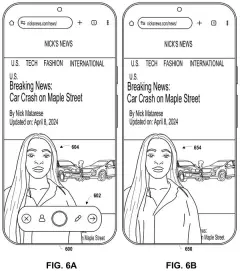
Today, blurring the background of a video is expensive for a phone. Every frame gets cleaned up, brightened and scanned for objects, including the background you are about to smudge, and that load can cause lag or heat the phone up. Lowering the quality of the whole video saves power, but you can see the difference.
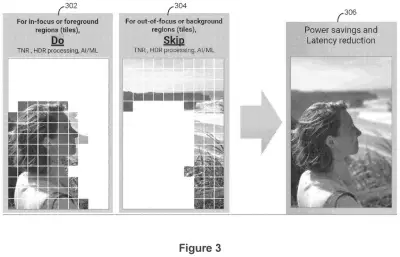
Google's patent takes a narrower route. It splits each video frame into a grid of small tiles and sorts them into sharp ones (your subject) and blurry ones (everything behind). The sharp tiles get the full treatment. The blurry tiles only get the steps that really matter, such as working out how far away things are, and skip the rest.
Then the phone stitches the tiles back into one finished frame. Your subject looks the same, and the phone does less work.
… applying the first set of one or more critical image processing operations to the second set of one or more out-of-focus image tiles and omitting the second set of one or more non-critical image processing operations for the second set of one or more out-of-focus image tiles; …
Translation: The system does only the essential work on blurry background areas and skips the rest.
How the phone sorts sharp tiles from blurry ones
The filing sorts a phone's image processing steps into two groups. Critical steps matter for the whole picture, and the main example is depth estimation (working out how far each part of the scene is from the camera). Non-critical steps make little difference in a region that will be blurred: temporal noise reduction (smoothing grain by comparing neighboring frames), HDR enhancement (balancing bright and dark areas), and machine learning object detection.
Each frame is then cut into tiles. One example uses a grid of 10 by 14, or 140 tiles. Distance measurements decide which tiles are in focus and which are out of focus, and a small stored bitmap (a grid of 1s and 0s) records which tiles to skip.
- In-focus tiles get every processing step.
- Out-of-focus tiles get only the critical steps, plus the blur itself.
- The finished tiles are combined into one complete frame.
Working tile by tile also allows overlap. The phone can run motion estimation on one tile while it measures depth on the next, and it can blur the background while the sharp tiles get noise reduction. Which steps count as non-critical can shift with the device's delay, power use or temperature, and the number of tiles can change with the scene so edges around a subject are found more precisely. The filing also describes lower-resolution processing and more aggressive data compression for blurry tiles.
… generating a complete processed image frame by combining the first set of in-focus image tiles and the second set of out-of-focus image titles.
Translation: The final video frame is built by stitching the sharp and blurry sections back together.
Why cooler phones matter for video blur mode
Video blur mode is one of those features that looks simple and burns a lot of power. The filing says the processing load can cause lag and overheating, and the usual fixes, like lowering resolution or frame rate, make the whole video look worse. Trimming effort only where the picture is blurred anyway could keep your phone cooler and your battery lasting longer without changing how your subject looks.
The patent describes phones, but also laptops, tablets and cameras, and it lets the device change which steps count as optional based on delay, power or heat. So a device could cut more when it is getting hot and less when it is not. That adjustable part is the practical benefit: the feature gives up quality only when the device needs it to.
This is the 88th Google filing we've tracked since May in our AI photo editing race, building on filings like dog in any scene and fixing blocky video seams.
Source: US 2026/0368961 A1 at the USPTO (PDF). Full patent text and figures are in the official publication.
Get our take in your Top Stories
Liked this breakdown? Add Patentlyze as a preferred source on Google, and our plain-English take shows up more often in your Top Stories the next time Google patent news breaks.
Add Patentlyze on Google
One click.
There are more where this came from
We read every patent application Big Tech publishes and send you the ones worth knowing. Plain English, free, every week.
The drawings · 12 sheets
12 drawing sheets from US 2026/0368961 A1 · click any drawing to enlarge


Show the other 4 sheets


More from Google
All 1,127 Google patents →
More in Software
All 814 Software patents →
Qualcomm
Qualcomm Patents an AI Training Trick That Hides Parts of Photos While Adding Static
Qualcomm
A New Qualcomm Patent Cuts the Wait for AI-Generated Images
Qualcomm
Qualcomm Files Patent for AI That Sketches Where Everyone Stands Before Drawing a Group Photo
Qualcomm
No comments yet