
Google
Google · Software · Filed Oct 16, 2025 · USPTO published Nov 19, 2026 · This week's release
Google Patents a Notification Box That Picks the Few Alerts Worth Your Time
Google's filing sketches a single box that boils sixteen alerts from four apps down to the five you need, starting with a cancelled flight. The social media likes can wait.
- Publication number
- US 2026/0367941 A1(US20260367941A1)
- Applicant
- Google LLC
- Filed · Published
- Oct 16, 2025 · Nov 19, 2026
- Inventors
- Tim Wantland, Ryan Bryce Connolly, Christina Buquid, Jeffery Weber, Gus Winkelman
- Status when we published
- Waiting for an examiner
- Document
- 20 claims
- US classification
- 715/764
- Parent application
- National Stage Entry of PCT/US2023/066227 (filed Apr 26, 2023)(PCTUS2023066227)
What Google's one-box notification patent does
Right now, every app on your phone sends alerts on its own schedule, and you have to open each one to see what's waiting. A cancelled flight in your calendar can get buried among social media likes, and Google's filing says people miss important alerts that way.
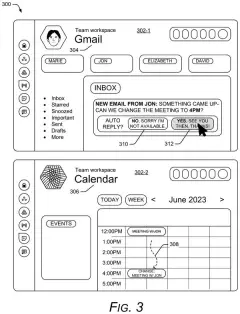
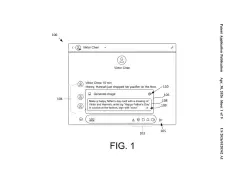
The patent describes one screen that gathers alerts from several apps and shows only the ones that look most important. In Google's example, sixteen alerts from four apps shrink to five. The cancelled flight goes first, then a meeting email, an urgent email, a text from someone you're meeting, and a comment on your post.
Tap one and you can read the full message in a small pop-up or a panel, without opening the app. The sorting can rely on your habits, your settings, or a model trained on how people use the feature.
… prioritizing the set of notifications into a priority group, the priority group including two or more of the notifications in the set of notifications and excluding one or more of the notifications in the set of notifications, the prioritizing based on a relation between and a disparate importance of notifications within the set of notifications …
Translation: The system sorts incoming alerts to display only the most important ones while hiding the rest.
How Google decides which alerts make the cut
The core claim covers a user interface application (the screen that sits on top of your apps) that receives a batch of notifications from at least two different apps. It then sorts them into a priority group: a smaller set that keeps at least two notifications and leaves at least one out. That group appears in a single notification region.
The sorting rests on how the notifications relate to each other and how important each one is. The filing lists several signals:
- Shared project: alerts tied to the same piece of work, judged from your app usage history or from the widgets you arranged on your home page.
- Due dates: a response deadline pulled from the message text or its metadata (the hidden labels attached to a message).
- A machine-learned model (software trained on examples) built from past behavior, including selections made by other users of the same interface.
In the description, the system also drops spam, ranks a newer email above an older one on the same subject, and skips a calendar alert that repeats an email when your history shows you prefer email.
Selecting an alert can open the app's own notification screen or show extra detail in a widget region (a small panel tied to that app). That panel can be highlighted so you see where the detail will appear.
… users may see significant time savings by avoiding the tedious task of switching between user interfaces for notifications as well as sifting through numerous insignificant notifications …
Translation: This saves you from jumping between apps and digging through junk alerts all day.
What Google's alert filter means for your phone
If you juggle work email, texts, a calendar and social media, this is about spending less time checking each app to find what needs you today. The filing says the goal is saving time by skipping the hopping between apps and the sifting through trivial alerts.
It also hints at where notifications could go: a layer above your apps that makes the call, with each app no longer shouting for itself. The filing lists phones, tablets, laptops, watches and glasses as possible devices. The catch is trust. A filter that hides alerts has to guess right, and the description relies on your habits, your settings and other people's behavior to do that.
This is the 1119th Google patent application we've tracked in our Google coverage since May, adding to work like ads during AI answers and private install counting.
Source: US 2026/0367941 A1 at the USPTO (PDF). Full patent text and figures are in the official publication.
Get our take in your Top Stories
Liked this breakdown? Add Patentlyze as a preferred source on Google, and our plain-English take shows up more often in your Top Stories the next time Google patent news breaks.
Add Patentlyze on Google
One click.
There are more where this came from
We read every patent application Big Tech publishes and send you the ones worth knowing. Plain English, free, every week.
The drawings · 10 sheets
10 drawing sheets from US 2026/0367941 A1 · click any drawing to enlarge


Show the other 2 sheets


More from Google
All 1,127 Google patents →
More in Software
All 814 Software patents →
Samsung
Samsung Files Patent for a Phone Search Box That Suggests What to Look For
Apple
Apple Patents a Smarter Push Notification Distribution System
Samsung
Samsung Patents a Way to Collapse Your Phone's Alert Pile Into One AI Summary
Apple
No comments yet