
Google
Google · AI / ML · Filed Apr 28, 2026 · USPTO published Nov 19, 2026 · This week's release
Google Patents a Video-Call-Style AI Chat That Sees Your Screen or Camera
Google's patent application turns asking an AI about what you see into something that works like a video call. Show it your camera or your screen, talk, and it answers out loud.
- Publication number
- US 2026/0367867 A1(US20260367867A1)
- Applicant
- Google LLC
- Filed · Published
- Apr 28, 2026 · Nov 19, 2026
- Inventors
- Jessica Lee, Clement Dickinson Wright, Harshit Kharbanda, Wewage Anuda Nethum Dep Weerasinghe, Kai Yu, Louis Wang, Stacy Lou Chiou, Sarah Fay Smith, Christopher James Kelley, David Kao-Chun Wu, Christophe Patrice Fondacci, Liza Sol Wah Ma, Olawale Abiri, Kimiya Hojjat
- Status when we published
- Waiting for an examiner
- Document
- 20 claims
- US classification
- 715/709
- Parent application
- Claims priority from a provisional application 63806455 (filed May 15, 2025)
What Google's video-call AI chat actually does
Searching for something you're looking at usually means turning it into words first, and that's harder than it sounds. Maybe you can't say what an object in front of you is, or the words you pick bring back the wrong results. Google's patent application describes a way around that: you start a chat that works like a video call with an AI.
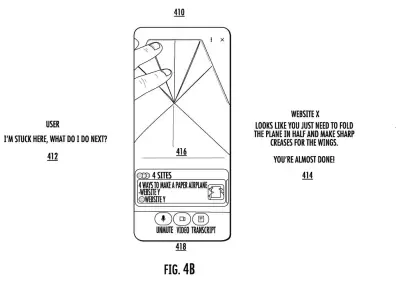
You can point your camera at something, or share your phone screen, and just ask out loud. The AI watches what you're showing it, listens to your question, looks things up on the web, and talks back. Little cards with source links pop up on screen so you can check the answer.
The filing also covers a few handy extras. You can start with a voice-only call and add video later, and the AI can read the whole webpage you're on, not just the part you can see. Afterward you can scroll through a transcript of the session.
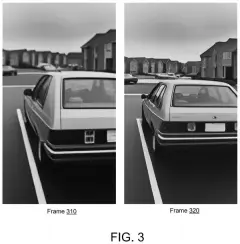
… obtaining, by the computing system, an image stream from the user computing device, wherein the image stream comprises a plurality of image frames; obtaining, by the computing system, an audio stream from the user computing device, wherein the audio stream comprises audio data obtained via one or more audio sensors of the user computing device; …
Translation: The system collects what your camera and microphone pick up from your device.
How the AI watches, listens, and searches for you
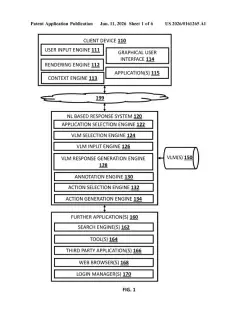
The claims cover a chat that takes two live feeds from your device: an audio stream (your voice, picked up by the microphone) and an image stream (frames from your camera or from a capture of your screen). A generative model (an AI that writes new text rather than just retrieving it) reads both and writes its own search query. A search runs, and the model combines the results with the query to write a reply that plays through your speaker.
The filing describes three ways in:
- A voice-only call.
- A viewfinder mode that uses your camera.
- A screensharing mode that captures what's on your display through an overlay.
To keep things fast, the system can sample frames at a variable rate, using pixel diffing (checking how much the edges of the picture change from frame to frame) so a still scene costs less to process. The claims mention between three and five minutes of frames, and the description says older visuals can be shrunk into short text summaries. During screensharing, the capture layer sits below the on-screen indicator, so the AI's own indicator never blocks its view.
It can also work out which webpage you're on, then fetch the full page or its source code, and it can save a transcript with the search results and relevant frames.
Systems and methods for providing a multimodal video chat interface can obtain data descriptive of an audio stream and an image stream, can process the audio stream and image stream to generate a model-generated query, can determine search results responsive to the model-generated query, and can generate a model-generated response based on the search results.
Translation: It takes your video and voice input, turns them into a search, and builds a smart reply from the results.
Why Google wants search to feel like a call
The filing's own examples are everyday ones: troubleshooting an appliance by showing it to your camera, comparing prices across browser tabs, or getting a long on-screen document summarized. You skip typing a search and just talk about what's in front of you.
The design treats the whole thing as a phone call with an assistant. You start with voice, can upgrade to video, and can switch between camera and screen mid-chat. The filing says it could run in a virtual assistant app on a phone or alongside a smart wearable. Whether it ever ships is unknown, since this is a patent application.
This is the 64th Google filing we've tracked since May on AI agents acting for you, joining earlier work on earbud voice filtering and a TV app-learning assistant.
Source: US 2026/0367867 A1 at the USPTO (PDF). Full patent text and figures are in the official publication.
Get our take in your Top Stories
Liked this breakdown? Add Patentlyze as a preferred source on Google, and our plain-English take shows up more often in your Top Stories the next time Google patent news breaks.
Add Patentlyze on Google
One click.
There are more where this came from
We read every patent application Big Tech publishes and send you the ones worth knowing. Plain English, free, every week.
The drawings · 24 sheets
24 drawing sheets from US 2026/0367867 A1 · click any drawing to enlarge


Show the other 16 sheets


More from Google
All 1,127 Google patents →
More in AI / ML
All 2,738 AI / ML patents →
Sony
Sony Patents an AI Gaming Companion That Adjusts Its Behavior Based on How You Actually Play
Microsoft
Microsoft Patents a System That Reads Your Screen and Answers Questions You Didn't Ask
Sony
Sony Patents an AI That Picks Your Game Settings From a Plain-English Request
Nvidia
No comments yet