
Microsoft
Microsoft · AI / ML · Filed Jul 24, 2026 · USPTO published Nov 19, 2026 · This week's release
Microsoft Patents a Paste Command That Reformats Content for Whatever App You're In
Microsoft's new patent application describes a second kind of paste: copy a messy web table, hit one shortcut, and an AI rebuilds it in the format the other app expects. The AI doesn't retype your data. It writes a small program to do the job.
- Publication number
- US 2026/0368199 A1(US20260368199A1)
- Applicant
- Microsoft Technology Licensing, LLC
- Filed · Published
- Jul 24, 2026 · Nov 19, 2026
- Inventors
- Jeevana Priya INALA, Gonzalo A. RAMOS, Nathalie M. RICHE, Chenglong WANG, Priyan VAITHILINGAM
- Status when we published
- Waiting for an examiner
- Document
- 20 claims
- US classification
- 707/602
- Parent application
- Continuation of 18/948,806 (filed Nov 15, 2024)(18948806)
What Microsoft's reformat-on-paste tool actually does
Ever copied a table from a website, pasted it into a spreadsheet, and watched it collapse into a pile of mismatched text? Microsoft's new patent application describes a fix: a paste command that works out where the content came from and where it is going, then reshapes it to fit.
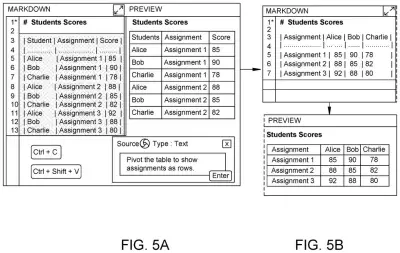
Here's how you'd use it. You copy as usual. When you paste with a special shortcut (the filing gives ctrl-shift-v as an example), a small box can pop up where you may type a short note in plain language, like "bold the highest values in each row." Or you can skip the note entirely. The tool looks at both apps and handles the conversion.
One detail stands out. The AI does not rewrite your data directly. It writes a small program that does the reshaping, which the filing says lowers the risk of the AI making up numbers and lets it handle big tables.
… at least in part by accessing a generative language model, generating transformation instructions for transforming the captured content based at least upon the source contextual data and the destination contextual data; …
Translation: An AI model figures out how to reformat your copied text based on where it came from and where it is going.
How the tool writes code to reshape your data
The tool hooks into the operating system's clipboard (the holding area where copied items wait). When you copy, it saves the content plus context about the source app, such as the app name, icon and browser tab name. It also keeps extra detail like the original HTML tags, because it cannot know yet where you will paste.
When you paste, it captures the same kind of context from the destination app. A generative language model (an AI that writes text and code) then produces transformation instructions from both contexts plus any short note you typed. In claim 20, those instructions are generated code that is compiled before it runs. The filing names Python, C# and TypeScript as options.
The code then works in stages:
- It pulls the raw data from the clipboard (text, rich text, HTML or an image).
- It parses that into structured data, a simpler form such as a grid of rows and columns, with the format chosen based on what was copied.
- It applies changes, like adding or removing columns, adding conditional formatting, or converting to the destination's format.
- It pastes the result into the destination app.
The filing also describes storing everything in a context object, synced across your devices, so you can paste again with new instructions and overwrite the earlier result.
… detect a capture request to capture content from a source application, in response to the capture request, capture the content and source context associated with the source application, detect a paste request to paste captured content to a destination application, in response to the paste request, capture destination context associated with the destination application, …
Translation: The system watches when you copy something and when you paste it so it knows the app context.
Why this could end the copy-paste cleanup chore
If you have ever moved a table from a web page into a spreadsheet and watched the layout fall apart, this is the chore the filing targets. Its examples include pasting a web table into a LaTeX editor as a finished LaTeX table, pasting spreadsheet data into a Python notebook along with the code to load it, and flipping a Markdown table from long to wide format with one typed sentence.
The pitch is fewer detours. Instead of exporting files, hunting for online converters or retyping, you stay in the app you're working in. The filing describes hooking into the operating system's clipboard and syncing across your devices, though it names no product. Running generated code also means large tables that would overflow the AI's input limit can still go through.
That makes this Microsoft's 64th filing we've tracked in Enterprise AI since May, a group that includes next work move suggestions and smarter job list gap-filling.
Source: US 2026/0368199 A1 at the USPTO (PDF). Full patent text and figures are in the official publication.
Get our take in your Top Stories
Liked this breakdown? Add Patentlyze as a preferred source on Google, and our plain-English take shows up more often in your Top Stories the next time Microsoft patent news breaks.
Add Patentlyze on Google
One click.
There are more where this came from
We read every patent application Big Tech publishes and send you the ones worth knowing. Plain English, free, every week.
The drawings · 13 sheets
13 drawing sheets from US 2026/0368199 A1 · click any drawing to enlarge


Show the other 5 sheets


More from Microsoft
All 681 Microsoft patents →
More in AI / ML
All 2,738 AI / ML patents →
Qualcomm
Qualcomm Files Patent for Phones That Learn From Days Like Today
Qualcomm
Qualcomm Files Patent for a Robot Brain With Fast and Slow Thinking Modes
Adobe
Adobe Files Patent for AI That Rebuilds Your Marketing Automations in a Different App
Adobe
No comments yet