
Microsoft
Microsoft · AI / ML · Filed May 6, 2025 · USPTO published Nov 12, 2026 · This week's release
Microsoft Patents Two Small AIs That Team Up to Operate Your Device
Microsoft's filing describes an AI helper that can recover when it gets stuck: a second AI steps in and redraws the whole plan. Both are small enough to run on your own device.
- Publication number
- US 2026/0359752 A1(US20260359752A1)
- Applicant
- Microsoft Technology Licensing, LLC
- Filed · Published
- May 6, 2025 · Nov 12, 2026
- Inventors
- Tianyi CHEN, Ran GAL, Sara ABDALI, Saeed AMIZADEH, Colby Richard BANBURY, Mohsen FAYYAZ, Ruomei YAN
- Status when we published
- Waiting for an examiner
- Document
- 20 claims
- US classification
- 718/106
What Microsoft's two-model planner actually does
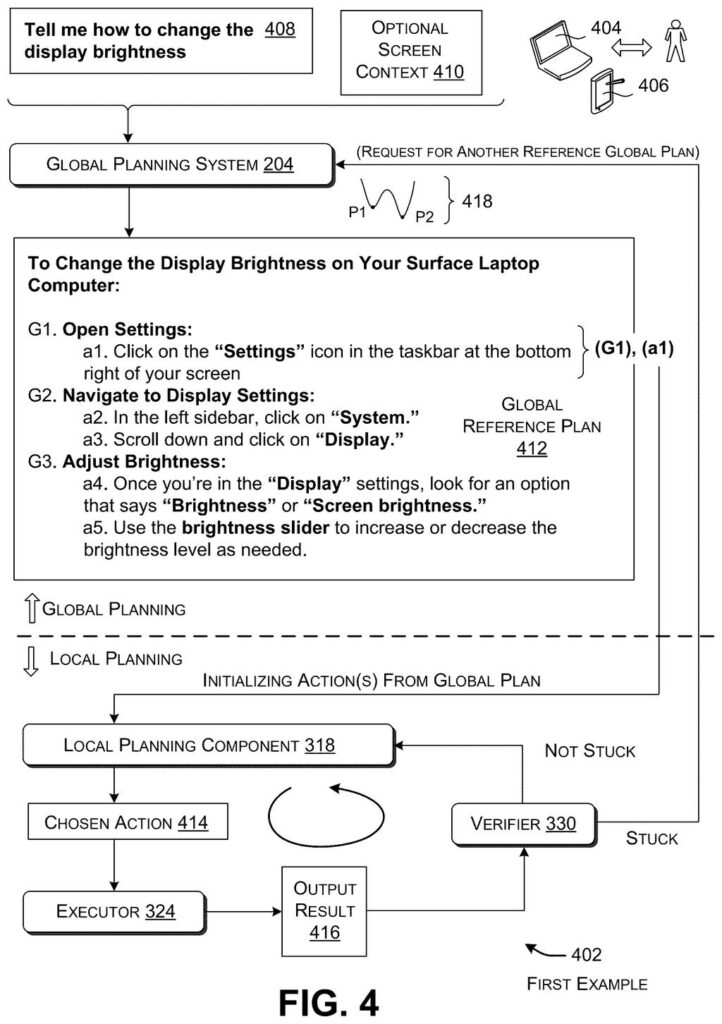
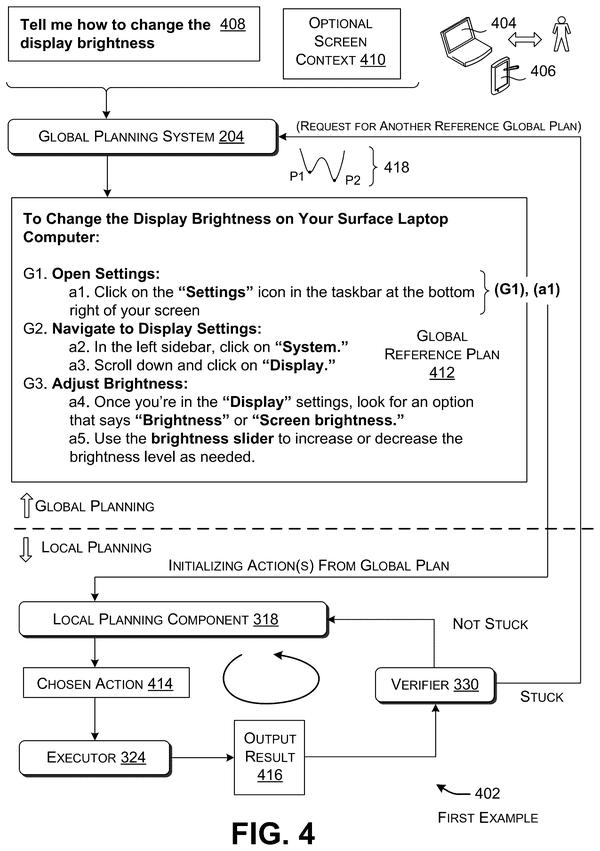
Imagine you tell your laptop, "Tell me how to change the display brightness," and an AI starts clicking through menus for you. Halfway through, a window freezes or a button isn't where it expected. A helper like that can easily keep hitting the same dead end.
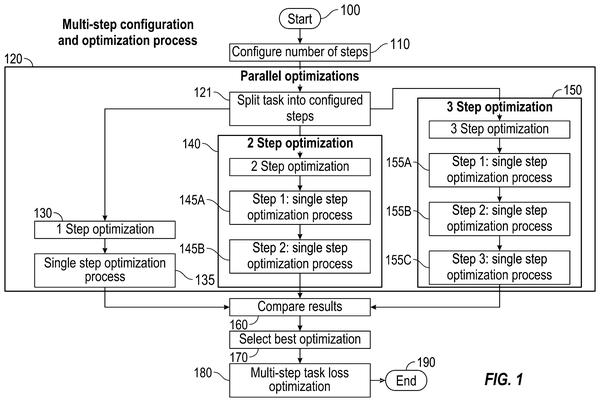
Microsoft's patent splits the job between two small AI models. One works like the person who studies the whole map and writes out the full list of steps. The other works like the driver: it takes one step at a time, checks the result, and adjusts to what is actually on your screen.
If the driver gets stuck, the map-maker draws up a fresh route and the driver carries on. The pitch is that two small models can pull this off on your own device, without sending your request off to the cloud.
for the successful result, directing the second machine-trained model to generate, execute, and verify a next action in the first local plan; for the unsuccessful result, directing the first machine-trained model to generate a second global reference plan …
Translation: If an action works, the second AI tries the next step; if it fails, the first AI creates a brand new master plan.
How the planner and the step-taker hand off
You type a request such as "Tell me how to change the display brightness," optionally with a screenshot of what's on your screen. The global planning model (the big-picture AI) turns that into a complete list of actions and can group them into sub-goals. In the filing's example, five actions fall into three sub-goals.
The local planning model (the step-by-step AI) then builds the real plan one action at a time. It usually starts with the global plan's first action and gives that plan's suggestions a boost, but it can pick something else when the screen in front of it says otherwise. A grounding check confirms that the button or menu it needs is actually there and finds where it sits.
After each action runs, a verifier program checks the result:
- Success: the local model generates the next action.
- Failure: it may first try a different action. After a set number of misses (3 in one example), or when it detects an endless loop, the global model writes a second plan.
The new plan can pick up at the point of failure or start over from the first action. The filing also describes a safe mode that tests actions without committing them until you confirm, and says risky tasks, like sending an email or transferring funds, can wait for your approval.
A collaboration planning system that includes the local planning model and the global planning model is small enough for successful implementation by a user computing device.
Translation: Both AI brains are small enough to run right on your personal device instead of in the cloud.
Why on-device task helpers need a backup plan
The filing's own background says ever-larger planning models are hard to fit on phones and laptops, while cloud versions need a connection and raise privacy worries, especially for personal requests. This design aims at the opposite: two small models that together run on your own device, so an assistant could keep working offline and keep your requests local.
The filing says the pair is more resilient than a single model working alone, and that the combined models use fewer total parameters (the adjustable numbers that set a model's size) than some single-model approaches. It is a patent application, so it names no product and gives no accuracy figures. Still, it lays out a plan for the awkward moment when an AI agent gets stuck.
Microsoft's 45th filing we've tracked in our AI teams working together watch since May builds on earlier applications like AIs talking in numbers and picking the best answer format.
Source: US 2026/0359752 A1 at the USPTO (PDF). Full patent text and figures are in the official publication.
Get our take in your Top Stories
Liked this breakdown? Add Patentlyze as a preferred source on Google, and our plain-English take shows up more often in your Top Stories the next time Microsoft patent news breaks.
Add Patentlyze on Google
One click.
There are more where this came from
We read every patent application Big Tech publishes and send you the ones worth knowing. Plain English, free, every week.
The drawings · 10 sheets
10 drawing sheets from US 2026/0359752 A1 · click any drawing to enlarge


Show the other 2 sheets


More from Microsoft
All 646 Microsoft patents →
More in AI / ML
All 2,637 AI / ML patents →
IBM
IBM Files Patent to Have a Big AI Grade a Small AI's Coding Homework
Samsung
Samsung Patents a System That Decides Where Your Device Should Run Its AI Tasks
Samsung
Samsung Files Patent for One AI Model That Handles Many Editing Jobs
IBM
No comments yet