
Meta · Filed Jun 25, 2026 · Published Oct 22, 2026

Meta Files Patent for Smart Glasses That Switch Off Their Microphones in Off-Limits Areas

Meta describes a device that mutes its own microphone when you walk up to a restroom sign, enter a marked no-recording area, or hear someone say 'stop recording.' No button press, no menu, no remembering to do it yourself.
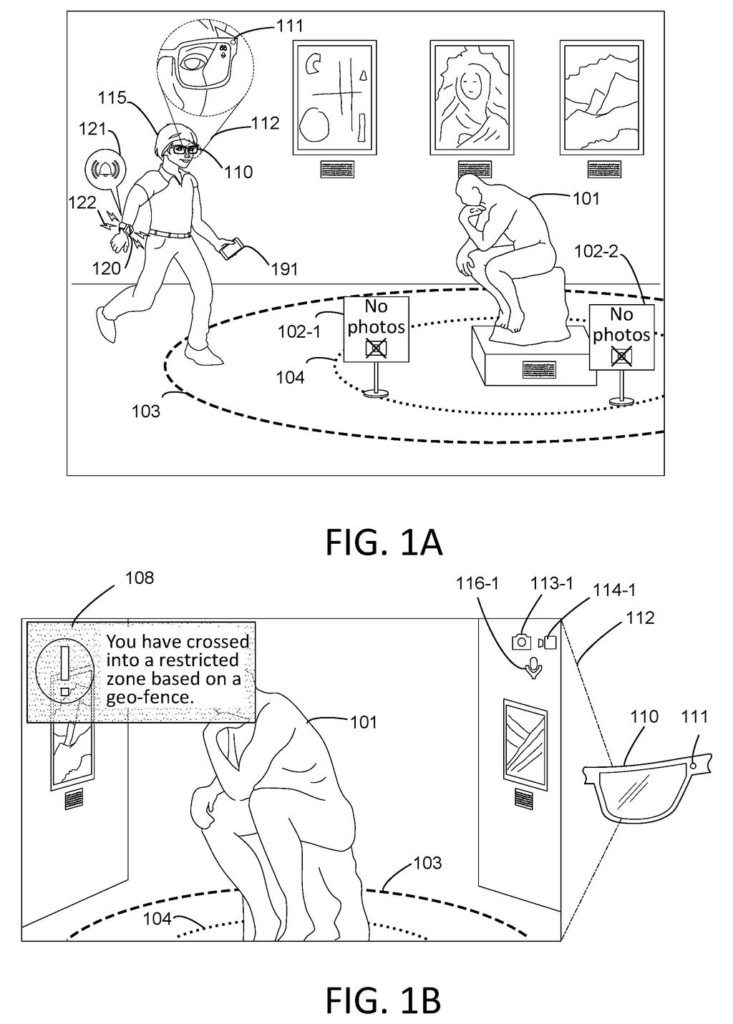
Smart glasses alert a wearer and restrict recording features after detecting that they walked into a no-photography zone. Drawing from patent filing US 2026/0330783 A1.
Smart glasses alert a wearer and restrict recording features after detecting that they walked into a no-photography zone.
See all 40 drawings from this filing ↓
Publication number US 2026/0330783 A1 US20260330783A1
Applicant Meta Platforms Technologies, LLC
Filing date Jun 25, 2026
Publication date Oct 22, 2026
Inventors Jared Zimmerman, Tae Wan An
US classification 345/633
Status when we published Waiting for an examiner (Jul 14, 2026)
Parent application is a Continuation of 18353826 (filed 2023-07-17)
Document 20 claims

What Meta's no-recording zones actually do

Every time you wear smart glasses into a restroom, a museum or someone's living room, the same awkward question comes up: is that thing listening? Meta's patent application tries to answer it by taking the decision out of your hands.

The idea is simple. Your device looks for markers that say a place is off-limits: an invisible boundary on a map, a sign such as a restroom symbol or a crossed-out camera, or the sound of someone saying 'stop recording.' When it decides you are inside the zone, your microphone switches off on its own. It also tells you with a buzz, a chime or a message on the display, and it can warn you as you approach.

The filing also describes the same logic for cameras, for linked gadgets like a smartwatch or a drone, and for zones you draw yourself around your own home.

How glasses spot a sign, a fence or a voice

Claim 1 covers a method with two steps. First, the device identifies a virtual restricted-use zone (an invisible area defined in software, with no physical wall) by detecting markers in the surrounding area. Second, when the device decides it is inside that zone, it disables its microphone automatically without human intervention.

The filing describes three kinds of markers:

  • Geofence markers: a location-based boundary, such as a 1, 3 or 5 meter radius around a spot, checked using GPS and motion sensors.
  • Visual cues: signs or symbols spotted by computer vision (software that recognizes objects in camera images), such as a restroom sign or a 'no photos' symbol.
  • Audio cues: spoken phrases like 'stop recording' or a venue announcement, picked out of the microphone's own audio. Machine learning can judge context.

Zones can overlap. A outer warning zone only sends a notification, while an inner enforcement zone cuts the microphone. Other claims cover muting a connected device too, such as a paired watch, and re-enabling the microphone with a notification when you leave. A separate zone can block audio while still letting the camera run.

People can define zones themselves. The description mentions drawing a circle around your home, setting work-hour restrictions, and letting registered devices through. It also describes an LED that turns off to show bystanders that recording has stopped.

Why a mic that mutes itself could matter to you

If glasses with cameras and microphones are going to be welcome in restrooms, gyms, offices and living rooms, the people around the wearer need a reason to relax. A device that mutes itself near a restroom sign or after someone says 'stop recording' gives them one, and it spares you from having to remember to switch things off. Meta's own filing says adoption of this kind of gear depends on trust.

There is a flip side. The system decides for you, and the description says it can hold off on disabling in some cases, such as a tense encounter after a car accident or an interaction with an officer. You also get controls: you can draw your own zones around your home and grant friends permission to record. How well it reads signs and voices in real life is the open question.

Meta's 79th filing we've tracked in our smart glasses patent watch since May builds on earlier work like tiny processors behind the display and a modular display insert.

Editorial take

Claim 1 is short and wide. It asks for three things: spot a zone from markers in the area, check that the device is inside it, and turn the microphone off without anyone pressing anything. It never mentions glasses, GPS, signs or notifications.

That width matters. The claim says 'device' and 'markers' without naming either, so as written it describes a phone, earbuds or a laptop that mutes itself near a sign, a map boundary or a spoken request. If granted as written, it would cover on paper any gadget that mutes itself this way. The specifics, like the spoken-cue claim and the warning-zone claims, sit in the narrower claims further down.

Broad opening claims often get narrowed during review. For now, the filing reads as Meta marking out the whole idea of a self-muting microphone, with smart glasses as the example it cares about most.

Get our take in your Top Stories

Liked this breakdown? Add Patentlyze as a preferred source on Google, and our plain-English take shows up more often in your Top Stories the next time Meta patent news breaks.

There are more where this came from

We read every patent application Big Tech publishes and send you the ones worth knowing. Plain English, free, every week.

The drawings

40 drawing sheets from US 2026/0330783 A1 · click any drawing to enlarge

Entering a restricted zone triggers a boundary alert, drawing sheet 1 from US 2026/0330783 A1
Sheet 1 Entering a restricted zone triggers a boundary alert
Spotting a no-photo sign prompts smart glasses to disable video, drawing sheet 2 from US 2026/0330783 A1
Sheet 2 Spotting a no-photo sign prompts smart glasses to disable video
Approaching an exhibit automatically turns off photo and video recording, drawing sheet 3 from US 2026/0330783 A1
Sheet 3 Approaching an exhibit automatically turns off photo and video recording
Requesting video inside a restricted boundary blocks recording, drawing sheet 4 from US 2026/0330783 A1
Sheet 4 Requesting video inside a restricted boundary blocks recording
Smartwatch warning shown when taking photos is blocked, drawing sheet 5 from US 2026/0330783 A1
Sheet 5 Smartwatch warning shown when taking photos is blocked
Walking out of the restricted zone reenables cameras and recording, drawing sheet 6 from US 2026/0330783 A1
Sheet 6 Walking out of the restricted zone reenables cameras and recording
Crossing into stadium seats shuts off video recording automatically, drawing sheet 7 from US 2026/0330783 A1
Sheet 7 Crossing into stadium seats shuts off video recording automatically
Moving closer to the field blocks taking still photos, drawing sheet 8 from US 2026/0330783 A1
Sheet 8 Moving closer to the field blocks taking still photos
Show the other 32 sheets
How smart glasses block photos inside a stadium geofence, drawing sheet 9 from US 2026/0330783 A1
Sheet 9 How smart glasses block photos inside a stadium geofence
Re-enabling recording once the wearer exits an off-limits area, drawing sheet 10 from US 2026/0330783 A1
Sheet 10 Re-enabling recording once the wearer exits an off-limits area
Taking photos freely outside any restricted camera zone, drawing sheet 11 from US 2026/0330783 A1
Sheet 11 Taking photos freely outside any restricted camera zone
Warning wearers as visual signs indicate a private space ahead, drawing sheet 12 from US 2026/0330783 A1
Sheet 12 Warning wearers as visual signs indicate a private space ahead
Shutting off cameras after spotting restroom door signs, drawing sheet 13 from US 2026/0330783 A1
Sheet 13 Shutting off cameras after spotting restroom door signs
Denying photo requests while inside a visually restricted zone, drawing sheet 14 from US 2026/0330783 A1
Sheet 14 Denying photo requests while inside a visually restricted zone
Restoring camera features after walking away from private zones, drawing sheet 15 from US 2026/0330783 A1
Sheet 15 Restoring camera features after walking away from private zones
Alerts continue on a smartwatch even if glasses are removed, drawing sheet 16 from US 2026/0330783 A1
Sheet 16 Alerts continue on a smartwatch even if glasses are removed
Drawing a privacy boundary around a house by finger, drawing sheet 17 from US 2026/0330783 A1
Sheet 17 Drawing a privacy boundary around a house by finger
Giving a thumbs up to save the custom private zone, drawing sheet 18 from US 2026/0330783 A1
Sheet 18 Giving a thumbs up to save the custom private zone
Drawing a personal privacy boundary directly around your own body, drawing sheet 19 from US 2026/0330783 A1
Sheet 19 Drawing a personal privacy boundary directly around your own body
Confirming a personal bubble where cameras cannot record you, drawing sheet 20 from US 2026/0330783 A1
Sheet 20 Confirming a personal bubble where cameras cannot record you
Choosing which contacts are permitted to record inside your zone, drawing sheet 21 from US 2026/0330783 A1
Sheet 21 Choosing which contacts are permitted to record inside your zone
Outlining an off-limits zone on a tablet screen, drawing sheet 22 from US 2026/0330783 A1
Sheet 22 Outlining an off-limits zone on a tablet screen
Smart glasses recording actively in an art gallery, drawing sheet 23 from US 2026/0330783 A1
Sheet 23 Smart glasses recording actively in an art gallery
Halting recording automatically after a bystander speaks an objection, drawing sheet 24 from US 2026/0330783 A1
Sheet 24 Halting recording automatically after a bystander speaks an objection
Warning you before a drone enters a no-fly zone, drawing sheet 25 from US 2026/0330783 A1
Sheet 25 Warning you before a drone enters a no-fly zone
Disabling a drone camera inside a restricted park area, drawing sheet 26 from US 2026/0330783 A1
Sheet 26 Disabling a drone camera inside a restricted park area
How the glasses decide to disable recording, drawing sheet 27 from US 2026/0330783 A1
Sheet 27 How the glasses decide to disable recording
Spotting a restricted zone using nearby signs and sounds, drawing sheet 28 from US 2026/0330783 A1
Sheet 28 Spotting a restricted zone using nearby signs and sounds
Turning off cameras and microphones automatically in off-limits areas, drawing sheet 29 from US 2026/0330783 A1
Sheet 29 Turning off cameras and microphones automatically in off-limits areas
Alerting you in advance before shutting off the sensors, drawing sheet 30 from US 2026/0330783 A1
Sheet 30 Alerting you in advance before shutting off the sensors
Smart glasses connecting with a smartwatch and cloud servers, drawing sheet 31 from US 2026/0330783 A1
Sheet 31 Smart glasses connecting with a smartwatch and cloud servers
Typing on a virtual keyboard projected into your view, drawing sheet 32 from US 2026/0330783 A1
Sheet 32 Typing on a virtual keyboard projected into your view
Playing augmented reality games with smart glasses and a watch, drawing sheet 33 from US 2026/0330783 A1
Sheet 33 Playing augmented reality games with smart glasses and a watch
Parts of a smartwatch that detaches from its wristband, drawing sheet 34 from US 2026/0330783 A1
Sheet 34 Parts of a smartwatch that detaches from its wristband
Internal sensors and chips inside the smartwatch and strap, drawing sheet 35 from US 2026/0330783 A1
Sheet 35 Internal sensors and chips inside the smartwatch and strap
Camera and sensor layout on augmented reality glasses, drawing sheet 36 from US 2026/0330783 A1
Sheet 36 Camera and sensor layout on augmented reality glasses
Front cameras and strap components of a virtual reality headset, drawing sheet 37 from US 2026/0330783 A1
Sheet 37 Front cameras and strap components of a virtual reality headset
Computer hardware running the headset and smart glasses, drawing sheet 38 from US 2026/0330783 A1
Sheet 38 Computer hardware running the headset and smart glasses
Handheld controller designed to pair with the headset, drawing sheet 39 from US 2026/0330783 A1
Sheet 39 Handheld controller designed to pair with the headset
Electronic components powering the handheld controller, drawing sheet 40 from US 2026/0330783 A1
Sheet 40 Electronic components powering the handheld controller
Browse all the drawings 40 drawing sheets
Patent filing page

Source. Full patent text and figures from the official USPTO publication PDF.
Reader comments

Be the first to weigh in

Start the discussion

Real name or a handle, either is fine. Comments are read by a person before they appear, so allow a little time. Keep it about the filing.