
Adobe Files Patent to Fix the Garbled Text in AI-Generated Images
AI image generators can paint a gorgeous perfume bottle and then label it with letters that look like alphabet soup. Adobe's filing has the generator run a text-reading program on its own half-finished picture and nudge it toward the right spelling.
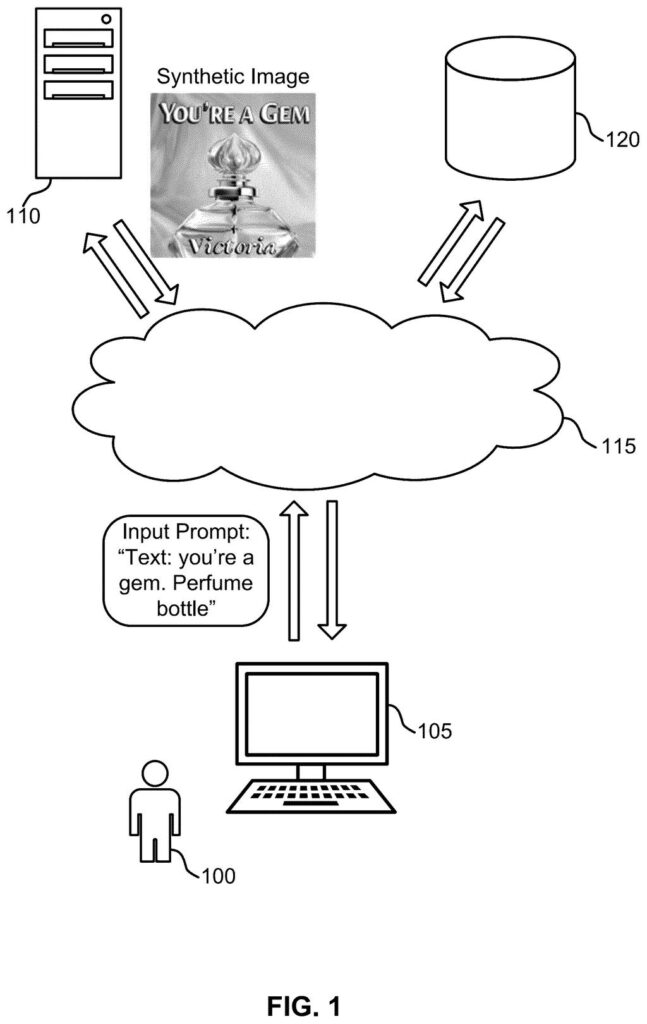
What Adobe's text-checking image patent does
Ask an AI image generator for a perfume ad that says 'you're a gem,' and you often get a lovely bottle covered in letters that almost spell something. Adobe's filing says these models are good at the overall scene but struggle to produce legible text, which is why signs, labels and quotes so often come out as gibberish.
Adobe's fix is to give the generator a built-in proofreader. While the picture is still taking shape, a text-reading program (the same kind that scans a paper document) looks at the rough draft and checks what the lettering says. If it reads wrong, the generator gets a nudge toward the right spelling.
Adobe stresses that the image model itself doesn't need to be retrained or redesigned. The proofreader is added on top, so it could work with a generator that already exists. Your prompt stays the same, and the words just come out right more often.
obtaining an input prompt indicating a target visual text; generating, using an image generation model, an intermediate image based on the input prompt; computing a character recognition loss based on the target visual text and the intermediate image …
Translation: The system reads what words you want, makes a rough first picture, and checks how badly it messed up the spelling.
How the AI checks its own spelling mid-draw
The claims cover a loop that runs while the image is being generated. A diffusion model (an AI that starts from random static and removes the noise step by step until a picture appears) gets a prompt that includes the exact words to show, such as 'think outside the box' on a sign in the filing's example.
At chosen steps, the system turns the half-finished image into a viewable picture and runs optical character recognition (OCR, software that reads text in images). It compares what the OCR read with the target words. The mismatch becomes a character recognition loss, basically a score for how wrong the lettering is.
That score is turned into a gradient (a direction that says which tweaks would make the text more readable), which adjusts the image as the noise is removed. The filing describes several controls:
- Apply the correction only in a middle range of steps, when letter shapes exist but can still change.
- A strength setting dials how hard the correction pushes.
- Normalizing the correction keeps it from distorting the parts of the picture that are not text.
- It can combine with classifier-free guidance, the standard technique that makes the image follow the prompt.
… generating a synthetic image based on the character recognition loss, where the synthetic image depicts the target visual text.
Translation: It uses that spelling error score to fix the letters and output a final picture with readable words.
Why garbled text matters for Adobe's image tools
If you make social posts, ads or product mockups with AI, misspelled words are one of the most obvious giveaways and one of the most tedious things to fix. A generator that spells the requested words correctly more often means fewer retries and less hand-patching of letters in an editing app. Any image maker built on this type of model could gain from it.
The no-retraining angle is the strategic part. Retraining a large image model is expensive, while a proofreading add-on can be attached to a model that already exists. The filing also says limiting the check to a middle range of steps keeps the extra computing in check, and a strength dial lets the system balance text accuracy against the model's usual creative freedom.
That makes this Adobe's 37th filing we've tracked since May in our controllable AI images watchlist, which already covers ideas like pasting objects with matched light and teaching AI your pet.
If you have ever asked an AI tool for a poster and spent ten minutes re-rolling because the headline read 'SALLE' instead of 'SALE,' this patent is aimed squarely at you. You would notice it the moment a sign, label or slogan comes out spelled correctly on the first try, which saves retries and the chore of fixing letters by hand.
A proofreader can only fix what it can read, so fancy script fonts or tiny small print could still trip it up. The filing gives no numbers on how often the fix works, only a statement that results beat conventional models. A short, plain slogan on a bottle or a banner looks like the sweet spot.
Checking the lettering at each step likely adds some computing per image, though Adobe says limiting it to a middle range of steps keeps that cost down. For everyday users the verdict is simple: a practical fix for one of the most visible flaws in AI images, and one you would see right away.
Get our take in your Top Stories
Liked this breakdown? Add Patentlyze as a preferred source on Google, and our plain-English take shows up more often in your Top Stories the next time Adobe patent news breaks.
There are more where this came from
We read every patent application Big Tech publishes and send you the ones worth knowing. Plain English, free, every week.
The drawings
15 drawing sheets from US 2026/0340897 A1 · click any drawing to enlarge


Show the other 7 sheets


Want this weekly breakdown for a company we don't cover? Patentlyze Pro →
Be the first to weigh in