
Apple
Apple · Software · Filed Apr 29, 2026 · USPTO published Nov 12, 2026 · This week's release
Apple Patents Tapping a Photo of Your Room to Control Its Lights
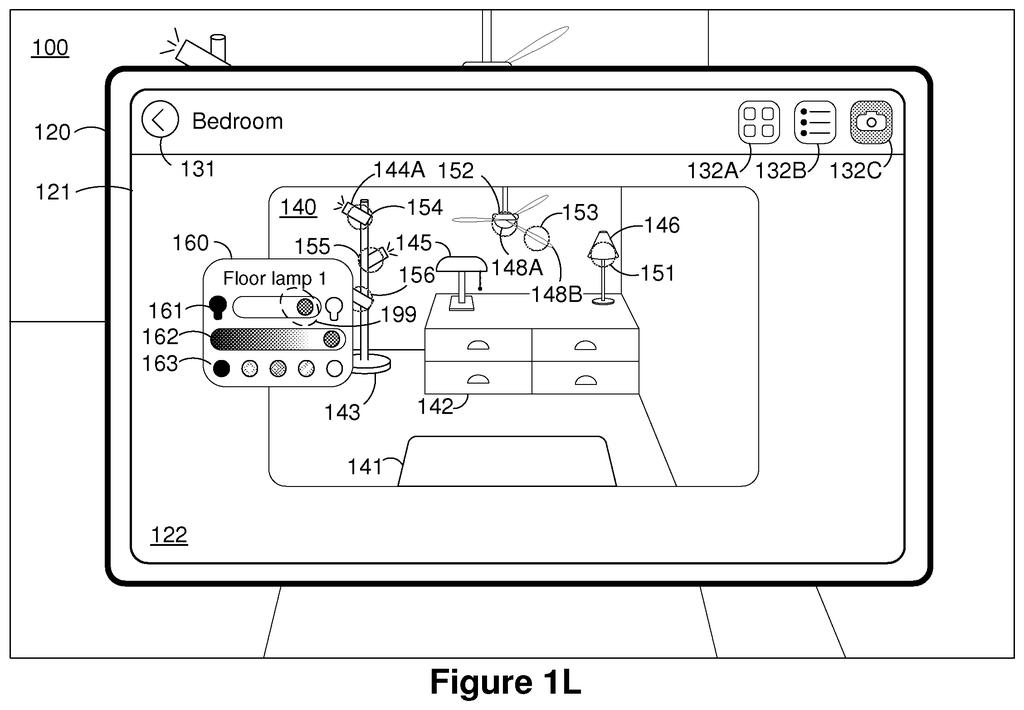
Apple's patent turns a photo of your bedroom into the control panel for your lights: tap the lamp in the picture and the real lamp switches on. The phone can even work out which of several identical bulbs is which by flipping them on and off and watching the photo.
- Publication number
- US 2026/0358778 A1(US20260358778A1)
- Applicant
- Apple Inc.
- Filed · Published
- Apr 29, 2026 · Nov 12, 2026
- Inventors
- Yutaka Yokokawa, Amrutha Hakkare Arunachala, Dimitris Ladopoulos, Magnus H. Johnson, Mahdi Azmandian
- Status when we published
- Waiting for an examiner
- Document
- 20 claims
- US classification
- 340/4.3
- Parent application
- Claims priority from a provisional application 63800609 (filed May 6, 2025)
What Apple's photo-based home remote does
Imagine you're lying in bed and want to turn off the lamp across the room, but your phone lists "Lamp 1," "Lamp 2," and "Lightbulb 3," and you have no idea which is which. Apple's patent swaps that list for a photo of the room itself. You tap the lamp in the picture, and the lamp responds.
You set it up once. Snap a photo (or let the phone collect pictures as you walk around), then mark which spot in the picture matches which gadget. The phone saves the photo and those links, so the photo keeps working later, even when you're in a different room.
The clever part is for lookalike gadgets. Four identical ceiling lights are hard to tell apart, so the phone can switch each one on and off, watch the picture for the change, and match them up on its own.
obtaining an image of a physical environment including a plurality of objects; generating a respective plurality of associations between the plurality of objects and a plurality of portions of the image of the physical environment; …
Translation: The system takes a picture of a room and links different parts of that photo to the items inside the space.
How the app learns which light is which
The claims cover a method run on a device with a display, memory and processors. It gets an image of a physical space with several objects in it, then builds associations (saved links) between each object and a portion of the image, meaning a set of pixels. The image and the links are stored in memory, so they survive a restart or leaving the room.
The device then shows the image. When you tap a portion, the linked object changes state, such as a light turning on or changing color. That can mean sending a command right away or showing controls for on/off, brightness and color. Dragging a finger across several marked spots selects several lights at once.
The filing describes three ways to make the links:
- You tap a spot in the photo and pick the device it belongs to.
- The app compares the photo against a stored object model (pictures or a 3D model) of the gadget.
- In a "dynamic" mode, the app sends on, off or color commands and watches for a change in brightness, color, motion or sound.
The photo can come from the camera, the camera roll, or pictures the phone captures on its own, then picks from or stitches together. A marked spot can also sit away from the device, like a wall switch or a smart plug feeding a lamp. After a change, the app may show an updated image, including one edited with generative AI so the lamp looks lit.
… in response to receiving user input directed to a particular portion of the image of the physical environment of the plurality of portions of the image of the physical environment, causing a change in state of a particular object …
Translation: When you tap a specific spot on the photo, it changes the status of the item located in that part of the room.
What this means for your smart home apps
The practical win is naming. Smart home apps usually list gadgets by name, and a house with several similar bulbs ends up with labels like "Light 3" that nobody remembers. A photo of the room gives you a visual cue instead. The filing notes you can use the saved picture from a different room, for example to switch a set of outdoor lights from inside without recalling which numbered light is where.
The self-matching step could also cut setup effort in rooms full of identical fixtures. The filing lists a watch, phone, tablet, laptop or head-mounted device as possible hosts, so the same tap-the-picture idea could show up on whatever screen you have in hand. It remains a patent application, and nothing in it says whether it will ship.
Apple's 669th filing in our Apple coverage since May follows patents like sharing display settings across devices and a head-tilt muting headset.
Source: US 2026/0358778 A1 at the USPTO (PDF). Full patent text and figures are in the official publication.
Get our take in your Top Stories
Liked this breakdown? Add Patentlyze as a preferred source on Google, and our plain-English take shows up more often in your Top Stories the next time Apple patent news breaks.
Add Patentlyze on Google
One click.
There are more where this came from
We read every patent application Big Tech publishes and send you the ones worth knowing. Plain English, free, every week.
The drawings · 42 sheets
42 drawing sheets from US 2026/0358778 A1 · click any drawing to enlarge


Show the other 34 sheets


More from Apple
All 672 Apple patents →
More in Software
All 753 Software patents →
Sony
Sony Patents a Shortcut That Lets a Moving Camera Map a Room Faster
Google
Google Files Patent for Answering Phone Calls by Tapping Instead of Talking
Google
Google Files Patent to Let Gadget Makers Add Their Own Controls to One Home App
Samsung
No comments yet